|
Sweet Home 3D Forum » List all forums » » Forum: Features use and tips » » » Thread: Imperfect rendering |
|
| Print at Feb 3, 2026, 11:47:18 AM | |
| Posted by hansmex at May 22, 2010, 10:40:39 PM |
|
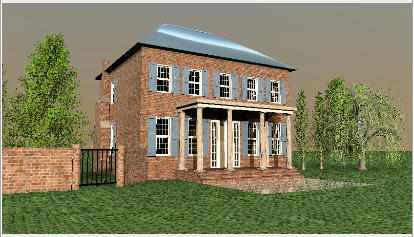
Imperfect rendering Emmanuel: While testing various new features I (more or less) completed this project. Below is a render using the new "standard" advanced rendering. There are a few problems: - there is a blue hole in the roof; this was also visible in a test-render using the "old" standard photo feature. - the top of the roof is too bright; maybe the "sun" is too low (or close) in the light calculation? - the shadows underneath the porch are too dark; this resembles a bit the darkness of an interior that is lighted only with sunlight. Maybe the shattering of light by the dust in the air is not taken into account? This kind of extreme shadows is what you would expect on the Moon, not on Earth. Hans ![]() ---------------------------------------- Hans new website - under constuction hansdirkse.info |
| Posted by fhoofman at May 22, 2010, 11:36:31 PM |
|
Re: Imperfect rendering can it be more like a photo quality? |
| Posted by db4tech at May 23, 2010, 6:24:36 AM |
|
Re: Imperfect rendering As I discovered, while trying to create very soft shadows from a large light source, by making a beauty dish (two dishes with a very bright light inside) out of a reflective umbrella model that Emmanuel kindly made for me to test. In the rendering process a light rays path is only being calculated once, after the ray has hit a surface it disappears, so light bouncing (scattering) isn't happening. This might be the same reason your buildings entrance is appearing dark, because the light isn't being reflected back off the ground to help provide some fill light? Here is the beauty dish model. ![]() How it renders. I used Uber this time but all photo and advanced photo renders appear the same (from a light point of view) The frame at the side isn't illuminated by the light, the frame is a shiny surface and reflecting the illuminated dish. ![]() I have written this next part to try and explain (for those who don't know) the effect of putting a single light source inside a beauty dish makes. Since a single small distant light source will always cause objects to produce dark hard edge shadows (like the Sun does on a clear day) Putting a single light source inside a beauty dish. (by the way no direct light rays can hit an object from a beauty dish, only reflected light) The light rays bounce around the surfaces several times before finally exiting in multiple directions creating the effect of a much larger light source, because the light rays then hit the object from different controlled angles, the light rays overlap each other causing the same object to cast softer edge shadows as the light wraps around the objects surface, as can be seen here. Image produced in Art of Illusion. ![]() Of course rendering the paths of multiple light rays and their surface interactions requires intensive calculations, producing much slower (final photo) rendering times. db4tech |
| Posted by Puybaret at May 23, 2010, 8:31:07 PM |
|
Re: Imperfect rendering db4tech, I found where this wrong effect comes from. I would be glad to publish a plug-in with the fix but there's still a problem with sunlight that doesn't reflect on walls. ![]() ---------------------------------------- Emmanuel Puybaret, Sweet Home 3D creator |
| Posted by Puybaret at May 24, 2010, 9:52:42 PM |
|
Re: Imperfect rendering there is a blue hole in the roof Could you check if this hole appears in version 2.2 too?the top of the roof is too bright The shininess set on the roof object must be too high. You should edit the MTL file of this object and reduce its Ns and Ks values. Caution: don't change the color of the roof afterwards because changing the color of an object sets its shininess to 64 (shininess may have a value between 0 and 128). ---------------------------------------- Emmanuel Puybaret, Sweet Home 3D creator |
| Posted by db4tech at May 24, 2010, 11:03:26 PM |
|
Re: Imperfect rendering Hi Emmanuel, I am also seeing holes in the roof of other models, they are present with all three rendering plug-in's Advanced photo, Phong and Uber. I was thinking of calling the builders to fix the roof but then thought I'd best let you see it first ![]() PS: I'll cover the grey leaves in the other forum thread. db4tech |
| Posted by Puybaret at May 25, 2010, 1:35:11 AM |
|
Re: Imperfect rendering I'm quite sure this wrong rendering and Hans' one, is miserably due to a problem in the rendering process of SunFlow. In version 2.2, it ended up to infinite loops; I fixed the infinite loops problem but sometime holes appear instead now. I really don't master SunFlow source code yet... ![]() ---------------------------------------- Emmanuel Puybaret, Sweet Home 3D creator |
| Posted by db4tech at Jun 12, 2010, 6:25:30 PM |
|
Re: Imperfect rendering db4tech, I found where this wrong effect comes from. I would be glad to publish a plug-in with the fix but there's still a problem with sunlight that doesn't reflect on walls. ![]() Hi Emmanuel, With you now working on Sweet Home version 2.5, is this something that could be added (even though sunlight doesn't reflect) or is it something to add to the shader plug-in's? If it is a shader addition, knowing that renders will take longer to calculate, will you be able to add a render quality slider (like the inbuilt photo render) so a user can choose to render with or without indirect illumination? Having indirect illumination (even without sunlight reflection) with maybe only 1 or 2 ray bounces will make a dramatic effect, further enhancing the realism of final renders. I am very happy to test this for you! ![]() One last request, when you do finally replace the inbuilt render with one of the advanced renders please keep the most basic render (like the inbuilt Create photo... Fast render) I find this setting very useful (creating an almost instant render) to see what will appear in a final render when trying different camera positions, angles and aspect ratios, before doing a full render. Thank you for your time. Hope you are having a great weekend! db4tech |
| Posted by Puybaret at Jun 20, 2010, 11:51:27 PM |
|
Re: Imperfect rendering The "hole" bug Hans mentioned at the beginning of this thread will be fixed in the coming version 2.5, with this bug and that one related to rendering too. ![]() You can test the correction in the version 2.5 Beta 7. db4tech, managing reflection can be done in the plug-in itself and I'll try that after the release of version 2.5. ---------------------------------------- Emmanuel Puybaret, Sweet Home 3D creator |
| Posted by Puybaret at Jun 22, 2010, 2:21:05 AM |
|
Re: Imperfect rendering Version 2.5 with the bug fix was released on June 21, 2010. ---------------------------------------- Emmanuel Puybaret, Sweet Home 3D creator |
| Posted by db4tech at Jun 22, 2010, 3:00:41 AM |
|
Re: Imperfect rendering Already downloaded and rendering Thank you for the update! db4tech |
| Posted by db4tech at Jun 22, 2010, 3:17:39 AM |
|
Re: Imperfect rendering I have found one rendering bug that has carried over into 2.5, think I forgot to mention it though with 2.4 ![]() Several times (using 2.4) while trying to render the maximum 3000 pixels, it visibly finishes rendering but the Save... button never appears, almost as if it is stuck in a loop. Just tried two tests with 2.5 the first one at 3000 got to the end but (as mentioned) the Save... button doesn't highlight to allow the render to be saved, so just tried 2990 pixels instead and that finishes and allowed a picture save. db4tech Edit: In case it is helpful here are a few extra details. Render settings used 3000 x 2000 3/2 aspect, Best, lamp lights ticked, Sunlight ticked, all other boxes unticked. db4tech Edit 2: As a different test, started 2.5 then trying a render (with the same setting as above) without designing anything to see if it completes. It is difficult to test due to the amount of time required to render at that resolution. Okay the blank test completed successfully so maybe my scene is too complex, it does contain lots of Google models. Although if that was the problem why would it complete when set at 2990 pixels? Edit 3: After successfully rendering at 2990 I thought I'd get as close to 3000 as possible, so I tried 2999 and it rendered! At this point I started to wonder if because it rendered close to 3000 it might now work at 3000, so I did the same render again at 3000 and that worked too. Hmmm I think this calls for further testing! Maybe once a render at a lower resolution has completed successfully the maximum resolution of 3000 will always work? When I get time, the next tests I will try (even though I have done the first test I will still try it again) will be, open Sweet Home and straight away try rendering the scene at 3000. If that doesn't work I will close the program, re-open the program again and try rendering the scene at 200 pixels, once that completes I will then jump straight to the maximum 3000 pixels and try that again. db4tech |
| Posted by hansmex at Jun 22, 2010, 10:46:57 AM |
|
Re: Imperfect rendering Emmanuel: Having installed version 2.5, I thought I should revisit my "house with hole in the roof" that started this thread. I made a series of renderings which showed a few surprising things. Because I wanted to know how SH3D deals with memory, I decided to have my System Monitor open, so I could keep an eye on processor use and memory use. Here follow a few observations: - When making a render using Create photo quality 0 or 1, I noticed that the processor load isn't balanced. One processor runs at (close to) 100% while the other "idles" at around 50%. This goes back and forth between the two processor cores. In quality 2 and 3, and in the Advanced Photo and Phong renderings, both cores (after an initial uneven phase) operate continuously at near 100% loads. - Even though I used "XMX 2048" to allow SH3D 2Gb of memory, under "normal" rendering the program only uses between 650 and 725 Mb. That includes the advanced modes. The surprise was the "old" photo rendering in quality setting 1. With unbalanced loads, memory use shot up to slightly above 1.1 Gb. Even so, after several minutes of calculating, SH3D ended the rendering with a nice red cross in the window, but no image. - SH3D keeps crashing on opening files. I have reported this before, but this behaviour hasn't changed. As I described before, the solution is to open SH3D, insert a model (any model), and then open the file on which I want to work. When the file (almost any file) is opened in the second instance of SH3D, there is no problem. So here are a few questions: (1) what parameters change in SH3D when I insert a single model into an empty sheet and (2) why and how does this influence the opening of the second instance of SH3D. All these crashes I keep reporting are not related to textures or other mistakes on my behalf. It happens on most of my models, regardless of what textures have been used. I have used large textures (2048x2048 pixels) many times without problems, and I have the feeling that the bug was introduced somewhere in the last few months. Maybe when the feature of textures on models was introduced? - I shall reduce my memory setting xmx 2048 to xmx 1024. Maybe that is causing a problem, and seeing that SH3D normally doesn't use more than, say, 750 Mb, it only seems overkill to allow more memory. I include links to my last error logs. I checked them, but couldn't find the "mesa"and "texture" lines Emmanuel described. The other links are screenshots of all the renderings I performed. Apart from the rendered image, they show the System Monitor window, where you can see the processor load and memory usage. - The first screenshot with the "white house" is from the first time I loaded the program. The house is made of 4 imported OBJ's and wouldn't render in the 3D window, although the photo render Q0 shows the house correctly. When I ran the Q1 render, the program took so long that I killed it. That produced the first error log. - The second error log is from reloading the file. SH3D crashed before it was ready with the 3D render. - I then opened SH3D and inserted one single object. After doing this, I opened the house again, which now showed correctly. This is what I almost always have to do in order to be able to work on a previously saved file. All the other screenshots were made without SH3D crashing, in one continuous process. They were created in this order: Photo 0, Photo 1, Photo 2, Photo 3, Advanced photo fast, Advanced photo best, Phong fast, Phong best, again Photo 0 (b), again Photo 1 (b, c, d), again Photo 2 (b) and again Photo 3 (b). I hope you all have a very nice day. Hans Photo q0 Photo q1 Photo q2 Photo q3 Advanced photo fast Advanced photo best Phong fast Phong best Photo q0 -b- Photo q1 -b- halfway Photo q1 -c- memory usage Photo q1 -d- ready Photo q2 -b- Photo q3 -b- error log 32640 = 08:20 hrs error log 32752 = 08:25 hrs ---------------------------------------- Hans new website - under constuction hansdirkse.info |
| Posted by db4tech at Jun 22, 2010, 1:42:30 PM |
|
Re: Imperfect rendering Hi Hans, Is all the crashing mainly on your Linux box? Is your CPU, memory and possibly (depending on Motherboard BIOS overclocking features) on-board graphics overclocked? Do you (or can you set up a) dual boot Windows partition on your Linux machine? If you do have a dual boot partition and your dual core CPU is made by Intel, can you run IntelBurnTest and provide the results. Or Could you set up a Windows virtual machine on Linux if possible using the free VMware Player (it has improved 3D Graphics support on the Guest system) If you can't use VMware then there is the excellent (also free) ORACLE VirtualBox, still has very good graphics support but I'm not sure Sweet Home runs under VirtualBox. Sweet Home definitely runs under VMware Player. If it helps I am a qualified PC technician and am just trying to help isolate what maybe causing the crashing and instabilities. Thought if I make the text real small no one else will notice I said that! (Kidding!) If all this is basic stuff for you please ignore this post. db4tech PS: If you would like to read about IntelBurnTest, here is the link for you, or if you are using different Hardware there are other programs that maybe useful. http://www.ultimate-filez.com/?page=downloads |
| Posted by hansmex at Jun 22, 2010, 2:06:15 PM |
|
Re: Imperfect rendering db4tech: Indeed, my Ubuntu PC is the one I use most frequently. I like the interface and stability, as well as the fact that this machine has better specs than my Windows Vista laptop. My Ubuntu install is "clean" in the sense that I haven't changed anything. I am not a PC technician. So nothing is overclocked or so. And no, it's not a dual boot machine, because I don't have a legal copy of Windows lying around, and wouldn't know how to do a dual-install when already having Ubuntu. Windows isn't really facilitating dual-installs, as is Ubuntu. I could repeat these same tests on my laptop, and probably will do so shortly and report on my findings. I'm not sure if you have studied all the screenshots I included in my previous post. Those may provide a clue to the answer: (a) the increased memory use during quality setting 1, and (b) the fact that it doesn't complete and (c) the erratic processor load swings. Also the fact that my problems disappear when I first open another instance of SH3D with ONE item in it, makes me rather sure that it's not my Ubuntu PC but some bug in SH3D that causes these crashes. Hans ---------------------------------------- Hans new website - under constuction hansdirkse.info |
| Posted by db4tech at Jun 22, 2010, 2:27:31 PM |
|
Re: Imperfect rendering I haven't had a look at all the images yet, while if you want to supply a download I can try rendering your house on a Sweet Home running on Windows 7 and see if it crashes? db4tech |
| Posted by db4tech at Jun 22, 2010, 3:05:20 PM |
|
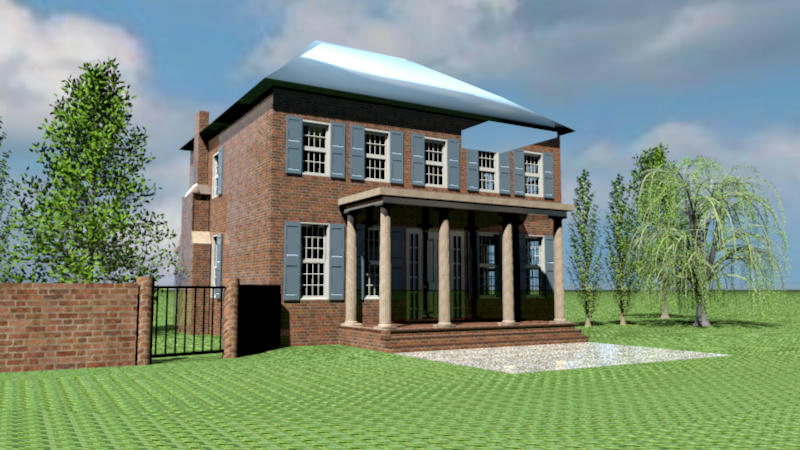
Re: Imperfect rendering Yay, well done Emmanuel! Previously using Sweet Home 2.4 Uber shader 1.3 ![]() Now with Sweet Home 2.5, Create advanced photo... 1.5 ![]() Also as a direct comparison to the first image, Sweet Home 2.5, Create advanced photo Uber shader 1.4 (1.5 isn't available yet) the roof renders correctly. ![]() For anyone else reading this. Don't worry about the silver leaves (as seen on the first and final Uber render) the Uber shader is work in progress and holds lots of advanced possibilities for the future. No need to call the builders to fix the roof anymore! db4tech |
| Posted by hansmex at Jun 22, 2010, 4:04:45 PM |
|
Re: Imperfect rendering db4tech: Thanks for you offer to render the picture for me. The problem isn't so much in the rendering, as well in the fact that I have to start a new drawing first, before I can open a file. The rendering works fine, except for the one low quality setting. Even the leaking roof which started this thread has been fixed in v2.5, as you demonstrated so clearly, and which made me come back to that specific model. Hans ---------------------------------------- Hans new website - under constuction hansdirkse.info |
| Posted by hansmex at Jun 23, 2010, 2:31:04 AM |
|
Re: Imperfect rendering Emmanuel. db4tech: A few moments ago, I tried to make a standard photo render with quality setting 1 of the "House with porch" as shown above, using SH3D v2.5 on my Windows Vista laptop. Unfortunately the results are the same as under Ubuntu: no image. Q0, Q2 and Q3 render the picture as it should be, without the leaking roof. I'll see if I can install the additional plug-ins and do the the other renders as well. Here is the link to the file (approx. 27.5 Mb): House with porch Hans ---------------------------------------- Hans new website - under constuction hansdirkse.info |
| Posted by db4tech at Jun 23, 2010, 3:22:31 AM |
|
Re: Imperfect rendering Hi Hans, I normally only ever use Q1 to check for composition then use advanced or Uber, so it is very rare I try Q2,3 and 4. Q2 does the same on my machine, it constantly thinks and thinks and thinks. I had a guess that the tree branches might be too difficult for the simple Q2 ground shadow routines. I'm probably totally wrong! Deleting all the trees then allows Q2 to render the remaining scene straight away.db4tech |
| Posted by Puybaret at Jun 23, 2010, 8:56:09 AM |
|
Re: Imperfect rendering I understand better Hans' problem now. In his mind, quality scale starts at 0 !!! ![]() db4tech is right, its because you have many trees with many triangles to display. Fortunately, this doesn't seem to bother OpenGL too much, but Sweet Home 3D is generally unable to compute the shadow where there are too many trees. I didn't find any algorithm who could help me improve this yet. ![]() ---------------------------------------- Emmanuel Puybaret, Sweet Home 3D creator |
| Posted by hansmex at Jun 23, 2010, 9:27:34 AM |
|
Re: Imperfect rendering Emmanuel: It's not so much in my mind... but the slider from Create photo goes from left=0 to right=3 :-) I just checked and I notice there's a difference between Ubuntu and Windows that causes the confusion. Under Ubuntu the slider has numbers 0-1-2-3 above it, under Windows Vista these are absent, so I can understand that Windows users would rather naturally think of Q1-Q4, instead of Q0-Q3. Also the Create and Close buttons are reversed between these two OS's. Maybe a future version could make this the same for both OS's? I wouldn't bother too much with Q1 (or Q2 if Windows), because I hardly ever use it. It's either Q0, or else Q2 or Q3. And since the Advanced Photo renders are available, I don't use the standard rendering very often. Update I deleted all the trees from the model, and it rendered without problem, so Emmanuel was right when he pointed at the trees. One "Lombardy Poplar" also renders, but more trees cause problems. Hans ---------------------------------------- Hans new website - under constuction hansdirkse.info |
| Posted by db4tech at Jun 23, 2010, 4:22:09 PM |
|
Re: Imperfect rendering Emmanuel was right when he pointed at the trees. One "Lombardy Poplar" also renders, but more trees cause problems. What no mention of db5tech and the trees? Hans I'm just kidding! I don't mind really. ![]() db4.5tech |
| Posted by hansmex at Jun 23, 2010, 6:03:58 PM |
|
Re: Imperfect rendering db6tech: That post was on the previous page. My apologies for not lauding your considerable talents! Hans ---------------------------------------- Hans new website - under constuction hansdirkse.info |
| Posted by db4tech at Jun 23, 2010, 8:17:57 PM |
|
Re: Imperfect rendering Thanks Hans ![]() ________________________________________________________________________ Sweet Home 3D is generally unable to compute the shadow where there are too many trees. I didn't find any algorithm who could help me improve this yet. Emmanuel, rather than compute the triangles for the simple, second setting, built in render, why not just ignore the triangles whenever a tree is identified in a scene, instead, the trees X & Y size can be used to scale a simple rough edge png shape (like the example (complete with alpha channel) png below) to provide a simple shadow.![]() ![]() db4tech |
| Posted by Puybaret at Jun 27, 2010, 1:11:32 PM |
|
Re: Imperfect rendering I add this idea but I felt that combining the shadows of two trees close to each other (or other objects) would be make a too dark shadow at their intersection. ---------------------------------------- Emmanuel Puybaret, Sweet Home 3D creator |
|
|
Current timezone is GMT Feb 3, 2026, 11:47:18 AM |