Print at Dec 19, 2025, 6:14:22 PM
Posts: 22   Pages: 3   [ 1 2 3 | Next Page ]
View all posts in this thread on one page
Posted by hansmex at May 22, 2010, 6:51:04 PM
Auto-crashing file
Emmanuel:

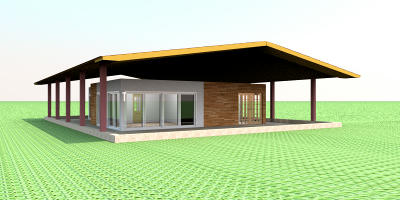
Looking at some of my older designs, I came across this file. (see House with double roof)

For some reason I can open the file, but SH3D v2.3 shuts itself down before displaying anything. I also attach the two log files.

Hans
----------------------------------------
Attachment hs_err_pid21648.log (49019 bytes) (Download count: 17082)

----------------------------------------
Attachment hs_err_pid21732.log (49454 bytes) (Download count: 17275)

----------------------------------------
Hans

new website - under constuction
hansdirkse.info

Posted by db4tech at May 23, 2010, 3:59:14 AM
Re: Auto-crashing file
Hi Hans,

With you helping me, with the Sweet Home windows position changing test, I do hope you won't mind I had a go at opening your home model.

It opened okay without any problems using Sweet Home 2.3 running on Windows 7. There was a slight delay as parts were drawn but otherwise it loaded and displayed okay.

So you know I have opened your model, I made the two slopping roof parts visible again, then (also in case it helps solve the problem) I re-saved the model with version 2.3 for you to try.

House with double roof re-saved with version 2.3

db4tech

Posted by hansmex at May 23, 2010, 11:04:30 AM
Re: Auto-crashing file
db4tech:

Thanks! The file now opens without any problem.
I'll do some more testing to find out if I can narrow down the problem.

Hans

(update)
Unfortunately I was too quick with my reply. The file has crashed again several times on opening, although on other occasions it works fine. Very strange!
----------------------------------------
Hans

new website - under constuction
hansdirkse.info

Posted by Puybaret at May 23, 2010, 11:45:48 AM
Re: Auto-crashing file
Hans, I'm glad db4tech fixed your issue, but I would be really astonished that re-saving might have changed anything! sad

If you have a quick look at the stack information in the log files you posted:

Stack: [0x11a5f000,0x11ab0000], sp=0x11aae830, free space=13e11aae1c0k
Native frames: (J=compiled Java code, j=interpreted, Vv=VM code, C=native code)
C [libGL.so.1+0x3dd3e]
C [i915_dri.so+0x49486]
C [i915_dri.so+0x49506]
C [i915_dri.so+0x908f3] _mesa_flush+0x23
C [i915_dri.so+0x49d65] intelMakeCurrent+0x45
C [i915_dri.so+0x217a2]
C [libGL.so.1+0x3d30c]
C [libGL.so.1+0x18e62] glXMakeCurrentReadSGI+0x432
C [libGL.so.1+0x18f33] glXMakeCurrent+0x23
C [libj3dcore-ogl.so+0xbd57] Java_javax_media_j3d_NativePipeline_createNewContext+0x155
j javax.media.j3d.NativePipeline.createNewContext(Ljavax/media/j3d/Canvas3D;JJJJZZZZ)J+0
[...]

createNewContext and then intelMakeCurrent makes me think more about a driver problem (you can deduce recent history in a program by reading a crash stack upside down, the most recent thing that happened being first cited).
Didn't you update drivers recently?
----------------------------------------
Emmanuel Puybaret, Sweet Home 3D creator

Posted by hansmex at May 23, 2010, 12:02:45 PM
Re: Auto-crashing file
Emmanuel:

You may remember that since changing from Ubuntu 9.04 to 9.10 I can use SH3D on my Ubuntu PC, because that version implemented new video drivers. Because I didn't like 9.10 (rather instable), I changed early-on to Ubuntu 10.04, which I have been using through all alpha's and beta's. I first installed it probably last November, and have since updated it regularly, so now I should have the official release version.

These last few weeks I experience many crashes on my PC when using SH3D, as well as all kinds of strange behaviour, like strange icons in the furniture list, non-deletable furniture items, holes in renderings, windows in front of plants, etc. I have reported several of these.

As you know, I am a-technical. All I can say is that Ubuntu 10.04 is excellent, very stable, and doesn't cause any problems in other programs, except in Firefox, which also crashes every now and then. But that is a problem I had also under 9.04 and 9.10.

Maybe I may once again ask for a new feature: Autosave ?

Hans
----------------------------------------
Hans

new website - under constuction
hansdirkse.info

Posted by Puybaret at May 23, 2010, 12:29:39 PM
Re: Auto-crashing file
You can always ask and I'm not against Autosave. wink

But if saving is simple on a technical point of view (saving already exists and programming a timer isn't difficult), it's more complicated than it looks like on a user interface point of view:
- When autosave should be run? Always after a certain period of time, even in the middle of a user input? Only between inputs? Then what is considered as an input?
- What feedback should be given to the user? Should a blocking save dialog box should appear? Or should a message appear in a status bar (then I'll have to create a status bar)? Or no feedback at all (the user could guess it was saved from the modified info in the title bar)?
- If there's no blocking save dialog box, what will happen if saving fails or if the user request to save while a saving operation occurs in a background task?
----------------------------------------
Emmanuel Puybaret, Sweet Home 3D creator

Posted by hansmex at May 23, 2010, 12:53:13 PM
Re: Auto-crashing file
Emmanuel:

"My" Autosave would be located in Preferences with a check-box to turn it on/off, and a field or drop-down box to set the interval.

In OpenOffice the Autosave works after a specified interval, regardless of what you are doing. If the file is large, you notice a short delay because everything is blocked during saving.

If I were you, I would start with a very simple feature, and if necessary refine it.

Hans
----------------------------------------
Hans

new website - under constuction
hansdirkse.info

Posted by hansmex at May 23, 2010, 4:34:30 PM
Re: Auto-crashing file
Emmanuel:

Doing some renderings I found that in this file the horizon is visible through the house. Walls are set a zero transparency.


If the image is too small, there is also a link to the original 1.8 Mb picture .

Hans
----------------------------------------
Hans

new website - under constuction
hansdirkse.info

Posted by Puybaret at May 23, 2010, 4:47:24 PM
Re: Auto-crashing file
Hum... Maybe it's the reflect of the horizon on the wall? wink
----------------------------------------
Emmanuel Puybaret, Sweet Home 3D creator

Posted by db4tech at May 23, 2010, 5:17:19 PM
Re: Auto-crashing file
Hans,

Does the model open and display without any crashes on your Vista machine?

On your Ubuntu machine how much memory does your graphics card have. Have you tested the Windows version of Sweet Home running under Wine to see if that works without any problems?

Just trying to think of ways to help narrow down what maybe causing the problem.


Both Hans and Emmanuel,

I do like the idea of an auto-save, say every 15 mins? But only auto-save if changes to the model have been made.

Emmanuel if you do implement this feature please can you save the file with _bk added to the end of the file name, that way if something goes very wrong or there is a system/software crash there will still be the original user saved file as well as the _bk version.

Then next time Sweet Home was opened (if there was a crash or something went wrong) the user can be given a choice of recovering from the _bk file or ignore and load the currently selected file.

As Sweet Home is closed and a user has saved their latest work [i(to their original file) the _bk version can be automatically deleted, so lots of _bk files don't exist.

db4tech

Posts: 22   Pages: 3   [ 1 2 3 | Next Page ]