Print at Dec 18, 2025, 4:22:47 AM View all posts in this thread on one page
Posted by hansmex at May 18, 2010, 10:21:38 PM
Incorrect icon picture when importing OBJ file
Emmanuel:

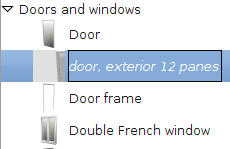
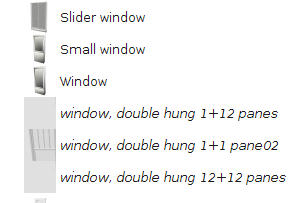
While importing a large number of models, I noticed that the icon picture in the model list isn't made correctly. I attach two files showing what goes wrong.

It happened earlier while having a large model loaded, but this time there was no model loaded at all. It happened on my Ubuntu 10.04 PC.

Hans


(edit)
I found another strange behaviour...Some of the imported models are imported as if they were original SH3D models that come in the standard libraries. They are easily distinguished because their name is in "normal" text, and not in italic text. Also, the right-click menu offers just three choices, so you cannot delete them.

I checked the .eteks directory and a few other places, but I can't find where the program puts them.
----------------------------------------
Hans

new website - under constuction
hansdirkse.info

Posted by Puybaret at May 19, 2010, 3:36:50 PM
Re: Incorrect icon picture when importing OBJ file
I've seen that bug once but I can't find a way to reproduce it.
From the Java program source, I don't understand at this time how it can happen. If ever you have a stack trace when this bug happens, I would be pleased to read it.
----------------------------------------
Emmanuel Puybaret, Sweet Home 3D creator

Posted by hansmex at May 22, 2010, 1:07:47 PM
Re: Incorrect icon picture when importing OBJ file
Emmanuel:

Here are two log files, the first from 17-05-10 and the other from 22-05-10. I'm not sure what was the exact configuration of the first file (pid16078), but the last one (pid18597) was SH3D v2.3 with all available plug-ins installed (I was testing the Phong and Uber plug-ins).

By the way, I tried to test those plug-ins with SH3D v2.4 b4, but I get an error message. Since you programmed the error message, I guess you are aware of that limitation.

Hans
----------------------------------------
Attachment hs_err_pid16078.log (56450 bytes) (Download count: 11636)

----------------------------------------
Attachment hs_err_pid18597.log (92722 bytes) (Download count: 11550)

----------------------------------------
Hans

new website - under constuction
hansdirkse.info

Posted by hansmex at Jun 6, 2010, 5:05:44 PM
Re: Incorrect icon picture when importing OBJ file
Emmanuel:

Today I was rebuilding the libraries that I lost during a crash/update of my Ubuntu PC some months ago. Everything went well, until I imported a few large (10 to 45 Mb) models. Directly after doing this, I noted that the icons of the models changed to grey squares, as shown in the previous post of this thread. For the first large model, the icon picture was correct, but the models I imported after that one, showed a part of the 3D render as background.

I deleted the objects with incorrect icons, closed and restarted SH3D. I then imported the largest model approx. 20 times, without problem. I then applied a texture to that model, and then imported that same model again. This time: BINGO! The icon was just a black square.

During the last 5 imports I had the System Monitor window open. The memory usage stayed stable around 40% of 3.3 GB. After the texture was applied this increased to 44.3%. Swap memory increased more gradually, I think, but I would have to run this test again and write down the exact values to be sure.

I'm pretty sure that it is the texture application to the large model, that is responsible for the icon error.

(update)
To be sure, I repeated the procedure. I imported the same 44 MB bed model, added it to the library, giving it a unique name. I then dragged it into the design window and gave it a texture. On the fifth repetition the icon was completely gray, making it a completely repeatable bug.
(end update)

Hans
----------------------------------------
Hans

new website - under constuction
hansdirkse.info

Posted by hansmex at Jun 11, 2010, 1:38:28 AM
Re: Incorrect icon picture when importing OBJ file
Emmanuel:

Playing around in SH3D I found that I can correct the icon picture. When in the furniture model list, I right-click and select Modify furniture... I then go to the last window and rotate the model slightly. SH3D now makes a new image for the icon, and the problem is solved.

I did this in a "clean" instance of SH3D so that I have the maximum memory available.

Hans
----------------------------------------
Hans

new website - under constuction
hansdirkse.info