|
Sweet Home 3D Forum » List all forums » » Forum: 3D problems » » » Thread: same texture appears different after imported as OBJ |
|
| Print at Dec 20, 2025, 12:16:15 AM | View all posts in this thread on one page |
| Posted by yafeng at Apr 14, 2010, 9:21:12 PM |
|
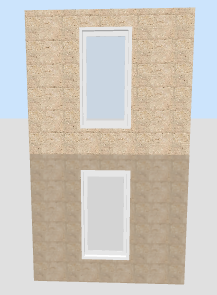
same texture appears different after imported as OBJ Hello, I'm desiging a two-levelled house with sh3d by importing second layer as OBJ on top of the first layer. But one annoying issue is, wall texture imported in OBJ file look differnt in 3D view, meaning even you align first-floor wall perfectly to another piece of imported second-floor wall, they don't appear as one piece. This happens when you apply a texture to the walls, not an issue if you apply color to the walls. Any idea how to solve this problem? BTW, after rendering, wall texture will look same, but it's still quite annoying since it's the 3D view that you work on most time. P.S. I prepared one example picture, but seems this board doesn't support uploading images directly. |
| Posted by hansmex at Apr 15, 2010, 12:21:45 AM |
|
Re: same texture appears different after imported as OBJ Yafeng: You can use www.mediafire.com or a similar service to upload your file and/or picture and give us a link to it. Hans ---------------------------------------- Hans new website - under constuction hansdirkse.info |
| Posted by Puybaret at Apr 15, 2010, 10:03:34 AM |
|
Re: same texture appears different after imported as OBJ Yafeng, I see what you mean. Textures applied to walls, floors, ceilings, ground and furniture aren't managed the same way as the ones read from OBJ files. ![]() Please, fill a bug report. I'll try to fix it. ---------------------------------------- ---------------------------------------- Emmanuel Puybaret, Sweet Home 3D creator |
| Posted by yafeng at Apr 15, 2010, 8:04:45 PM |
|
Re: same texture appears different after imported as OBJ Good, thanks for the information. A bug is reported about this. |
|
|
Current timezone is GMT Dec 20, 2025, 12:16:15 AM |