 Holes with curves in curved surfaces
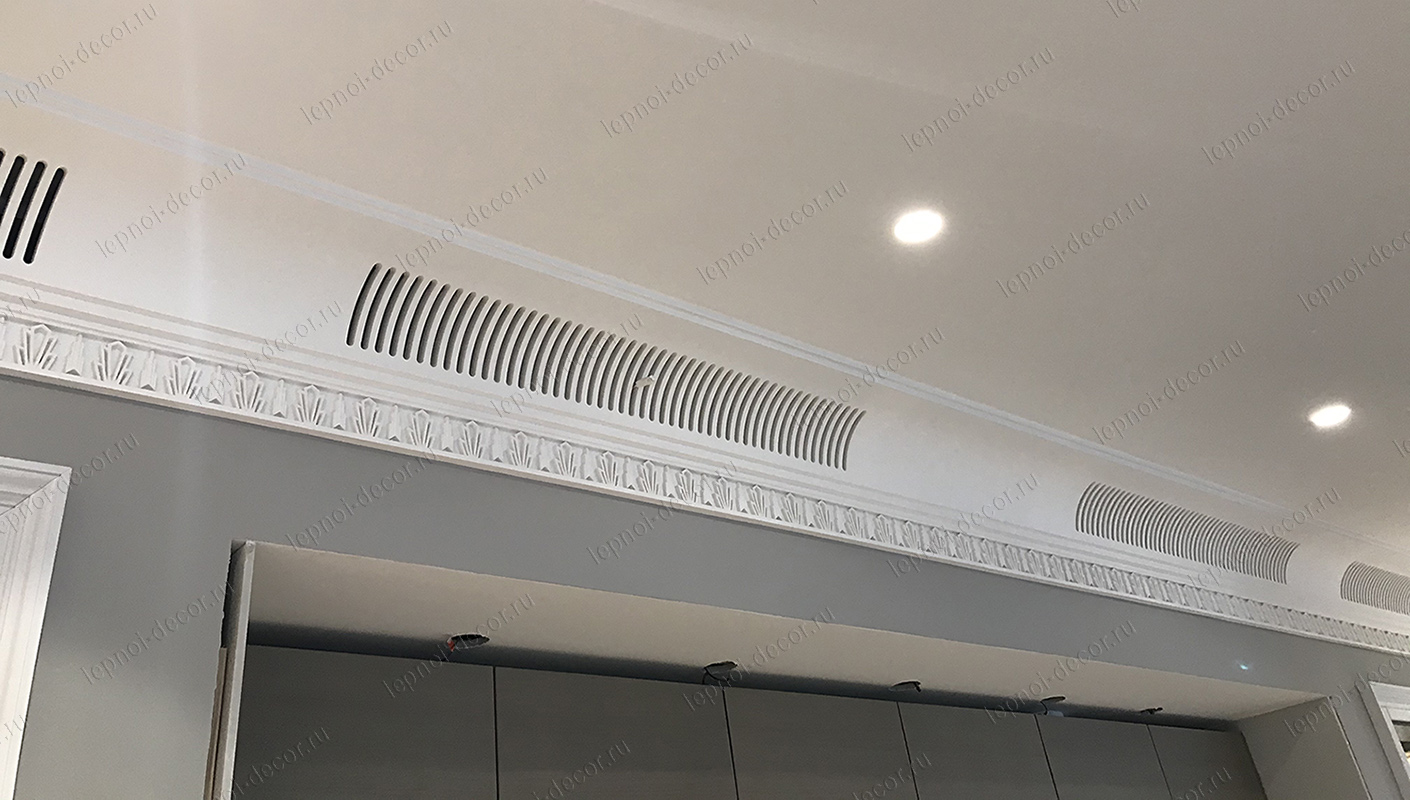
Hi. I want to make ventricles on a plaster semicircular cornice. As in the photo. Does anyone know how to make such holes in SH3D? So far, I've only got rectangular ones, but I need to do them with rounded ends.
|
Sweet Home 3D Forum » List all forums » » Forum: Features use and tips » » » Thread: Holes with curves in curved surfaces |
|
| Print at Oct 5, 2026, 11:18:16 PM | |
| Posted by GaudiGalopin3324 at Sep 5, 2024, 9:16:37 AM |
|
Holes with curves in curved surfaces Hi. I want to make ventricles on a plaster semicircular cornice. As in the photo. Does anyone know how to make such holes in SH3D? So far, I've only got rectangular ones, but I need to do them with rounded ends. |
| Posted by Keet at Sep 5, 2024, 10:08:30 AM |
|
Re: Holes with curves in curved surfaces Sorry, can't be done in Sweet Home 3D. I asked the same question two years ago and so far no solution. You will have to use Blender to create this. ---------------------------------------- Dodecagon.nl 1300+ 3D models, manuals, and projects |
| Posted by GaudiGalopin3324 at Sep 5, 2024, 10:31:52 AM |
|
Re: Holes with curves in curved surfaces Understood. Thanks Keet. I'll try it masterfully))) glue the curved and straight sections of the wall, in a straight line I will make a round hole (or arch). Maybe it will work out.  |
| Posted by Keet at Sep 5, 2024, 11:19:57 AM |
|
Re: Holes with curves in curved surfaces That's a solution I was thinking about . You can use a very small straight wall part with just half cutout of a circle and mirror it for the other side. Fill out with curved wall parts. I tried it and it works pretty well but of course not a perfect curve. I know you could first create it with a straight wall and then bend it in Blender but that's one of the things I haven't figured out yet. ---------------------------------------- Dodecagon.nl 1300+ 3D models, manuals, and projects |
| Posted by captaincook at Sep 5, 2024, 2:30:22 PM |
|
Re: Holes with curves in curved surfaces Bonjour à vous. J'espère que ça pourra vous aider. 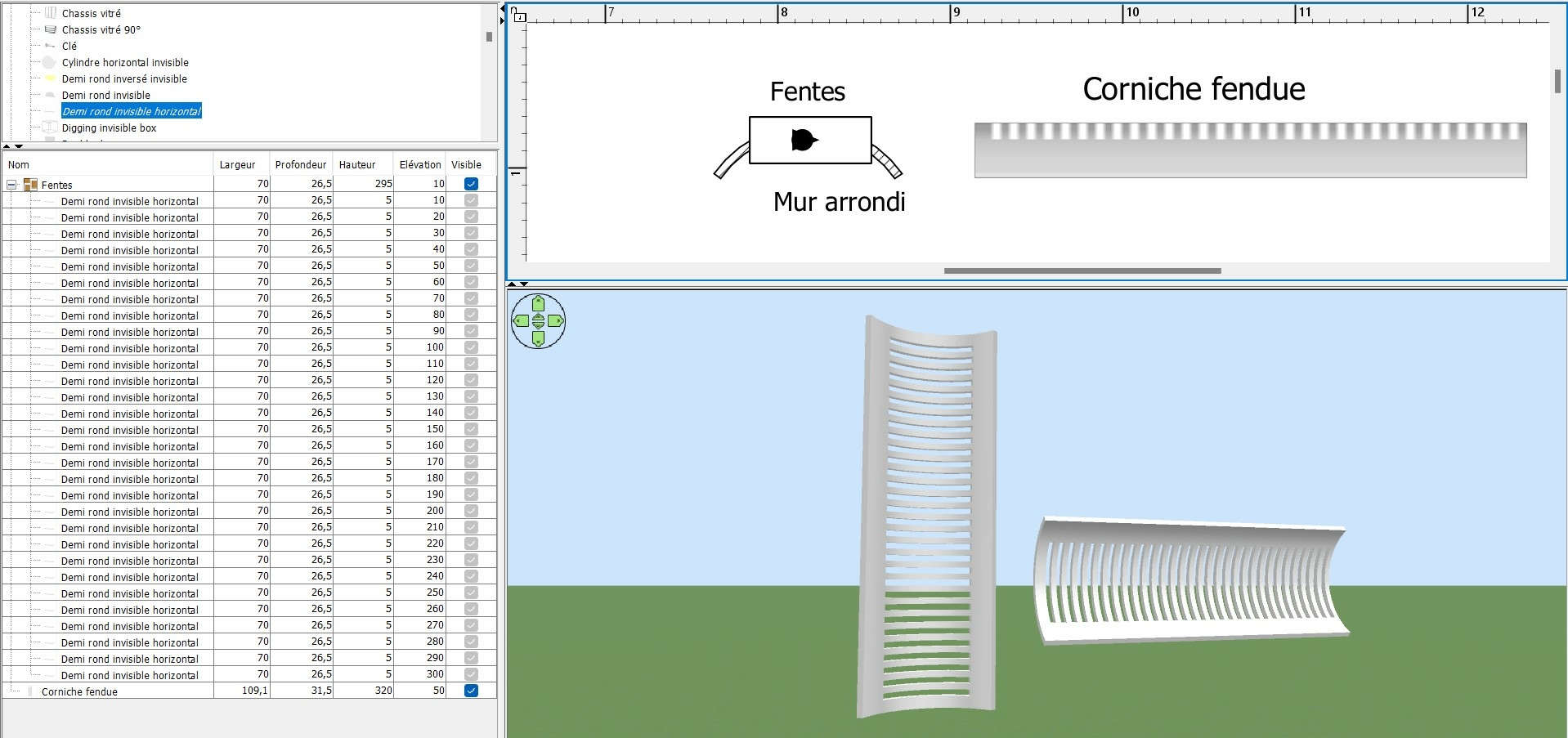 C'est évidemment à modifier en fonction de vos besoins. Bonne journée |
| Posted by Keet at Sep 5, 2024, 3:26:40 PM |
|
Re: Holes with curves in curved surfaces Creating the vent like that is not the problem. The problem is getting rounded holes instead of the square ended holes. I must say that even with square holes it looks very good. [French] La création de l'évent de cette manière n'est pas le problème. Le problème est d'obtenir des trous arrondis au lieu des trous carrés. Je dois dire que même avec des trous carrés, c'est très bien. ---------------------------------------- Dodecagon.nl 1300+ 3D models, manuals, and projects |
| Posted by captaincook at Sep 5, 2024, 7:03:04 PM |
|
Re: Holes with curves in curved surfaces Bon, j'ai ajouté des petites pièces taillées sur mesure (en rouge sur la pièce à droite) pour obtenir le résultat final à gauche.  |
| Posted by Keet at Sep 5, 2024, 7:54:54 PM |
|
Re: Holes with curves in curved surfaces Very clever. Using a smaller filler piece for the roundings. That's another way for GaudiGalopin3324 to achieve what he wants in Sweet Home 3D. [French] Très astucieux. L'utilisation d'une pièce de remplissage plus petite pour les arrondis. C'est une autre façon pour GaudiGalopin3324 d'obtenir ce qu'il veut dans Sweet Home 3D. ---------------------------------------- Dodecagon.nl 1300+ 3D models, manuals, and projects |
| Posted by GaudiGalopin3324 at Sep 5, 2024, 7:55:01 PM |
 Re: Holes with curves in curved surfaces
Wow!!))) quand je commence à concevoir un vaisseau spatial, je sais à qui demander conseil)))). Merci!!!)) Je vais exposer mon intérieur à la galerie demain matin. Avec vos innovations.  |
| Posted by GaudiGalopin3324 at Sep 5, 2024, 10:46:01 PM |
|
Re: Holes with curves in curved surfaces I did it like this. I built a wall of five parts, left two short parts straight and carefully bent the other three parts into an arc. Then he pierced it with round and rectangular windows. The main thing here is to turn off the magnet. The round window (purple) fits well into the wall only in one single position - strictly perpendicular. You need to catch this short moment of window movement and release your finger from the mouse. And then the window moves to the right place of the straight wall. The other half of the window in the curved wall cuts a rectangular hole next to it, but it doesn't matter anymore. With two rectangular windows (green), you can add a gap in the curved wall between short straight sections. Then you need to save it to OBJ, rotate it properly, make the windows invisible, and save it back to OBJ. It turns out a section with a slit as in the photo. These sections can be combined into a group of the desired size. And a cornice without cracks is a wall without windows, also a separate model in OBJ. everything is combined into a single composition. Interestingly, when scaling different models of this cornice, for some reason, slightly different sizes are obtained, I fixed everything to single digits manually. 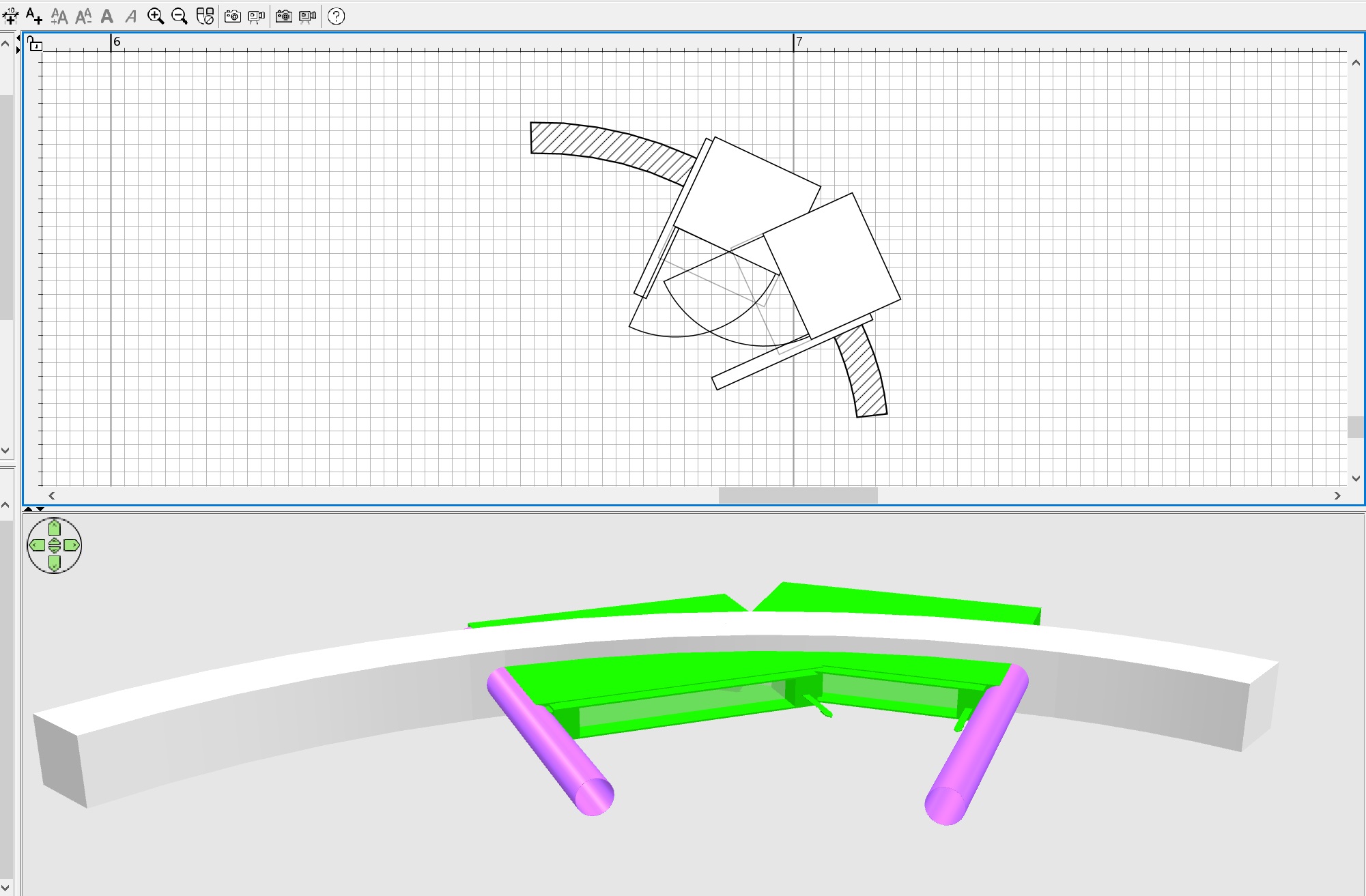 |
| Posted by Keet at Sep 5, 2024, 11:17:14 PM |
|
Re: Holes with curves in curved surfaces Some tips for easier editing: The main thing here is to turn off the magnet. The round window (purple) fits well into the wall only in one single position - strictly perpendicular. Draw that wall part horizontal and place the round window. It only has to be half as wide as the round window. Then select both and move/rotate. Use the rotate function of the Advanced Edit plugin: you don't have to switch off magnetism, just put in the numbers and with each arrow up/down or new number the rotation is shown in the 3D view. You can even use half degrees. Easier than trying to catch that magic spot with the mouse and possibly more precise. Create everything with a scale 10:1. It gives you more precision and it's easier to work with a larger part than a tiny little part. Only scale down when the whole model is completely done.Then you need to save it to OBJ, rotate it properly, make the windows invisible, and save it back to OBJ. Just export the wall parts without the windows. The created holes will be preserved even if you export without the windows.You have a nice curve in your wall. The straight parts are almost invisible. ---------------------------------------- Dodecagon.nl 1300+ 3D models, manuals, and projects |
| Posted by GaudiGalopin3324 at Sep 5, 2024, 11:43:38 PM |
|
Re: Holes with curves in curved surfaces Eh, but I do not know how to highlight only the walls((. Without grabbing the windows with them. So I capture everything and then make the details invisible, in two steps. I probably don't know the right way. But it's not difficult for me to move models back and forth a couple of times. But thanks for the advice anyway! The picture is loading)  |
| Posted by Keet at Sep 5, 2024, 11:48:21 PM |
|
Re: Holes with curves in curved surfaces Eh, but I do not know how to highlight only the walls((. Without grabbing the windows with them. Select both walls and windows and then unselect the windows in the objects list on the left ---------------------------------------- Dodecagon.nl 1300+ 3D models, manuals, and projects |
| Posted by GaudiGalopin3324 at Sep 6, 2024, 8:09:41 AM |
|
Re: Holes with curves in curved surfaces Select both walls and windows and then unselect the windows in the objects list on the left smile an incredible discovery for me!!)) Keet, it's like I went back to school in the first grade. Thanks! |
| Posted by Keet at Sep 6, 2024, 9:12:39 AM |
|
Re: Holes with curves in curved surfaces The object list has more uses: you can select multiple objects with click and drag up or down in the list. With the correct ordering this is often more efficient than selecting in the 2D pane. Just remember that multi select with individual clicks in the 2D and 3D panes is with the shift key and in the object list with the ctrl key. Without any ordering (no arrows in any of the column headers) new objects are added to the bottom of the list. This will not only show you the order in which the objects were added but it makes it easy to find a new added object in a long list: at the bottom. Another very important feature is that you can add objects to an existing group by copying an object, then select the group in the list and right click for the context menu, select "Paste to group". ---------------------------------------- Dodecagon.nl 1300+ 3D models, manuals, and projects |
| Posted by GaudiGalopin3324 at Sep 6, 2024, 8:38:42 PM |
|
Re: Holes with curves in curved surfaces Thanks Keet! These are very, very, very good and necessary recommendations. Everyone needs to know this, but this procedure must be fixed by practice. And then the SH3D tool will sound. There is everything for creativity here. |

|
Current timezone is GMT Oct 5, 2026, 11:18:16 PM |