|
Sweet Home 3D Forum » List all forums » » Forum: Gallery » » » Thread: Dodecagon |
|
| Print at Jan 12, 2026, 8:05:54 AM | |
| Posted by Keet at Jun 29, 2024, 10:27:46 PM |
Dodecagon Introducing the Dodecagon website I just published a new website with models and manuals for Sweet Home 3D. More than 500 models are available in multiple libraries. And that is just the startup. Expect more models and manuals to be added over time. Everything on the site is custom created for use in Sweet Home 3D and released under the CC0 1.0 Universal license. This means all models are in the public domain, free to download and use without attribution. Updates will be announced here. Important! The Dodecagon site is new and in continuing development. There will be typos and other errors and I appreciate it if you report any errors you find. I only test with Firefox on Linux Debian (desktop) and Firefox on Linux PureOS (mobile). Please do not report site errors here in the forum. This forum is not the place to report errors found on an external site. Questions or remarks are of course fine, especially if they are of interest to more members. But if you want to report errors concerning the Dodecagon site please send me a PM. Have fun on Dodecagon.nl ! ---------------------------------------- Dodecagon.nl 1300+ 3D models, manuals, and projects |
| Posted by Ceciliabr at Jun 29, 2024, 11:28:00 PM |
|
Re: Dodecagon Hi! What a nice idea! I spent some time browsing around in your website, and I find it amazing. You must have invested a lot of hours. I think this ought to be sticky post. Wish you a blessed evening! Cecilia |
| Posted by Keet at Jul 1, 2024, 11:19:01 AM |
|
Re: Dodecagon I have updated the manual How-To_Change_Material_Names with extra information about splitting material names. ---------------------------------------- Dodecagon.nl 1300+ 3D models, manuals, and projects |
| Posted by Keet at Jul 1, 2024, 11:19:48 AM |
|
Re: Dodecagon Thank you Cecila for your kind words! ---------------------------------------- Dodecagon.nl 1300+ 3D models, manuals, and projects |
| Posted by Keet at Jul 3, 2024, 8:35:09 PM |
|
Re: Dodecagon The excellent work of GaudiGalopin3324 about adding animated gifs in a Sweet Home 3D video that he posted in the forum is added to the manuals section as a pdf: AddGifsInVideo ---------------------------------------- Dodecagon.nl 1300+ 3D models, manuals, and projects |
| Posted by Keet at Jul 13, 2024, 12:07:06 PM |
|
Re: Dodecagon The kitchen library is updated. The three refrigerators had a bug where the brand logo on the doors didn't open with the doors. The three models are now also heavily optimized shrinking them to about two thirds of the previous size without giving up any details. The doors and handles are now also smoothed. The rest of the library will also be optimized but that will take some time. ---------------------------------------- Dodecagon.nl 1300+ 3D models, manuals, and projects |
| Posted by Vinci68 at Jul 14, 2024, 1:33:51 PM |
|
Re: Dodecagon Well done and thank you Keet for sharing so generously! |
| Posted by Keet at Jul 20, 2024, 5:28:06 PM |
|
Re: Dodecagon A new library is added: The Glass Elevator. This is an elevator for public spaces that I use in multiple large projects. The models are fully optimized to make them as small and efficient as possible, a necessity when you use them in large projects. ---------------------------------------- Dodecagon.nl 1300+ 3D models, manuals, and projects |
| Posted by Keet at Jul 20, 2024, 8:29:53 PM |
|
Re: Dodecagon There was an issue with the header of the library file after download. It should work but if you have a problem with it just download it again. The issue is fixed. ---------------------------------------- Dodecagon.nl 1300+ 3D models, manuals, and projects |
| Posted by Keet at Jul 30, 2024, 7:56:17 PM |
|
Re: Dodecagon New library added: Rain Gutters ---------------------------------------- Dodecagon.nl 1300+ 3D models, manuals, and projects |
| Posted by Keet at Aug 1, 2024, 3:43:29 PM |
|
Re: Dodecagon The Office Library is updated with new models of modular conference tables. ---------------------------------------- Dodecagon.nl 1300+ 3D models, manuals, and projects |
| Posted by Keet at Aug 15, 2024, 6:52:57 PM |
|
Re: Dodecagon New furniture library added: Doors (4.6 MB, 96 models) ---------------------------------------- Dodecagon.nl 1300+ 3D models, manuals, and projects |
| Posted by hansmex at Aug 15, 2024, 7:06:43 PM |
|
Re: Dodecagon Keet, your website seems to be down... I can't access it. ---------------------------------------- Hans new website - under constuction hansdirkse.info |
| Posted by Keet at Aug 15, 2024, 7:12:44 PM |
|
Re: Dodecagon Try again, I have no problem accessing it. ---------------------------------------- Dodecagon.nl 1300+ 3D models, manuals, and projects |
| Posted by hansmex at Aug 15, 2024, 7:39:45 PM |
|
Re: Dodecagon Now it works fine on my tablet. Didn't work on my PC... Beautiful and very useful set of doors. Will definitely find use! Thank you. ---------------------------------------- Hans new website - under constuction hansdirkse.info |
| Posted by Keet at Aug 16, 2024, 7:31:16 PM |
|
Re: Dodecagon I converted all model images on the Dodecagon.nl site to WEBP (previously PNG). This should significantly speed up page loading. Important for those visiting the site with a metered connection (data limit): the amount of data for a page is now approximately a tenth of what it was before. ---------------------------------------- Dodecagon.nl 1300+ 3D models, manuals, and projects |
| Posted by VeroniQ at Aug 16, 2024, 8:24:55 PM |
|
Re: Dodecagon Many useful and well done models, Keet, thank you for sharing. I am looking forwards to read about the "Projects". What's about the "participative" part for the the Mall? I love this idea... |
| Posted by Keet at Aug 16, 2024, 8:50:34 PM |
|
Re: Dodecagon Thank you! What's about the "participative" part for the the Mall? I love this idea... It will come but it will take some time. It's one of the reasons why I am so aggressively optimizing models. Which by the way also results in the libraries for download With the size of that project it is currently unmanageable, it simply takes way too long to move around in it or even show it in full. And that's still the 'empty' project, as you know, and no textures or lights yet. I am changing the construction into manageable parts. Not separate levels in a project but really separate parts while trying to still keep the option of displaying the whole project when desired. I had hoped to do all that in a few weeks but it's clear that it will take a lot longer. It takes a lot of experimenting. Did you know that very long walls are very slow in displaying? I found out the hard way and still don't understand why. And that's just one of the problems I encountered. ---------------------------------------- Dodecagon.nl 1300+ 3D models, manuals, and projects |
| Posted by VeroniQ at Aug 16, 2024, 9:12:28 PM |
|
Re: Dodecagon No hurry, Keet. It was just to know... Courage! |
| Posted by JonnyD at Aug 17, 2024, 9:14:58 AM |
|
Re: Dodecagon These models are really excellent! I’ve had to rebuild entire kitchens already 😂 |
| Posted by Keet at Aug 26, 2024, 8:26:58 PM |
|
Re: Dodecagon I added a new library: Escalators. I don't think many users will need these since escalators are something you mainly see in big buildings. But big buildings is what I do mostly in Sweet Home 3D when I'm not creating furniture. There is something special in the library: each escalator has an accompanying staircase that spans the same height as the escalator. These staircases are 100% created with shapes created with the "Generate 3D shape" plugin tool. Every single part. No predefined shapes like boxes were used. (super kudos for who recognizes the guitar player in the display window) ---------------------------------------- Dodecagon.nl 1300+ 3D models, manuals, and projects |
| Posted by Keet at Sep 3, 2024, 8:25:59 PM |
|
Re: Dodecagon By request I have added Light Displays for posters or advertising to the Shop Library. 5 formats: ABRI (bus stop shelter), B0, B1 (movie posters), A0, and A1. Set the light power between 0.5% and 4% depending on the surrounding light and the poster you add to the display. ---------------------------------------- Dodecagon.nl 1300+ 3D models, manuals, and projects |
| Posted by Shralen at Sep 3, 2024, 9:54:07 PM |
|
Re: Dodecagon Lot of model you have there, I'm going to give the Kitchen one a try. Maybe it'll flow better than the curent one. The curent one: (Even made some 'custom' model in this) ![]() ---------------------------------------- I'm more comfortable writing in English, but I can also write in French. ,___, (OvO) Hoot /)_) " " |
| Posted by Shralen at Sep 3, 2024, 10:36:49 PM |
|
Re: Dodecagon So I've started to use your kitchen models, and I've noticed something. The dishwasher doesn’t perfectly aline with the Cabinet 100 Double Sink model, and so is the Cabinet Corner. Maybe it’s just my nick picking mind and it should look like this. Or this is just a small issue. I even tried to change the format of the models, and still it does not aline. I always prefer when the kitchen countertop aline with each other. Look better, in my opinion. ---------------------------------------- I'm more comfortable writing in English, but I can also write in French. ,___, (OvO) Hoot /)_) " " |
| Posted by Keet at Sep 3, 2024, 11:14:42 PM |
|
Re: Dodecagon You're right. It's that specific corner, not the dishwasher. It appears to have the wrong border. I will look into it. When aligning try to use align side-by-side. You can select a row of cabinets and use side-by-side aligning to perfectly align the whole row in one go. No need to align them one by one. ---------------------------------------- Dodecagon.nl 1300+ 3D models, manuals, and projects |
| Posted by Shralen at Sep 3, 2024, 11:27:10 PM |
|
Re: Dodecagon Oh! I've never used the side-by-side option I've alway done it manualy.Also I've made the full kitchen; ![]() Maybe I should give the side-by-side option a try and see if it would fix the small gap between the Cabinet 40 Drawers and the Cabinet Corner. There is also a small gap between the dishwasher and the Cabinet Corner. ---------------------------------------- I'm more comfortable writing in English, but I can also write in French. ,___, (OvO) Hoot /)_) " " |
| Posted by Keet at Sep 3, 2024, 11:40:23 PM |
|
Re: Dodecagon That's a big kitchen Try switching the refrigerator and high cabinet on the right. The border in the middle of the high cabinet should perfectly align with border of the lower cabinets. ---------------------------------------- Dodecagon.nl 1300+ 3D models, manuals, and projects |
| Posted by Keet at Sep 4, 2024, 11:25:07 AM |
|
Re: Dodecagon The Kitchen library is updated. The Corner Cabinet had a wrong border and toekick that prevented it from correctly aligning with other cabinets. This is fixed. The model is also partially optimized. The object size is now less than half of what is was before. Some time next year all models in this library will be optimized. ---------------------------------------- Dodecagon.nl 1300+ 3D models, manuals, and projects |
| Posted by Shralen at Sep 5, 2024, 8:24:51 PM |
|
Re: Dodecagon I'm not sure I undestand what you mean by "The border in the middle of the high cabinet should perfectly align with border of the lower cabinets" As for the udated library, if I importe the 'new' models to Sweet Home. Will it update the one alredy in my models library, or will it creat a copy of the model? Like I will have both the old 'Corner Cabinet' and the updated one. ---------------------------------------- I'm more comfortable writing in English, but I can also write in French. ,___, (OvO) Hoot /)_) " " |
| Posted by Shralen at Sep 5, 2024, 8:58:25 PM |
|
Re: Dodecagon Oh! forgot to say the kitchen is 9' by 14' (since you mentioned it was big.) I also have a thread about the 'house' http://www.sweethome3d.com/support/forum/viewthread_thread,10436 So I imported the new models and it replaced the old one in my library. So that's good. So I changed both corner cabinet in my house. Now only the dishwasher front face doesn't align with the rest. But just by a small bit. This is the full view of the Kitchen, no more gap between the toe kick, I've even added back my backsplash. ![]() ---------------------------------------- I'm more comfortable writing in English, but I can also write in French. ,___, (OvO) Hoot /)_) " " |
| Posted by Keet at Sep 5, 2024, 9:18:44 PM |
|
Re: Dodecagon I put a sink, dishwasher, and other cabinet next to each other and aligned them side-by-side. I don't see a problem with the dishwasher alignment. It does have a different handle because it's an appliance, not a cabinet. Maybe you a refering to that. I see that you switched the refrigerator and high cabinet on the right. Nice that the cabinet borders align with the middle border in the high cabinet, not? Although that's a little hard to see when the tops and borders have the same color. Did you open the dishwasher? You can pull out each of the wire drawers and even flip the little plastic shelfs on the top drawer If you don't need that you can use the other dishwasher in the library where the inside is removed leaving a much smaller model in object size (830kB vs 53kB, wire drawers are expensive in object size!). Thank you for sharing your kitchen with us! ---------------------------------------- Dodecagon.nl 1300+ 3D models, manuals, and projects |
| Posted by Shralen at Sep 5, 2024, 10:33:49 PM |
|
Re: Dodecagon I was referring to the countertop, the dark area. By manually moving the model in my house, I managed to make it look seamless. Now I just need an oven to fit and it will be all good. But I wonder something, will you do a corner sink model? I used a plan to make this, and it has a double corner sink... I just never found a model that would fit, so I just used a normal double sink. ![]() Here another angle for the High cabinet, maybe I should put the middle vorder back to it normal gray, but I think it look nice like this... Or maybe I should put it white; ![]() I used the dishwasher model with the inside removed. But I did try the option to open it, just to see how it looked. ---------------------------------------- I'm more comfortable writing in English, but I can also write in French. ,___, (OvO) Hoot /)_) " " |
| Posted by Keet at Sep 5, 2024, 11:42:31 PM |
|
Re: Dodecagon The high cabinet is not right. The borders are supposed to line up. I will see what went wrong. Maybe I put the wrong version in the library. I was referring to the countertop, the dark area. By manually moving the model in my house, I managed to make it look seamless. When I align (side-by-side) the dishwasher with the same corner as you used, then my alignment is perfect. Both the top and the border. I'm not sure how you get your mis-alignment.But I wonder something, will you do a corner sink model? Some time ago I started with a corner sink but never finished it. The Kitchen library is one of my oldest libraries, most models aren't optimized yet and I don't use it very much myself. It will be end of next year before I have time to completely rebuild this library. It's a huge job but it will be worth it. The corner sink might be added then too.Now I just need an oven to fit and it will be all good. I'll see if I can add a cabinet with a closed front. Than you can use one of the many available oven fronts to have an oven that fits in the kitchen. My own oven is like the corner sink a work in progress that is not finished. A big job too because I want a lighted touch panel for the oven controls ![]() ---------------------------------------- Dodecagon.nl 1300+ 3D models, manuals, and projects |
| Posted by Keet at Sep 6, 2024, 9:52:11 AM |
|
Re: Dodecagon Kitchen Library I added a new model with a closed front. You can use it as a base for an oven by adding a model of an oven front. Many can be found online, for example here: https://free3d.io/?tag=oven The wrong border on the high cabinets was no error. As I mentioned before, this is one of my oldest libraries and I forgot why that border was different: if I aligned it with the cabinets the border would stick out to the front because the cabinet tops extend over the front of the doors/drawers. For the high cabinets that looks ugly and wrong. Something I have to remember when I start rebuilding this library. ---------------------------------------- Dodecagon.nl 1300+ 3D models, manuals, and projects |
| Posted by Shralen at Sep 6, 2024, 8:00:09 PM |
|
Re: Dodecagon I put the dishwasher with the corner and the sink on a different wall... I still get the misalignment. I aligned them (side-by-side) and on the wall side... I have no idea why it does this... ![]() I will try that closed model of you and show you the result once I'm done :D ---------------------------------------- I'm more comfortable writing in English, but I can also write in French. ,___, (OvO) Hoot /)_) " " |
| Posted by Shralen at Sep 6, 2024, 8:24:49 PM |
|
Re: Dodecagon So I made the oven, look quite nice. ![]() I get a small misalignment with the Cabinet 30 Drawers. I did try to manually align it like I did with the dishwasher... But wasn't able to do so. ---------------------------------------- I'm more comfortable writing in English, but I can also write in French. ,___, (OvO) Hoot /)_) " " |
| Posted by Shralen at Sep 6, 2024, 8:25:40 PM |
|
Re: Dodecagon Oops... Forgot to link the misalignment image XD. ![]() ---------------------------------------- I'm more comfortable writing in English, but I can also write in French. ,___, (OvO) Hoot /)_) " " |
| Posted by Keet at Sep 6, 2024, 8:54:05 PM |
|
Re: Dodecagon Your misalignment with the dishwasher looks like a difference in elevation. Both cabinets and dishwasher should have elevation 0. If you don't use side-by-side alignment, at least align them at the top. Same with the 30cm drawers cabinet. Using side-by-side or top alignment I get it perfect. To be perfecty clear: put cabinets and dishwasher roughly next to each other. No need to touch or align, just in the correct order you want them. select them all and then use align side-by-side from the context menu. The result should be that all tops are aligned and perfectly against each other. ---------------------------------------- Dodecagon.nl 1300+ 3D models, manuals, and projects |
| Posted by Shralen at Sep 6, 2024, 10:51:51 PM |
|
Re: Dodecagon So I tried the 'roughly next to each other' method. Then I used the side-by-side alignment. But still get the same misalignment. As you can see the back of all the furniture perfectly align with each other... but not the front eadge... Here is the furniture size; ![]() I didn't change them, I simply put them in my plan and aligned them... I really don't know what's going on. I have the latest Sweet Home and your latest Kitchen library... ---------------------------------------- I'm more comfortable writing in English, but I can also write in French. ,___, (OvO) Hoot /)_) " " |
| Posted by Keet at Sep 7, 2024, 12:01:55 AM |
|
Re: Dodecagon I have no idea how you get that misalignment. I do exactly the same as I told in my previous post: roughly drag the models in place and use align side-by-side to put them together. Everything aligns perfectly, both at the top and the border: ![]() Could you start a new project and simply try the same models and alignment method? Maybe set the preferences to the decimal system to compare with the numbers in my image. I don't think the imperial system itself can cause this, as far as I know it is always decimal in the background. If that does align as it should there is something else in your project that causes this or the dishwasher was accidentally resized. ---------------------------------------- Dodecagon.nl 1300+ 3D models, manuals, and projects |
| Posted by Shralen at Sep 8, 2024, 4:44:39 AM |
|
Re: Dodecagon So I started a new project and set it to meter. Everything looks good. ![]() Then I just wanted to test something so I put the setting back to the imperial system and made a new project. Look nice from a distance. ![]() On closer look at the misalignment is back.... ![]() This is rater odd ---------------------------------------- I'm more comfortable writing in English, but I can also write in French. ,___, (OvO) Hoot /)_) " " |
| Posted by Keet at Sep 8, 2024, 10:32:32 AM |
|
Re: Dodecagon All my models are created using the decimal system. As far as I know using models created on a system with the decimal system on a system with the imperial system should not make a difference. Models exported to OBJ/MTL and compiled into a library are stored with decimal numbers anyway, even when created on a system using the imperial system. That's what the OBJ/MTL specifications require. So, I tried it on my system too. I set the preferences to foot/inch and used the same models to align next to each other. I got the same misalignment you have. I switched back to centimeters and had to remove and add the models again to get rid of the misalignment. I tried to find another kitchen to test with but couldn't find one that had appliances like the dishwasher to fit in a row. I thought the problem was that the depth of the dishwasher model is 0.02cm (0.00787") less than the cabinets (different handle). Using the original parts of the dishwasher I moved the handle 2mm down and exported the model. Now it's depth is the same as the other cabinets. I aligned the same models again using the imperial system and it got even worse: now even the height is not converted the same for each model. Using the decimal system everything aligns perfectly. Of course there is a conversion needed to display models in the imperial system but the misalignment seems rather big to me. I'm sorry that I (obviously) can't resolve this problem. I have made a note of the problem though to ensure that when I rebuild and optimize the kitchen library I will use the same type and position of handles for both cabinets and appliances. Maybe using one of the other imperial units in the preference dialog gives better results. ---------------------------------------- Dodecagon.nl 1300+ 3D models, manuals, and projects |
| Posted by Puybaret at Sep 8, 2024, 11:06:27 AM |
|
Re: Dodecagon You should add furniture with magnetism disabled. When magnetism is on, the size is adjusted to the closest 1/8 inch in Imperial system. ---------------------------------------- Emmanuel Puybaret, Sweet Home 3D creator |
| Posted by Keet at Sep 8, 2024, 12:09:35 PM |
|
Re: Dodecagon @Shralen Notice the post from Emmanuel! Add your models with magnetism off and the alignment is correct. I tested it and I'm very glad that it works. Problem solved. After more than 15 years working with Sweet Home 3D I still have things to learn ![]() Thank you Emmanuel for your fast respons and working solution. ---------------------------------------- Dodecagon.nl 1300+ 3D models, manuals, and projects |
| Posted by Shralen at Sep 9, 2024, 3:33:28 AM |
|
Re: Dodecagon Thank you both, I did all the models with magnetism off and the alignment is correct. I will try to remember this trick for future projects. ---------------------------------------- I'm more comfortable writing in English, but I can also write in French. ,___, (OvO) Hoot /)_) " " |
| Posted by Keet at Sep 9, 2024, 10:04:10 AM |
|
Re: Dodecagon A tip for users of the Imperial system: As mentioned in the previous posts: import models from the catalog into your the 2D plan with magenetism off to avoid rounding of the conversion from decimal to imperial. But of course you want magnetism on to align easily aling models. After import in the 2D pane you can switch magnetism back on, you only need magnetism off when you add the models from the catalog in your plan. If you didn't know: there's a button in the toolbar for easy switching magnetism on and off. ---------------------------------------- Dodecagon.nl 1300+ 3D models, manuals, and projects |
| Posted by GeoffS at Sep 11, 2024, 11:17:20 AM |
|
Re: Dodecagon @Keet Thank you for a fantastic contribution. I am currently designing a Kitchen / Pantry using your library and have a suggestion for an addition to the Cabinet High 60 range. ![]() |
| Posted by GeoffS at Sep 11, 2024, 1:54:31 PM |
|
Re: Dodecagon After I posted the image, I went for my evening walk and realised I should have made your shelves invisible and added some at the correct heights. So here it is with its mate. ![]() |
| Posted by Keet at Sep 11, 2024, 2:17:15 PM |
|
Re: Dodecagon Nice idea, but I would do it a little different: why have doors in front of the sliders? A little heads-up: the total downloads of libraries is almost at 10.000 and the kitchen library is by far the most popular. It is also my oldest library and one of the few that is not optimized yet. It also has several flaws that I want to fix. (Someone tried to be funny and downloaded the kitchen library over a thousand times within an hour but I killed that run and removed those from the download counts.) These facts changed my planning. Contrary to what I said a few days ago I started rebuilding all cabinets in the kitchen library. That's a lot of work and I have a few other projects I'm busy with so it will take some time before it is finished, with a little luck before the end of the year. The new library will have a model added like your idea but as a high cabinet version of the current lower version. The first design of that is already in progress. Put two of them next to each other and you get something that closely resembles the model on your image. ---------------------------------------- Dodecagon.nl 1300+ 3D models, manuals, and projects |
| Posted by GeoffS at Sep 11, 2024, 3:24:50 PM |
|
Re: Dodecagon The reason I went with doors over the sliders is I felt with the doors closed, it gave a much cleaner look with 4 handles as opposed to 10, that is 8 for the sliders and 2 to access the storage shelves above the sliders. Initially I mounted a slider on top of another but the problem was it introduced another cabinet height that would need a top cabinet to be consistant with your 2400 high cabinet and top of your upper cabinets. On these designs the top of the slider unit is set at 1665 because that is how it worked out, but if it was much higher, visibility into the sliders would be a problem. |
| Posted by Keet at Sep 11, 2024, 6:16:44 PM |
|
Re: Dodecagon The new model I am designing for this has a single handle. The same as the current lower slider but now on a single full height slider and most likely vertical. I'm still deciding on the width. Maybe I'll make two in different widths. The problem with your proposal is that the higher sliders are physically impossible or at least need a very heavy rail system. A kitchen has some heavy stock like botlles, cans, glass vegetable jars, etc. Put that into one of these models and it will be too heavy for a normal drawer type rail. That is also a flaw the current model has. The new model I am designing uses wheels at the bottom that support a heavily loaded slider-drawer. I am revising the lower model to the same type. Examples of real slide outs: https://i.pinimg.com/originals/41/94/0b/41940b4ecf7b2b4ff08e0e30733f5b94.jpg https://interiordesignparadise.com/wp-content...-kitchen-cabinets-1-1.jpg Thank you thinking about model designs for this library. That's fun! ---------------------------------------- Dodecagon.nl 1300+ 3D models, manuals, and projects |
| Posted by GeoffS at Sep 12, 2024, 2:15:05 AM |
|
Re: Dodecagon The drawer runners I intend to use in the real product are rated at 45kg and by having the slider in two sections the load on the runners is halved or the carrying capacity is doubled. ![]() |
| Posted by Keet at Sep 12, 2024, 9:34:00 AM |
|
Re: Dodecagon 45kg, that's a lot for sliders and should be enough. I have seen images of other heavy duty rails that were a lot more massive (twice as high). That's the reason I wanted to use wheels instead. I'll see if I split the high slider cabinet into two sliders. The upper slider will be a lot higher than the lower slider but heavy stuff is usually stored lower anyway so it should stay realistic. I does solve the problem I'm having with the center border so it's a very appealing solution. ---------------------------------------- Dodecagon.nl 1300+ 3D models, manuals, and projects |
| Posted by GaudiGalopin3324 at Sep 12, 2024, 10:25:57 AM |
|
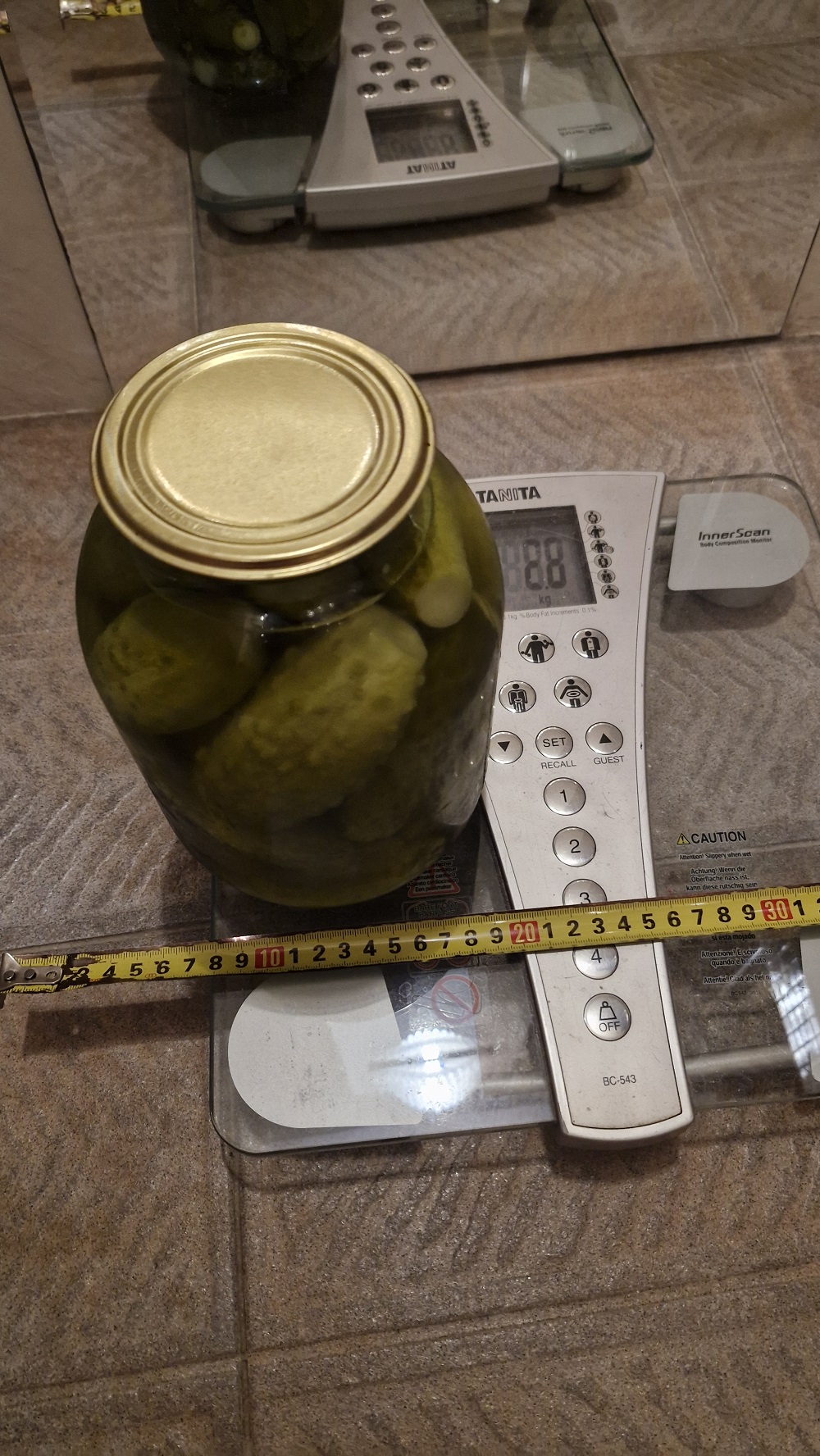
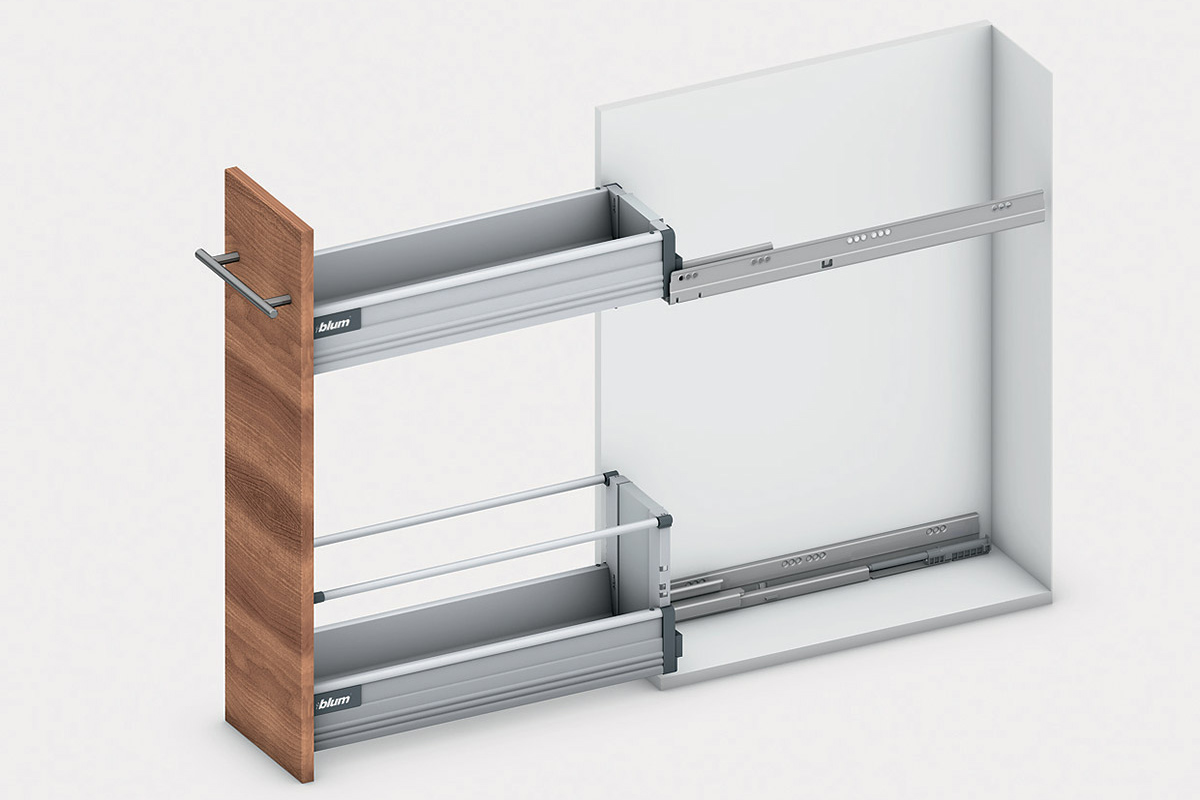
Re: Dodecagon Manufacturers write everything, here you can see the installation recommendations for the retractable bottle holder 300. This is necessarily a diagonal arrangement of the guides. Otherwise, there will be screw deformations. For ready-made steel bottle holders with 2 shelves, this is a total maximum load of 20kg, 10kg per shelf. A jar of cucumbers of 2 liters weighs 2.8 kg, 5 cans are placed on the shelf, and this is already beyond the recommendations, you need to be careful. The chipboard box is also prone to twisting deformations. Manufacturers allow one-way mounting of guides only for narrow boxes, 150-200 maximum. With a load of up to 15 kg. I would recommend making a middle wall so that the guides can be attached to it. A large external door with internal drawers is a normal solution if you want to get a large design solution without small facades in the kitchen. Here you need to take into account the size of the door hinges so that the drawers slide past them. Manual ![]() |
| Posted by Keet at Sep 12, 2024, 11:37:18 AM |
|
Re: Dodecagon That's a very useful manual. I haven't found one with such clear dimensions as a guide line until this one. The image shows almost exactly what my new design looks like, including the dimensions, amazing! The rail design is especially useful for me because I was strugling with that. Thank you! ---------------------------------------- Dodecagon.nl 1300+ 3D models, manuals, and projects |
| Posted by Shralen at Sep 19, 2024, 10:10:17 PM |
|
Re: Dodecagon If you didn't know: there's a button in the toolbar for easy switching magnetism on and off. I actually didn't know about the button in the toolbar, I keep going in the preference, so this will help a lot. I downloaded the Door library, I was a bit overwhelmed by the quantity of model it had. It would have been nice if there were an option to get only the kind of model we want. Like I was only interested in the exterior on and would have loved to only get those. I was also wondering if it were possible to delete one of your libraries once we installed in our Sweet Home program? ---------------------------------------- I'm more comfortable writing in English, but I can also write in French. ,___, (OvO) Hoot /)_) " " |
| Posted by Keet at Sep 19, 2024, 11:45:17 PM |
|
Re: Dodecagon I downloaded the Door library, I was a bit overwhelmed by the quantity of model it had. It would have been nice if there were an option to get only the kind of model we want. Like I was only interested in the exterior on and would have loved to only get those. After you have added the door(s) of your choice to your project you can remove the library. The door(s) will remain in your project.I was also wondering if it were possible to delete one of your libraries once we installed in our Sweet Home program? You can remove libraries from the furniture directory in your Sweet Home 3D install directory. The easy way is to open the About dialog under the Help menu. On the bottom click the button Libraries. In the list with furniture libraries find the one you want to remove and click it. It should open the filemanager in that directory. Simply delete the .sh3f file of the library you want to remove. After restart of Sweet Home 3D the library is gone from the catalog. Did you try using keywords? In the preferences dialog you can set your catalog to a searchable list. This will display a searchbox at the top of the catalog where you can enter (partial) keywords. You could have found your exterior doors easily: Select category Doors&Windows, in the search box enter "dodec exter", short for dodecagon and exterior. The list will filter to only Dodecagon doors with the keyword exterior, around 10 I think it is. From the web page: You can select the correct door for the thickness of your wall by using a keyword to filter: W10, W15, W20, or W30. The number is the wall thickness in cm. If you have your catalog set to a searchable list this makes it easy to filter all doors that match your wall thickness. ---------------------------------------- Dodecagon.nl 1300+ 3D models, manuals, and projects |
| Posted by Shralen at Sep 23, 2024, 1:52:31 AM |
|
Re: Dodecagon I put one of each door in my project, but all had that odd square knob on the inside side of the door. I've never seen something like this... Maybe it's more common where you’re from. So I ended up not using any of the models. I didn't try the keyword, since I easily found them by looking for the word exterior in my folder. In my new project, I needed the dishwasher to be part of the Corner Cabinet. So with some tweaks I managed to do this: ![]() Not bad ---------------------------------------- I'm more comfortable writing in English, but I can also write in French. ,___, (OvO) Hoot /)_) " " |
| Posted by Keet at Sep 23, 2024, 9:17:36 AM |
|
Re: Dodecagon I put one of each door in my project, but all had that odd square knob on the inside side of the door. I've never seen something like this... Maybe it's more common where you’re from. The square handle is the outside of the door and yes, that's common here. From the outside you unlock the door with a key and push the door inside or use the handle to pull the door closed when you go out. On the inside you have a normal handle to open the door without a key.The square outside handle could just as easy be a round knob but here they usually don't turn to open a door. The same on the inside would turn to open. Have you thought about making the square handle invisible and add your own knob? In the obj file of the knob just give each group the prefix "sweethome3d_opening_on_hinge_1_". Import the knob and add it to the door. Export/Import door+knob and you have your door with your own knob. Good job with the dishwasher in the corner. Looks quite nice! ---------------------------------------- Dodecagon.nl 1300+ 3D models, manuals, and projects |
| Posted by Keet at Sep 23, 2024, 1:05:41 PM |
|
Re: Dodecagon Surprise, surprise! Updated DodecagonDoors library. I have added the same 10 exterior doors but now with the American style doorknobs instead of the European handles. Like all my models the doorknobs are custom created, outside with a lock and inside without. ---------------------------------------- Dodecagon.nl 1300+ 3D models, manuals, and projects |
| Posted by GaudiGalopin3324 at Sep 23, 2024, 2:43:25 PM |
|
Re: Dodecagon Good job with the dishwasher in the corner. Looks quite nice! I disagree. Placing the dishwasher in this way, at an angle, has several disadvantages. If you open the car door, it will block the sink door (did I understand correctly that there is a sink in the corner cabinet?). In addition, it will be difficult to reach the sink, but you need to first rinse the dishes in the sink, and then put them inside the dishwasher. Another possible drawback is that the door will touch the adjacent handle on the facade, you need to make an enlarged spacer. The best arrangement of the dishwasher is in the same row with the sink, not at an angle. And it is better to place the car to the right of the sink, under the right arm, so it is more convenient to shift the dishes from the sink. Then it does not interfere and everything is convenient. If the sink is located to the left of the corner cabinet, then you can arrange it that way, but the door leans back 58-62 cm, and can still block several doors, not only the corner cabinet. |
| Posted by captaincook at Sep 23, 2024, 3:05:48 PM |
|
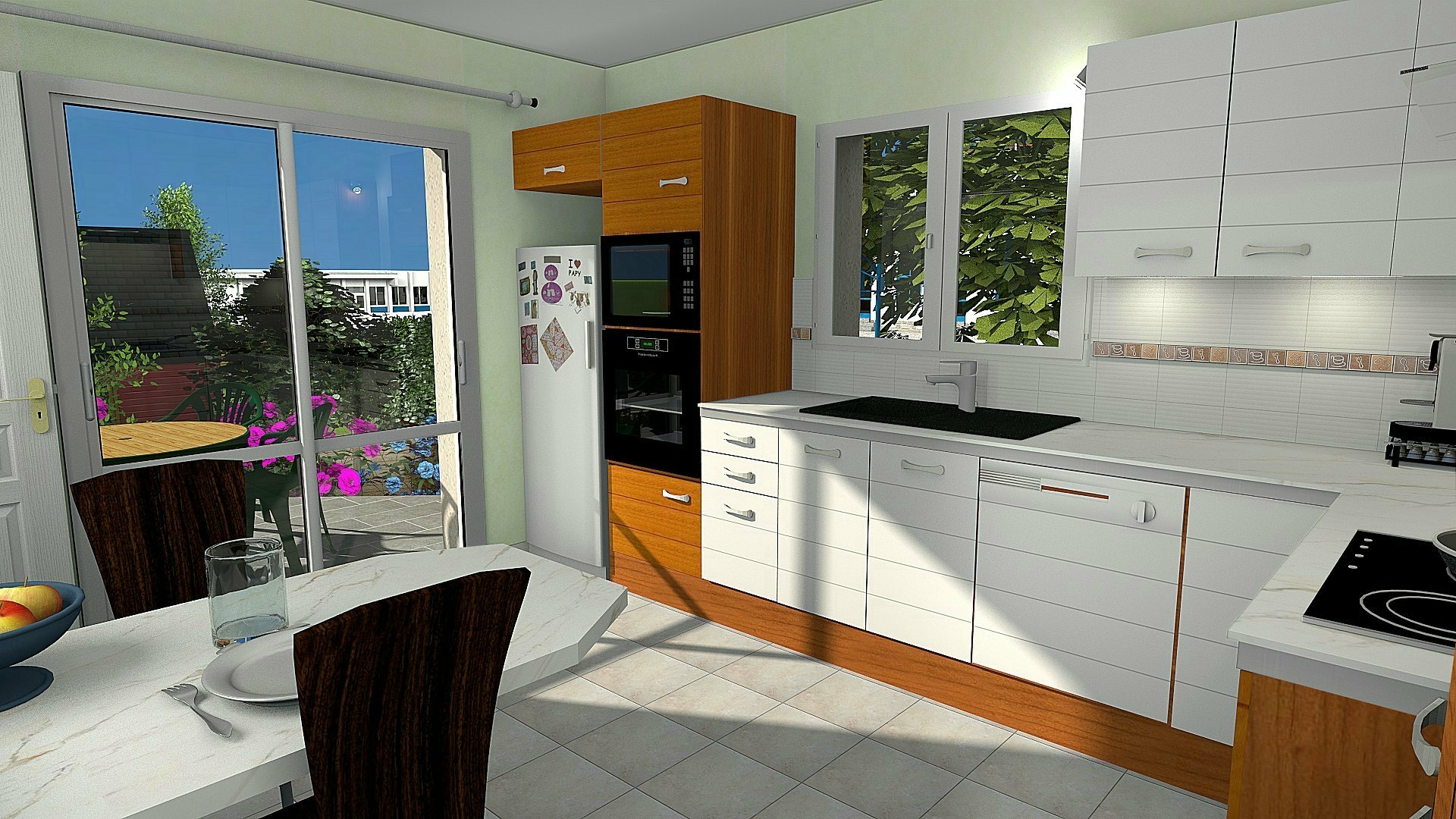
Re: Dodecagon Je suis d'accord avec GaudiGalopin. C'est aussi la disposition que j'ai adopté dans ma cuisine. ![]() |
| Posted by Keet at Sep 23, 2024, 3:22:26 PM |
|
Re: Dodecagon I agree that ergonomically the dishwasher should be placed next to the sink. The blocking doors are less of a problem, sometimes you have no other choice in a small kitchen. With "Good job" I meant that Shralen managed to integrate the dishwasher into the corner cabinet without misalignements. There's no sink in the corner cabinet and that would be a bad choice anyway with the dishwasher where it is. (Sneek preview : the new kitchen library that is in development has a corner cabinet with double sinks) ---------------------------------------- Dodecagon.nl 1300+ 3D models, manuals, and projects |
| Posted by Keet at Sep 24, 2024, 1:13:47 PM |
|
Re: Dodecagon A minor update for the DodecagonMedical library. A few models are optimized and smoothed. ---------------------------------------- Dodecagon.nl 1300+ 3D models, manuals, and projects |
| Posted by Shralen at Sep 24, 2024, 8:52:59 PM |
|
Re: Dodecagon Did I understand correctly that there is a sink in the corner cabinet?) Actually, this is a new project, so there is no sink in the corner cabinet. The sink in the corner cabinet was in the previous house I made. I was trying to make the kitchen the same as https://www.planmaisonquebec.com/en/plan-de-maison-2-chambres-plain-pied this model. But the more I look at it in the Sweet Home render the odder I find it. Mostly the fridge placement… it kinda look lost there. I’ll probably use captaincook kitchen as inspiration for mine. It looks really nice. I’ll try a few things to see what look better. I managed to avoid the misalignment with the align Top or Bottom and Right or left to get it like this. ---------------------------------------- I'm more comfortable writing in English, but I can also write in French. ,___, (OvO) Hoot /)_) " " |
| Posted by Shralen at Sep 24, 2024, 10:20:58 PM |
|
Re: Dodecagon This was my first attempt with the kitchen And here the second ![]() ---------------------------------------- I'm more comfortable writing in English, but I can also write in French. ,___, (OvO) Hoot /)_) " " |
| Posted by Keet at Sep 24, 2024, 10:35:57 PM |
|
Re: Dodecagon Much better. I think it was our esteemed member GaudiGalopin3324 who once described the ergonomics about moving in a kitchen. He described moving food from the refrigerator to a preparation area, to the stove, etc. Unfortunately I can't find that post. It was very useful information when you are designing a kitchen. ---------------------------------------- Dodecagon.nl 1300+ 3D models, manuals, and projects |
| Posted by Keet at Nov 15, 2024, 4:03:49 PM |
|
Re: Dodecagon The Dodecagon Shop & Retail Furniture Library is updated. New models added: glass display cabinets, consoles, tube lights, and more. ---------------------------------------- Dodecagon.nl 1300+ 3D models, manuals, and projects |
| Posted by Keet at Dec 31, 2024, 11:51:42 PM |
Happy New Year!![]() To start of the year with a bang! I have a few presents: ∙ A completely rebuild Dodecagon site with larger images and 3D views for many models. ∙ A new Kitchen 2 library in addition to the 'old' kitchen library (which is renamed to Kitchen 1). ∙ A small new Tableware library available on the Kitchen 2 page. ∙ A new Park&Streetlights library. To make it complete the clock from the image is added to the Clock library. ![]() I wish you all a happy, healthy, and creative 2025! ---------------------------------------- Dodecagon.nl 1300+ 3D models, manuals, and projects |
| Posted by Shralen at Jan 3, 2025, 12:54:29 AM |
|
Re: Happy New Year! Once I saw there was a new Kitchen library, I had to give it a try. So with the https://dessinsdrummond.com/plan/ozias-chalet-1002811 as models I tried to replicate the Kitchen, with a few modifications of my own. First image without the middle island ![]() Second with the island ![]() Except the refrigerator and the oven model, everything else was made with the new Kitchen library. ---------------------------------------- I'm more comfortable writing in English, but I can also write in French. ,___, (OvO) Hoot /)_) " " |
| Posted by JonnyD at Jan 3, 2025, 8:48:31 AM |
|
Re: Happy New Year! Hey Keet - any chance you could create some high oven units - single/double etc? I’ve had a go by combining some of your existing furniture but they don’t quite work 😁 |
| Posted by Keet at Jan 3, 2025, 7:11:57 PM |
|
Re: Happy New Year! These are already in development. Actually the cabinets are already finished but not the appliances to put in them. I added the 2 high cabinets to the Kitchen2 library, one with a closed front and one with a framed front. There are many applicances available online or you can use a screenshot as a texture on a box to place in the fronts. Look at the image on the Kitchen 2 page on dodecagon.nl for an example. ---------------------------------------- Dodecagon.nl 1300+ 3D models, manuals, and projects |
| Posted by JonnyD at Jan 3, 2025, 7:52:39 PM |
|
Re: Happy New Year! Thank you! |
| Posted by Keet at Jan 3, 2025, 10:32:04 PM |
|
Re: Happy New Year! @Shralen ![]() Except the refrigerator and the oven model, everything else was made with the new Kitchen library. If you have your catalog set as searchable list use the keywords "dodec 2 border". ("2" to avoid the borders for Kitchen 1.) With those keywords you can also see the end cap for the side of the border of the most left cabinet. Notice the description when you hover over the end cap item. It tells you the alignment numbers. A side border can finish the right side of the dishwasher. Island tip: you can place cabinets back-to-back to create an island with doors/drawers. Fill in the counter top sides with side-borders. ---------------------------------------- Dodecagon.nl 1300+ 3D models, manuals, and projects |
| Posted by JonnyD at Jan 4, 2025, 10:19:34 AM |
|
Re: Happy New Year! I don’t seem to be able to download Kitchen 2. - is it just me? |
| Posted by JonnyD at Jan 4, 2025, 10:23:31 AM |
|
Re: Happy New Year! Ignore me - it’s working, |
| Posted by Shralen at Jan 5, 2025, 3:22:49 AM |
|
Re: Happy New Year! I don't know if you noticed but the library also has separate borders you can use for the island. They are specifically there for custom additions. Yeah, I noticed the borders, but didn't use them. I even made them invisible on all the furniture present in the image. I find them a bit odd, like why does the border go above the counter top? (Could be just me not used to see this kind of design on a border XD) The one I'm more used to seeing have more of a rounded end. Like a Quarter Round or Half Bullnose. Island tip: you can place cabinets back-to-back to create an island with doors/drawers. Fill in the counter top sides with side-borders. Actually, I miss used the word 'island' furniture is more like a bar (not sure of the word). Doors/drawers on one side, and a place for stool or high chair on the other side. ---------------------------------------- I'm more comfortable writing in English, but I can also write in French. ,___, (OvO) Hoot /)_) " " |
| Posted by Keet at Jan 5, 2025, 1:57:16 PM |
|
Re: Happy New Year! Yeah, I noticed the borders, but didn't use them. I even made them invisible on all the furniture present in the image. I find them a bit odd, like why does the border go above the counter top? (Could be just me not used to see this kind of design on a border XD) The border sticks out above the top as a water barrier to avoid running of the counter. A very common design for kitchen counter tops.The one I'm more used to seeing have more of a rounded end. Like a Quarter Round or Half Bullnose. A little insight in the problems you can encounter with custom designing furniture: Not to put up any hopes, but I do have a partial set with a nose instead of the current border. The problem I have is that the nose for the corner cabinet with the 45° front needs to stick out to the sides to get a correct cut with cabinets placed beside it. A sticking out nose changes the bounding box (width/depth). This in turn makes it that you can't align the corner cabinet with other cabinets without manually moving the cabinet. Another problem is that you can't simply put a nose to the side of the cabinet if it is the last cabinet in line. It doesn't fit correctly. That could be fixed but it would destroy the correct cut for an inner corner. A chicken-egg problem. And then there is the problem "where does it end"... Another set with different handles? One for each type of border and each handle? With handles it could be solved with adding multiple handles and the user makes all but one type invisible. That will significantly increase the model sizes and won't work for the borders. As you can see creating custom furniture is a 'little' more than putting together a few boxes It takes a lot of time and effort.In real life a counter top (with border) is not part of the cabinets but a custom fit when all cabinets are in place. For a Kitchen library that is useless considering the different corners, sink cutouts, etc. If you want a nose instead of the current border I suggest you use a resized and rotated half-clinder (available in the Shapes library) and create such a custom nose. With a simple U shaped kitchen you would only need three long noses (one more if you have the 45° corner cabinet). I'll see if I can put together a library with just the replacement noses I have. That way they will texture correctly, it has a rounded nose corner, and all have the correct elevation when added in the 2D view. On the Kitchen 2 download page there is now an extra library with replacement noses. . ---------------------------------------- Dodecagon.nl 1300+ 3D models, manuals, and projects |
| Posted by Shralen at Jan 5, 2025, 10:20:58 PM |
|
Re: Happy New Year! Ah! Yeah... Corner cabinets can be tricky. I've made a few custom furniture, but they were quite simple, just a bunch of 'rectangle' put together. Yeah, it could be a never-ending issue. Like different handle, different doors, different borders. It'll, A make the model size extra big, or B make the library with too many models. (If you were to make every possibility option as a model. + also take more of your time to do this.) And here is my kitchen, but with the round nose, I also changed the oven for the new models, refrigerator remain unchanged; ![]() ---------------------------------------- I'm more comfortable writing in English, but I can also write in French. ,___, (OvO) Hoot /)_) " " |
| Posted by Keet at Jan 9, 2025, 8:01:48 PM |
|
Re: Kitchen 2 library update The Kitchen 2 library is updated with new models: New hoods 60cm and 80cm, each in a version with and without lights. A hood cabinet with doors is added for both the 60cm and 80cm hoods. The existing 60/80/100cm hoods now have a copy with lights. I left the versions without lights in the library because the models are significantly smaller in size. (You might have to clear your browser cache if the old hoods image and 3Dview is displaying. The new image and the new 3Dview include the new hoods.) ---------------------------------------- Dodecagon.nl 1300+ 3D models, manuals, and projects |
| Posted by Shralen at Jan 11, 2025, 9:14:15 PM |
|
Re: Kitchen 2 library update Yes! Love that you added a hood cabinet with doors. I added it to my kitchen. ![]() ---------------------------------------- I'm more comfortable writing in English, but I can also write in French. ,___, (OvO) Hoot /)_) " " |
| Posted by Keet at Jan 24, 2025, 11:26:14 AM |
|
Update You missed me for 10 days here on the forum because I was fighting of a flu (influenza A) and 'follow-up' pnueumonia. Don't ever mistake a common cold for a real flu. For 2 days I was very close to death, the most scary thing I ever experienced. I'm not nearly 100% yet but I'm slowly getting there. Dodecagon will continue Question: there are many downloads for the replacement noses for DodecagonKitchen2. Is this because you like those noses better or are the noses just nice objects you can use for other models? Should I replace the original borders with these noses instead of a seperate library? ---------------------------------------- Dodecagon.nl 1300+ 3D models, manuals, and projects |
| Posted by VeroniQ at Jan 24, 2025, 12:01:13 PM |
|
Re: Update Take care of yourself, Keet!! And thank you for all your librairies. Long life to you and Dodecagon. |
| Posted by GaudiGalopin3324 at Jan 24, 2025, 2:00:05 PM |
Re: UpdateKeet, I wish you good health. There's still a lot to do, and you can't get sick. Please be careful. ![]() |
| Posted by captaincook at Jan 24, 2025, 3:54:52 PM |
Re: Update Sweet Home, c'est génial mais une bonne santé c'est encore beaucoup mieux.Bon courage et prompt rétablissement à vous, Keet. ![]() |
| Posted by Keet at Jan 24, 2025, 7:11:18 PM |
|
Re: Update Thank you all for your kind responses. For a while it was really, really tough but I'm slowly getting better. Merci à tous pour vos gentilles réponses. Pendant un certain temps, c'était vraiment, vraiment difficile, mais je vais lentement mieux. ---------------------------------------- Dodecagon.nl 1300+ 3D models, manuals, and projects |
| Posted by [email protected] at Jan 26, 2025, 7:12:21 PM |
|
Re: Update Here I am again after a long, too long, time. Best wishes Keet, best wishes for your health (I opened the forum only today after more than a very troubled year for my health and I discovered your current/past problems). For me it will take a long time to get back to a logical thread of what I have abandoned, for other more burdensome and important thoughts. I sincerely hope that you heal well and soon and that the recovery time for you is not the same. Greetings |
| Posted by Keet at Feb 6, 2025, 8:59:21 PM |
|
Libraries Updated Several libraries have been updated: Office - added reception desks and a file cabinet, updated the glass walls Furniture - added a bar stool Bathroom - added a corner sink Kitchen2 - added a filler cabinet (wedge) for a 150° angle (a dodecagon corner, lower and upper) I have added the file date of the libraries on the download pages to make it easier to see if a library has been updated recently. You can use the version number to see if you have the latest version. (See "About libraries" on the home page about how to check the versions of installed libraries in Sweet Home 3D.) Upcoming: A bedroom library. When this library is released the current bedroom furniture in the Furniture library will be moved to this library in addition to new models. ---------------------------------------- Dodecagon.nl 1300+ 3D models, manuals, and projects |
| Posted by Shralen at Mar 2, 2025, 3:45:35 AM |
|
Re: Libraries Updated Decided to test how the kitchen would look if I made it as close as the plane I'm using. (https://dessinsdrummond.com/plan/ozias-chalet-1002811) ![]() I was also wondering, what kind of wood texture did you use for the 3D preview we see on your site? (I'm curious to see how my kitchen would look with wood texture instead of white.) ---------------------------------------- I'm more comfortable writing in English, but I can also write in French. ,___, (OvO) Hoot /)_) " " |
| Posted by Keet at Mar 2, 2025, 8:36:59 AM |
|
Re: Libraries Updated I was also wondering, what kind of wood texture did you use for the 3D preview we see on your site? (I'm curious to see how my kitchen would look with wood texture instead of white.) The Wood 003 texture from the AmbientCG texture library.You can download the AmbientCG texture library here: https://github.com/fabien-michel/sweethome3d-textures-ambientcg Download the 256 or 512 library. A higher resolution is useless for Sweet Home 3D ---------------------------------------- Dodecagon.nl 1300+ 3D models, manuals, and projects |
| Posted by Shralen at Mar 2, 2025, 7:50:16 PM |
|
Re: Libraries Updated Tnx for the info, here the kitchen now: I did notice about the higher resolution. When I take textures from Skechup, Sweet Home always tell me it’s too high and ask for permission to shrink it. Also I'm still plaing with the backsplach texture, I use some box (each are 1'4" x 1'4" except for the last one) for it. Insted of using the baseboard option. ---------------------------------------- I'm more comfortable writing in English, but I can also write in French. ,___, (OvO) Hoot /)_) " " |
| Posted by Shralen at Mar 10, 2025, 1:45:22 AM |
|
Re: Libraries Updated Since the Ozais plans I'm using has several variants, I decided to try the kitchen in the V-1 option. ![]() I tried a mix of version 0 and V-1 then only 0 version. But I think the V-2 is my favorite so far. ---------------------------------------- I'm more comfortable writing in English, but I can also write in French. ,___, (OvO) Hoot /)_) " " |
| Posted by Shralen at Mar 10, 2025, 1:47:07 AM |
|
Re: Libraries Updated oops... I ment to type V-1 (as favorite) the one you see in the image. My bad. ---------------------------------------- I'm more comfortable writing in English, but I can also write in French. ,___, (OvO) Hoot /)_) " " |
| Posted by Keet at Apr 2, 2025, 1:42:28 PM |
|
Re: Libraries Updated I updated the Shapes library with a few quarter and eight pipe corners (Torus/Donut parts). You can't create these with Sweet Home 3D but sometimes you need a rounded pipe part to create your furniture. Now you can resize and use one of these. ---------------------------------------- Dodecagon.nl 1300+ 3D models, manuals, and projects |
| Posted by Keet at Apr 4, 2025, 11:43:14 AM |
|
Re: Libraries Updated I added a new manual "How-to Create Beveled Borders" to the manuals section on dodecagon.nl. It explains two different ways to create bevels when you create furniture in Sweet Home 3D. ---------------------------------------- Dodecagon.nl 1300+ 3D models, manuals, and projects |
| Posted by Keet at Jun 30, 2025, 9:35:25 PM |
|
Five new Furniture libraries. Lots of new models. So... I've been a bit busy As promised a (small) Bedroom library and four other new libraries. Some other libraries have been updated. There's a story behind most of my models/libraries. I tend to get 'distracted' when working on one of my large projects. In this case the Shopping Mall project. At first I wanted to add a parking area outside the mall, that resulted in the solar parking places with charger poles. Then I got the idea to extend the current subway basement on both sides to include an underground parking garage. That required models like the bumps and parking lines, and of course the always present security cameras. My Stand Builder project had a spinoff with the stadium lights. The Appliances library was overdue and while reorganizing my model sources I fixed that. Another spinoff from my Shopping Mall project and Exterior library. One sign I needed was not enough so I went over the top and created them all. And that is how my Shopping Mall project is already over 10 years in development. But I'm slowly getting closer to publishing. The wardrobes in the Furniture01 library have been moved to this library. Besides the wardrobes there are beds (boxspring), bedsidetables, mattresses, and pillows in this library. Something went wrong with this library. It is not the version that it is supposed to be. I'll fix things and upload a much better version. A new Appliances library, changed kitchen libraries. Existing appliances in the two kitchen libraries have been moved to a new Appliances library. Commercial refrigerators and freezers are added. (The dishwashers remain in their own kitchen library because they are created as the cabinets in that library.) A new Exterior library A new Hardware library This is mostly a "parts" library. Things like wheels, hinges, glass profiles, locks, handles, knobs, poles, brackets, etc. I created these models to use as parts for more complex models. This library will update infrequently as I add new parts or update existing parts. A new Traffic Signs library and a new texture library with 119 Dutch traffic signs Most of the Dutch traffic signs are available in a separate texture library. These will probably be good for most other countries but because they are textures its very easy for an enterprising member to create a set of textures for another country. If you want to create a set of textures for your own country do it like this: • The images for the Dutch signs come from https://commons.wikimedia.org/wiki/Category:D..._signs_of_the_Netherlands. Wikimedia.org has the same for other countries. That's a good place to get your images because most have a licence that allows redistribution which is a requirement if you want to share them. • Check the scaling of the current textures as a guide for your own images. Some images might need some editing to remove border space. • Start the Texture Library Editor. Select all your sign images and drag them in the Editor window. The whole list will be added. Edit the signs to add to correct licence for each image and a name for the creator. (Select all, and with Ctrl+E you can edit them all at once for those fields that are the same for all.) • Test the images on the appropiate sign board • If you want the texture library for your country hosted on dodecagon.nl the appropiate licenses must be present and allow redistribution. Wikimedia shows the licence for each each image so pay attention to that. • Let me know if a texture needs a specific back that is not available in the current library. If it's not too exotic I will create it and add it to the furniture library. Have fun and let me know if I missed anything while updating the site. It was quite a big operation this time ![]() ---------------------------------------- Dodecagon.nl 1300+ 3D models, manuals, and projects |
| Posted by Keet at Jul 2, 2025, 11:15:34 AM |
|
Re: Five new Furniture libraries. Lots of new models. The bedroom library is available again. The correct, much better version. All libraries were temporarily unavailable because of a mistake I made but that is fixed too. All libraries are available for download as before. ---------------------------------------- Dodecagon.nl 1300+ 3D models, manuals, and projects |
| Posted by Puybaret at Jul 4, 2025, 9:53:26 AM |
|
Re: Five new Furniture libraries. Lots of new models. Thanks for the update and the new models ![]() ---------------------------------------- Emmanuel Puybaret, Sweet Home 3D creator |
| Posted by Keet at Jul 4, 2025, 7:33:06 PM |
|
Re: Five new Furniture libraries. Lots of new models. Two small updates: In the TrafficSignsNL texture library an extra image is added (round, max height/clearance) In the Exterior library a few models are added: • A Maximum Height beam for over the entrance • Three different Corner Crash poles (the ones used to protect electricity cabinets etc.) • Parking garage occupied/free ceiling lights. For the Max Height beam I have a GIMP .xcf file Update: The file is available for download. ---------------------------------------- Dodecagon.nl 1300+ 3D models, manuals, and projects |
| Posted by SpaceMushrooms at Jul 9, 2025, 1:20:18 PM |
|
Re: Five new Furniture libraries. Lots of new models. Want to create your own custom 3D object? Now you can! We’re giving our most passionate design enthusiasts the unique opportunity to meet directly with our talented 3D modelist and design a one-of-a-kind object of their choice — give freedom to your imagination! How to participate? Simply join the challenge (details below), share your project, and you could win this exclusive experience. Don’t miss this chance to add something truly special to your Sweet Home 3D library. Enter now and turn your imagination into reality! Challenge: Theme: Your dream home — unleash your creativity and show us how you imagine your perfect house. The Dream House should leave plenty of room for dreams, so think big and without limits! Let your imagination run wild! How to participate: - Follow our Instagram page @sweethome.3d -Send us your project via Instagram DM - Stay tuned for daily updates and prepare to compete with other amazing designs! Every day, we will share updates exclusively on our Instagram channel @sweethome.3d, and our followers will vote in daily polls to decide who moves forward to the final. It will be the community that chooses the winner! |
| Posted by Keet at Jul 9, 2025, 1:47:55 PM |
|
Re: Five new Furniture libraries. Lots of new models. @SpaceMushrooms Sorry, I stay far away from all social media crap. I have it all DNS blocked on my router. Why not use the sweethome3d.com site and the forum? I'm not the only one that doesn't use any social media. ---------------------------------------- Dodecagon.nl 1300+ 3D models, manuals, and projects |
| Posted by dorin at Jul 9, 2025, 10:25:40 PM |
|
Re: Five new Furniture libraries. Lots of new models. I'm agree with you! Probably we are old :( ---------------------------------------- A computer program does what you tell it to do, not what you want it to do. Murphy's Law When all else fails, read the instructions. Murphy's Law If you don't like "AS IS", DIY. Dorin's law |
| Posted by hansmex at Jul 10, 2025, 2:21:38 AM |
|
Re: Five new Furniture libraries. Lots of new models. Agreed... I don't have accounts on Facebook or Instagram!! ---------------------------------------- Hans new website - under constuction hansdirkse.info |
| Posted by GaudiGalopin3324 at Jul 10, 2025, 8:52:20 AM |
|
Re: Five new Furniture libraries. Lots of new models. Facebook Instagram are generally blocked in my big country (stroking his long gray beard). Of course, only the SH3D forum is allowed. ![]() |
| Posted by gordonpm at Aug 18, 2025, 8:20:46 PM |
|
Re: Five new Furniture libraries. Lots of new models. For some reason every time open up a design using Kitchen2 library, all the items are red boxes... I have to delete each item and re-add it to get the proper model to show |
| Posted by Keet at Aug 21, 2025, 1:04:29 PM |
|
Re: Five new Furniture libraries. Lots of new models. I doubt that this is a problem with the kitchen library or I would have heard of it much sooner and from more users. It sounds more like a problem with your Sweet Home 3D install or the project itself. Only the Kitchen2 items or all items in your design? What Sweet Home 3D version are you using and on which operating system? Usually the boxes mean that when a project is opened it can't load the furniture items properly. It could also be a memory problem but you would notice that with other (larger) projects too. Try a new project and add the same furniture and see if the problem persists. That at least excludes a corrupted project file problem. If you suspect a memory problem you can increase the allowed amount of memory that Sweet Home 3D can use. See the question "How can I adjust the memory used by Sweet Home 3D?" on the FAQ page . ---------------------------------------- Dodecagon.nl 1300+ 3D models, manuals, and projects |
| Posted by Keet at Aug 29, 2025, 1:50:24 PM |
|
New furniture library Traffic Lights I have added a new library to dodecagon.nl: TrafficLights. Once again I got distracted from my main large projects because I needed a traffic light. I went a little over the top this time by creating this full library where I only needed a simple Red/Green light This library is a little different from my other libraries. More details and larger model sizes. Traffic lights are mostly round by default and this makes it difficult to keep models small in model size. Since these are not models that you will use dozens of in a project I don't think that will be a problem. As you can read on the site there are many parts to construct your own traffic light scenes and only a limited number of complete and ready-to-use models. There aren't too many traffic lights that are generic enough to create a full model for. ![]() ---------------------------------------- Dodecagon.nl 1300+ 3D models, manuals, and projects |
| Posted by Keet at Sep 17, 2025, 11:54:25 AM |
|
Shop&Retail library updated I have added multiple models of Roll Containers to the DodecagonShop library. A little warning: although optimized as far as possible every part of these models is rounded resulting in much larger model sizes then you are used to from Dodecagon models. But I think they do look good with nice details. ---------------------------------------- Dodecagon.nl 1300+ 3D models, manuals, and projects |
| Posted by Keet at Dec 31, 2025, 8:15:14 PM |
Happy New Year! The clock is added to the DodecagonClocks library. Updated libraries: DodecagonCloks, DodecagonHardware, DodecagonShop, DodecagonExterior, DodecagonEscalators, DodecagonShapes, and DodecagonTrafficlights. ---------------------------------------- Dodecagon.nl 1300+ 3D models, manuals, and projects |
| Posted by Keet at Jan 4, 2026, 6:39:40 PM |
|
Integrate paths and rivers with the TerrainGenerator I added a new manual: How-To - Create paths and rivers with the TerrainGenerator. The TerrainGenerator is a great tool to generate terrains with hills and mountains but at some point you will want to include paths and rivers in that terrain. And that is easy but you will have to know the tricks to do it. This manual explains it. ![]() ---------------------------------------- Dodecagon.nl 1300+ 3D models, manuals, and projects |
| Posted by Vinci68 at Jan 7, 2026, 2:08:19 PM |
Re: Integrate paths and rivers with the TerrainGeneratorThank you so much Keet for this new tutorial and all my best wishes for the new year with lots of projects in mind... |
| Posted by marcos608 at Jan 7, 2026, 2:37:07 PM |
|
Re: Integrate paths and rivers with the TerrainGenerator Essa novo site é uma excelente novidade mais ficaria mais melhor se ajeite quee usa o programa por desse postar nosso mordelo também |
| Posted by Keet at Jan 7, 2026, 3:55:09 PM |
|
Re: Integrate paths and rivers with the TerrainGenerator @Vinci68 Thank you and the very best wishes for you too! @marcos608 Dodecagon é um site privado, não afiliado ao Sweet Home 3D. Eu apenas partilho os modelos que criei e alguns tutoriais. (Dodecagon is a private site, not affiliated with Sweet Home 3D. I just share the models I created and a few tutorials.) ---------------------------------------- Dodecagon.nl 1300+ 3D models, manuals, and projects |
| Posted by marcos608 at Jan 8, 2026, 2:11:21 PM |
|
Re: Integrate paths and rivers with the TerrainGenerator Mais era interseção que vocês criasse um site para nois que samos usuários do sweet home tem como compartilhar os projeto que ajeite mesmo crar!!! Mais isso é so uma ideia minha obrigado pela a tenção |
| Posted by Keet at Jan 8, 2026, 3:39:36 PM |
|
Re: Integrate paths and rivers with the TerrainGenerator Isso não seria muito difícil, mas o alojamento web já não é tão barato como era antigamente. E um site desse tipo requer manutenção diária, o que é um pouco demais para mim, que estou sozinho. [English] That wouldn't be too difficult but web hosting isn't as cheap as it once was. And such a site requires daily maintenance, a little too much work for lonely me. ---------------------------------------- Dodecagon.nl 1300+ 3D models, manuals, and projects |
|
|
Current timezone is GMT Jan 12, 2026, 8:05:54 AM |