|
Sweet Home 3D Forum » List all forums » » Forum: New versions » » » Thread: Sweet Home 3D 7.3 |
|
| Print at Dec 19, 2025, 9:18:08 PM | |
| Posted by Puybaret at Mar 29, 2024, 6:52:38 PM |
|
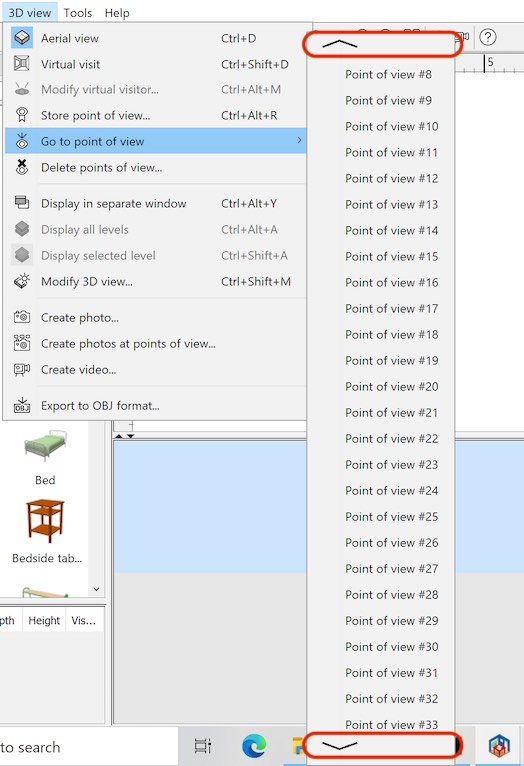
Sweet Home 3D 7.3 Hi, Here's the first public Beta version of Sweet Home 3D 7.3. This new version contains some bug fixes that I would be happy that you test when possible: - I added up and down arrows to scroll the Go to point of view menu when it's too long on small screens. Just place the mouse pointer on these arrows to scroll the menu. - Mirroring a group of furniture containing rotated pieces correctly works now. - Fixed parts in mirrored pieces don't move anymore after a deformation (like opening a door at a wide angle). - The program won't hang anymore when deformation groups are missing in a 3D model file. - The font of dimensions displayed in the 3D view is now set to the one chosen in preferences. - Imported 3D models are added to the catalog only when required (it was a regression which appeared in version 7.2). - Levels with an elevation index are correctly sorted in the furniture table. - Showing a file dialog box in Windows environments with special homonyms is fixed (to circumvent the bug https://bugs.openjdk.org/browse/JDK-8305072 ) - The printed level name in header and/or footer of the pages showing the plan is now correct when multiple levels are printed (but $level is replaced by "-" when a custom scale is set). - The menu items of untranslated plug-ins are now added to existing known menus. - Plug-ins not compatible with the running Java version are ignored to avoid blocking program launch. Happy Easter to you all! [Note: the final version of Sweet Home 3D 7.3 was published on April 4, 2024] ---------------------------------------- Emmanuel Puybaret, Sweet Home 3D creator |
| Posted by Keet at Mar 30, 2024, 11:58:37 AM |
|
Re: Sweet Home 3D 7.3 Thank you for this new version. I'm especially glad with the "incomplete deformation" import. That makes creating furniture parts that are part of a deformation a lot easier. I will also test the mirrored object deformations. ---------------------------------------- Dodecagon.nl 1300+ 3D models, manuals, and projects |
| Posted by dorin at Mar 31, 2024, 2:09:00 PM |
|
Re: Sweet Home 3D 7.3 Thank for this new version! I can confirm that this version solve the problem with the position of the roof windows. When I modify the windows opening it stay where should stay. Great! Happy Easter to all who have the Easter this days! (Mine will come later this year) ---------------------------------------- A computer program does what you tell it to do, not what you want it to do. Murphy's Law When all else fails, read the instructions. Murphy's Law If you don't like "AS IS", DIY. Dorin's law |
| Posted by Puybaret at Mar 31, 2024, 4:49:39 PM |
|
Re: Sweet Home 3D 7.3 If you speak about the issue you reported here, it will be still there because this would imply to change the elevation of transformed object after the moving window is opened. Sorry ![]() ---------------------------------------- Emmanuel Puybaret, Sweet Home 3D creator |
| Posted by dorin at Apr 1, 2024, 10:58:25 AM |
|
Re: Sweet Home 3D 7.3 I'm sorry too! I was confused by the Pan 3D view plugin which let me (and keep it) open multiple objects at selected level (in 3D only). It reverse to initial position when change the level and/or close the program. I hope I don't mistaken again! ---------------------------------------- A computer program does what you tell it to do, not what you want it to do. Murphy's Law When all else fails, read the instructions. Murphy's Law If you don't like "AS IS", DIY. Dorin's law |
| Posted by Keet at Apr 1, 2024, 12:03:02 PM |
|
Re: Sweet Home 3D 7.3 I can confirm that deformation of a mirrored object now works perfectly. The mirrored deformation problem as I mentioned in this thread is solved. ---------------------------------------- Dodecagon.nl 1300+ 3D models, manuals, and projects |
| Posted by Keet at Apr 1, 2024, 12:18:25 PM |
|
Re: Sweet Home 3D 7.3 There's a little annoying problem with keyboard shortcuts but I'm not sure if this a Sweet Home 3D or Pan3Dview problem. When you select a single object in the 3D view the keyboard combo ctrl+E works to get the modify dialog but not if you select multiple objects in the 3Dview. With walls and ctrl+shift+E the modify walls dialog does appear with either one or more selected walls. The same should happen for normal objects. I think it's simply a missing keyboard event. If this is in Sweet Home 3D it's an easy fix to include in the next 7.3 beta. ---------------------------------------- Dodecagon.nl 1300+ 3D models, manuals, and projects |
| Posted by Waldemar.Hersacher at Apr 1, 2024, 9:21:42 PM |
|
Re: Sweet Home 3D 7.3 The font of dimensions displayed in the 3D view is now set to the one chosen in preferences > is OK. Imported 3D models are added to the catalog only when required (it was a regression which appeared in version 7.2). > I don't see any change and it was OK for me. The assistant shows the check box Add to catalog not active when the focus is not in the catalogue pane. Otherwise I need a more detailed description or the reference to the bug report here. Levels with an elevation index are correctly sorted in the furniture table. > I used the demo 2 Bedroom house with basement. I made the column Level visible. I made a new level with the same elevation as the basement and put a furniture in that level. I changed the sorting of the column Level up and down and the furniture is in the correct order. Showing a file dialog box in Windows environments with special homonyms is fixed > Could not be tested. The printed level name in header and/or footer of the pages showing the plan is now correct when multiple levels are printed > is OK but is it intended that when I have selected multiple levels in the page setup only the level selected in the plan is printed in 3D view. ---------------------------------------- MSI GP60, Linux Mint 21.3 Virginia base: Ubuntu 22.04 jammy, SH3D 7.5 with Photo-video rendering 2.8 |
| Posted by Keet at Apr 1, 2024, 9:35:01 PM |
|
Re: Sweet Home 3D 7.3 Imported 3D models are added to the catalog only when required (it was a regression which appeared in version 7.2). > I don't see any change and it was OK for me. The assistant shows the check box Add to catalog not active when the focus is not in the catalogue pane. Otherwise I need a more detailed description or the reference to the bug report here. That was the regression: the add to catalog was checked by default and objects were added to the group "User". You don't want objects to be added to the catalog by default, especially not when you are designing parts for furniture. All those exports/imports generated many temporary objects in the User category. I had to delete everything in the User category many times because they popped up when I was trying to select other objects. I'm very glad this is fixed again.---------------------------------------- Dodecagon.nl 1300+ 3D models, manuals, and projects |
| Posted by Waldemar.Hersacher at Apr 2, 2024, 12:32:18 AM |
|
Re: Sweet Home 3D 7.3 it was a regression which appeared in version 7.2 the add to catalog was checked by default Do I understand it right: Before 7.2 it was not checked by default but in some earlier versions. In 7.2 it was checked by default. In 7.3 it is not checked by default. I have a 7.2 version where it is not checked by default. I have downloaded SweetHome3D-7.2-linux-x64.tgz on 2024-01-02. The top level folder in the archive is from 2023-09-22T14:32 as (not completely checked) any other file in the archive. ---------------------------------------- MSI GP60, Linux Mint 21.3 Virginia base: Ubuntu 22.04 jammy, SH3D 7.5 with Photo-video rendering 2.8 |
| Posted by Keet at Apr 2, 2024, 10:18:39 AM |
|
Re: Sweet Home 3D 7.3 Do I understand it right: Originally when you imported furniture the object had to be in a category. This landed a lot of furniture in the Bathroom category because that was the first in the list.Before 7.2 it was not checked by default but in some earlier versions. In 7.2 it was checked by default. In 7.3 it is not checked by default. I think it was in version 7.02 that a checkbox 'Add to catalog' was added which lets you choose whether or not to add your import to a category. Unchecked the imported object was not added to the catalog. In 7.2 The User category was introduced as a default category. With the checkbox 'Add to catalog' unchecked imports were still added to the catelog in the User category. With the checkbox unchecked the import should not have been added to the catalog at all. In the latest 7.3 beta-1 this is solved so that when 'Add to catalog' is uncheked the import is not added to the catlog. ---------------------------------------- Dodecagon.nl 1300+ 3D models, manuals, and projects |
| Posted by Keet at Apr 2, 2024, 12:03:20 PM |
|
Re: Sweet Home 3D 7.3 - The program won't hang anymore when deformation groups are missing in a 3D model file. That does work correctly now. (hurray!)Important: The same import should be implemented for import in the next version of the Furniture Library Editor. The editor doesn't hang when you try to import, it just refuses the import completely. ---------------------------------------- Dodecagon.nl 1300+ 3D models, manuals, and projects |
| Posted by Puybaret at Apr 2, 2024, 12:33:19 PM |
|
Re: Sweet Home 3D 7.3 Thanks for your tests and feedback The regression in the furniture import wizard of the version 7.2 is that a 3D model imported in the plan is added to the catalog even if you keep the checkbox Add to catalog unselected. You have to select then unselect the checkbox again to prevent the imported model to appear in the catalog. As explained in the help, importing a 3D model into furniture catalog or into home depends on whether the catalog has focus or not when you choose Furniture > Import furniture... menu item. If the furniture list, the home plan or the 3D view has focus when you choose this menu, the imported model will appear in catalog only if you check the Add to catalog check box, at the third step of furniture import wizard. The same thing happens if you drop the file of a 3D model onto the furniture catalog or the plan. When you select a single object in the 3D view the keyboard combo ctrl+E works to get the modify dialog but not if you select multiple objects in the 3Dview. I just tried under Windows, macOS and Linux, but didn't notice this issue. It would be astonishing that a plug-in could alter this behavior.The same import should be implemented for import in the next version of the Furniture Library Editor. It will.---------------------------------------- Emmanuel Puybaret, Sweet Home 3D creator |
| Posted by Keet at Apr 2, 2024, 2:04:28 PM |
|
Re: Sweet Home 3D 7.3 When you select a single object in the 3D view the keyboard combo ctrl+E works to get the modify dialog but not if you select multiple objects in the 3Dview. I just tried under Windows, macOS and Linux, but didn't notice this issue. It would be astonishing that a plug-in could alter this behavior.Since ctrl+E does work with a single object it's not likely that the keyboard event is caught by something else. Multiple selects of walls or rooms work as they should (ctrl+shift+E and ctrl+alt+E). Maybe worthy to note: select multiple furniture in the 3Dview and add another one to the selection in the 2Dview. Now ctrl+E does work for the multi-selection. Even select/unselect an additional object in the 2Dview makes it that ctrl+E does work. It seems that a multi-selection only in the 3Dview isn't recognized for the keyboard event. Using the context menu does work but it requires to leave the keyboard and use the mouse. This is with Sweet Home 3D 7.3 beta 1 on Debian Linux (tested on two different Debian versions, host and VM). Version 7.2 has the same problem. ---------------------------------------- Dodecagon.nl 1300+ 3D models, manuals, and projects |
| Posted by Keet at Apr 2, 2024, 9:08:08 PM |
|
Re: Sweet Home 3D 7.3 A strange one: Unviewable tab captions are no longer grayed out when the tab/level is made unviewable. ---------------------------------------- Dodecagon.nl 1300+ 3D models, manuals, and projects |
| Posted by Puybaret at Apr 2, 2024, 9:56:35 PM |
|
Re: Sweet Home 3D 7.3 A strange one: Unviewable tab captions are no longer grayed out when the tab/level is made unviewable. Yes, I know, it's my fault, I made a temporary change for tests purpose and forgot to roll back the change. It's fixed in Beta 2 where German help was updated thanks to Waldemar Hersacher.---------------------------------------- Emmanuel Puybaret, Sweet Home 3D creator |
| Posted by Waldemar.Hersacher at Apr 2, 2024, 10:37:30 PM |
|
Re: Sweet Home 3D 7.3 Originally when you imported furniture the object had to be in a category. This landed a lot of furniture in the Bathroom category because that was the first in the list. I think it was in version 7.02 that a checkbox 'Add to catalog' was added which lets you choose whether or not to add your import to a category. Unchecked the imported object was not added to the catalog. In 7.2 The User category was introduced as a default category. With the checkbox 'Add to catalog' unchecked imports were still added to the catelog in the User category. With the checkbox unchecked the import should not have been added to the catalog at all. In the latest 7.3 beta-1 this is solved so that when 'Add to catalog' is uncheked the import is not added to the catlog. This was a failure of the tester. I wasn't aware of the regression so when I first tested it I didn't go any possible ways and maybe I didn't reset the catalogue to the default contents at any time. With your description Keet I can confirm that it is solved. I have left out some updates because the version before 7.2 was 6.x. ---------------------------------------- MSI GP60, Linux Mint 21.3 Virginia base: Ubuntu 22.04 jammy, SH3D 7.5 with Photo-video rendering 2.8 |
| Posted by Waldemar.Hersacher at Apr 2, 2024, 11:10:38 PM |
|
Re: Sweet Home 3D 7.3 When you select a single object in the 3D view the keyboard combo ctrl+E works to get the modify dialog but not if you select multiple objects in the 3Dview. I just tried under Windows, macOS and Linux, but didn't notice this issue. It would be astonishing that a plug-in could alter this behavior. I used the 2 Bedrooms house with basement again. I selected in 3D-View the corner sofa and the table (a cylinder) before it. Ctrl+E is opening the Modify furniture dialogue. The only plugin I have installed is the Photo-Video rendering plugin 2.7. Tested wit 7.2 and 7.3 Beta 2 on Linux. ---------------------------------------- MSI GP60, Linux Mint 21.3 Virginia base: Ubuntu 22.04 jammy, SH3D 7.5 with Photo-video rendering 2.8 |
| Posted by Keet at Apr 2, 2024, 11:39:46 PM |
|
Re: Sweet Home 3D 7.3 I just tried under Windows, macOS and Linux, but didn't notice this issue. It would be astonishing that a plug-in could alter this behavior. And yet that is exactly what happens. I have 21 plugins installed. I uninstalled them all and ctrl+E functions as it should. One-by-one I added the plugins again and the Pan3Dview plugin is causing the problem. With all other plugins re-installed except Pan3Dview ctrl+E works, add Pan3Dview and it no longer works. ---------------------------------------- Dodecagon.nl 1300+ 3D models, manuals, and projects |
| Posted by Puybaret at Apr 5, 2024, 12:22:34 AM |
|
Re: Sweet Home 3D 7.3 I released the version 7.3 today. Thanks again for your tests! ---------------------------------------- Emmanuel Puybaret, Sweet Home 3D creator |
| Posted by Daniel_C at Apr 8, 2024, 1:52:00 PM |
|
Re: Sweet Home 3D 7.3 Hi, installed the new version 7.3 today on my Mac Mini M2 Pro, but it crashes instantly. Previous versions worked well. Crash report says, that some "Code 1 Library" is missing... ------------------------------------- Translated Report (Full Report Below) ------------------------------------- Process: SweetHome3D [1230] Path: /Applications/Sweet Home 3D.app/Contents/MacOS/SweetHome3D Identifier: com.eteks.sweethome3d.SweetHome3D Version: 7.3 (7300) Code Type: X86-64 (Translated) Parent Process: launchd [1] User ID: 501 Date/Time: 2024-04-08 12:44:42.2440 +0200 OS Version: macOS 14.4.1 (23E224) Report Version: 12 Anonymous UUID: C2EE1AD6-4813-E6A0-DF7E-C476B04B0D7F Time Awake Since Boot: 770 seconds System Integrity Protection: enabled Notes: PC register does not match crashing frame (0x0 vs 0x10001CA78) Crashed Thread: 0 Exception Type: EXC_CRASH (SIGABRT) Exception Codes: 0x0000000000000000, 0x0000000000000000 Termination Reason: Namespace DYLD, Code 1 Library missing Library not loaded: /System/Library/PrivateFrameworks/JavaApplicationLauncher.framework/Versions/A/JavaApplicationLauncher Referenced from: <DB4461F7-56F8-5BE2-25DE-0B22B179E73D> /Applications/Sweet Home 3D.app/Contents/MacOS/SweetHome3D Reason: tried: '/System/Library/PrivateFrameworks/JavaApplicationLauncher.framework/Versions/A/JavaApplicationLauncher' (no such file), '/System/Volumes/Preboot/Cryptexes/OS/System/Library/PrivateFrameworks/JavaApplicationLauncher.framework/Versions/A/JavaApplicationLauncher' (no such file), '/System/Library/PrivateFrameworks/JavaApplicationLauncher.framework/Versions/A/JavaApplicationLauncher' (no such file, not in dyld cache), '/Library/Frameworks/JavaApplicationLauncher.framework/Versions/A/JavaApplicationLauncher' (no such file), '/System/Library/Frameworks/JavaApplicationLauncher.framework/Versions/A/JavaApplicationLauncher' (no such file, not in dyld cache) (terminated at launch; ignore backtrace) Error Formulating Crash Report: PC register does not match crashing frame (0x0 vs 0x10001CA78) |
| Posted by Puybaret at Apr 8, 2024, 5:26:48 PM |
|
Re: Sweet Home 3D 7.3 Previous versions worked well. Did it work with version 7.2 too?---------------------------------------- Emmanuel Puybaret, Sweet Home 3D creator |
| Posted by Daniel_C at Apr 8, 2024, 9:57:35 PM |
|
Re: Sweet Home 3D 7.3 Found the reason. Sorry, it was my fault: I installed the wrong MAC version (SweetHome3D-7.3-macosx-10.4-10.9.dmg) instead of appropriate (SweetHome3D-7.3-macosx.dmg) for my MacOS 14.4.1 machine by simply clicking the green SourceForge download button. By the way: Are there any plans to provide a native Apple Silicon arm64 build? |
| Posted by Puybaret at Apr 8, 2024, 11:16:49 PM |
|
Re: Sweet Home 3D 7.3 Are there any plans to provide a native Apple Silicon arm64 build? It's already the case. The application in SweetHome3D-7.3-macosx.dmg is for Intel and Apple Silicon.---------------------------------------- Emmanuel Puybaret, Sweet Home 3D creator |
|
|
Current timezone is GMT Dec 19, 2025, 9:18:08 PM |