|
Sweet Home 3D Forum » List all forums » » Forum: Features use and tips » » » Thread: More on (no) illumination: The Twilight Zone |
|
| Print at Dec 16, 2025, 1:14:15 AM | View all posts in this thread on one page |
| Posted by hansmex at Jan 26, 2010, 4:14:45 PM |
|
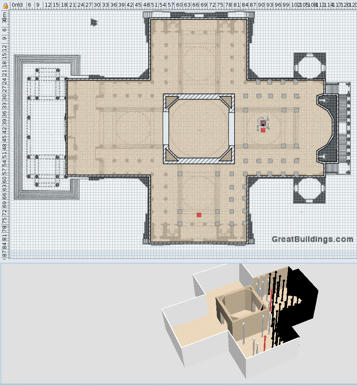
More on (no) illumination: The Twilight Zone Hello :-) Today I started on another project, a full scale replica of the Pantheon in Paris. Here's what I learnt: - walls cannot be higher than 2.000 cms (two thousand); - there's a twilight zone where illumination is switched on and off. When you drag an object into the twilight zone, it becomes black, When you drag it back it gets back its original color. In the attached file are a few columns in red. The one at X=9199 is lighted, the one at X=9201 is in the dark. Similarly there is a red column at Y=7422.5 that becomes black if you move it to Y=7423. Stranger still are the columns between the red columns: although they are at XY-values lower than the limits mentioned before, they are still in the dark. Maybe the sum of X and Y coordinate has a maximum? Putting in a floor and ceiling doesn't switch the light on either. Needless to say walls also are black in the twilight zone. So, if you fancy a big project, you may want to consider drawing it a scale of 1:10 to be able to view it correctly. Hans ![]() ---------------------------------------- ---------------------------------------- Hans new website - under constuction hansdirkse.info |
| Posted by Puybaret at Jan 26, 2010, 4:44:11 PM |
|
Re: More on (no) illumination: The Twilight Zone Did you already finish the nice cathedral you were working on? walls cannot be higher than 2.000 cms (two thousand) In fact there's no real limitations in theory. It's just because the spinner controls with -/+ that let you choose lengths in Sweet Home 3D need a maximum value. I felt a 20m high wall would be ok. If some users like you or other ones need bigger maximum size for any field in the user interface, please feel free to share your ideas here or better in a request. I'll change all of them in once. Meanwhile, here's a workaround : use meter unit in preferences because the 2000 max value don't depend on the chosen unit (but that will probably change in the future). there's a twilight zone where illumination is switched on and off This a bug in Sweet Home 3D lights management and I just fix it. I never thought Sweet Home 3D could be use to draw such big buildings! Expect a version 2.3 Beta in the coming hours to let you work normally on your Pantheon. ---------------------------------------- Emmanuel Puybaret, Sweet Home 3D creator |
| Posted by hansmex at Jan 26, 2010, 7:59:24 PM |
|
Re: More on (no) illumination: The Twilight Zone Emmanuel: Thank you very much! You are one FAST programmer!! :-) As to the Pantheon, I started again in millimeters to stay under the 20 mtr limit, but I now find that it's the 2000 and not the unit that counts. Well, I guess I'll have to start a 3rd time :-) Thanks again, Hans ---------------------------------------- Hans new website - under constuction hansdirkse.info |
| Posted by Puybaret at Jan 27, 2010, 8:16:58 AM |
|
Re: More on (no) illumination: The Twilight Zone That bug was really simple to fix! ![]() Just one number replaced by a bigger one. From the size of your Pantheon, you could have also centered the plan at the point (0,0) to enlighten all the walls in version 2.2, because illumination is active in a sphere with a radius of 100 m centered at (0,0,0). ---------------------------------------- Emmanuel Puybaret, Sweet Home 3D creator |
|
|
Current timezone is GMT Dec 16, 2025, 1:14:15 AM |