|
Sweet Home 3D Forum » List all forums » » Forum: Features use and tips » » » Thread: Floating toolbar |
|
| Print at Dec 15, 2025, 5:00:50 PM | View all posts in this thread on one page |
| Posted by hansmex at Jan 24, 2010, 4:13:48 PM |
|
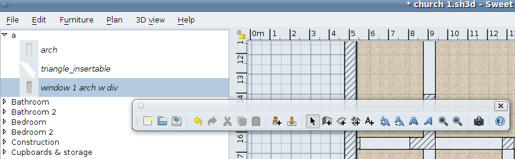
Floating toolbar Hello :-) While changing the batteries of my wireless mouse, I must -accidentally- have done something strange, because the toolbar is now detached and is floating on top of the screen. Is there a way to "undo" this? Thanks for your help, Hans ---------------------------------------- Hans new website - under constuction hansdirkse.info |
| Posted by Puybaret at Jan 24, 2010, 7:13:10 PM |
|
Re: Floating toolbar You can attach the toolbar back to its window, simply by closing the toolbar window or with a drag and drop of the vertical line at left of the New icon to one of the borders of the main window. ---------------------------------------- Emmanuel Puybaret, Sweet Home 3D creator |
| Posted by hansmex at Jan 24, 2010, 7:58:34 PM |
|
Re: Floating toolbar Emmanuel: Closing it worked for me. Thanks! Hans ---------------------------------------- Hans new website - under constuction hansdirkse.info |
|
|
Current timezone is GMT Dec 15, 2025, 5:00:50 PM |