|
Sweet Home 3D Forum » List all forums » » Forum: Wishlist » » » Thread: Dark Mode |
|
| Print at Dec 16, 2025, 11:31:31 PM | |
| Posted by Keet at Jan 13, 2024, 9:40:02 PM |
|
Dark Mode In the blog for 6.6 (27 July 2021) future support of a dark mode is mentioned. Is there any progress in that direction? Switching between Sweet Home 3D and Blender painfully shows how much better a dark mode is for your eyes, especially with the current early dark evenings . The interface and 2Dview have a lot of glaring white screen space which would be a lot less straining on the eyes with a dark mode. ---------------------------------------- Dodecagon.nl 1300+ 3D models, manuals, and projects |
| Posted by Kunda at Jan 21, 2024, 2:17:12 PM |
|
Re: Dark Mode Indeed! I was wondering about this as well. |
| Posted by MantisNebula at Feb 5, 2024, 9:41:38 AM |
|
Re: Dark Mode I agree. Using this on a 60" TV is rough on my photosensitive eyes. Also it would be helpful to have a simple way to adjust the font size. |
| Posted by Keet at Feb 5, 2024, 7:05:44 PM |
|
Re: Dark Mode In the preferences you can set a default font. There are fonts that are larger by default so setting such a font should give you a larger font in the userinterface. ---------------------------------------- Dodecagon.nl 1300+ 3D models, manuals, and projects |
| Posted by Kunda at Feb 6, 2024, 9:51:33 PM |
|
Re: Dark Mode Per further research per Emmanuel: > If you're able to run Sweet Home 3D from code source, simply change implementation of getBackgroundColor and getForegroundColor in PlanComponent class. Otherwise, this might be difficult. ref: https://www.sweethome3d.com/support/forum/vie...95DCE10A9F6EDF64173AC2B00 Relevant ticket: https://sourceforge.net/p/sweethome3d/feature-requests/824/ |
| Posted by Keet at Feb 6, 2024, 10:45:29 PM |
|
Re: Dark Mode If you're able to run Sweet Home 3D from code source, simply change implementation of getBackgroundColor and getForegroundColor in PlanComponent class. Otherwise, this might be difficult. That's not even close to a Dark Mode. Implementing a Dark Mode is basically implementing a theme system and that's not an easy or quick job. I haven't seen a response to my initial information request but I suspect that the first step needed is switching from ancient Swing to JavaFX. I have no idea how easy or difficult this is, the sources I found online differ very much in their options. Looking at the future, switching to JavaFX might not be a step that can be ignored.---------------------------------------- Dodecagon.nl 1300+ 3D models, manuals, and projects |
| Posted by Daniels118 at Feb 7, 2024, 9:33:44 AM |
|
Re: Dark Mode Theming is extremely easy to implement in java swing applications, it just requires adding the theme jar to the library path and a parameter to the command line to tell which theme it should use. It seems that this method doesn't work with the exe launcher (the program freezes), but works fine if SH3D is started through the jar file. A nice dark theme library can be found in flatlaf. Once you add the jar to the install_dir/lib folder, you can start SH3D from the jar file adding the following option to the command line: -Dswing.defaultlaf=com.formdev.flatlaf.FlatDarkLafResult: ![]() Here you can find the available themes in flatlaf: https://www.formdev.com/flatlaf/themes/ On the same website you can download a nice theme editor to create your own theme (with real time preview). |
| Posted by Keet at Feb 7, 2024, 10:56:05 AM |
|
Re: Dark Mode I should have known somebody already did the hard work, in this case FlatLaf I read about that project when researching about dark mode but didn't realize it was so easy to use it with Swing. ---------------------------------------- Dodecagon.nl 1300+ 3D models, manuals, and projects |
| Posted by shadowcaster at Jun 5, 2024, 9:17:26 AM |
|
Re: Dark Mode Hi, I've tried using the FlatDarkLaf but am not having any success. I've never ran any java swing program like this before, so I might be missing something simple. I added flatlaf-3.4.1.jar into the sweethome3d\lib folder. I ran "java -jar SweetHome3D-7.4 jar -Dswing.defaultlaf=com.formdev.flatlaf.FlatDarkLaf. From cmd it starts to run sweethome but hangs after the logo displays. From powershell it runs, pauses, then launches the program but without applying flatdarklaf. Any suggestions? |
| Posted by Daniels118 at Jun 5, 2024, 7:20:24 PM |
|
Re: Dark Mode Use the following commands: set SH3DINST=C:\Program Files\Sweet Home 3D |
| Posted by shadowcaster at Jun 6, 2024, 1:33:50 AM |
|
Re: Dark Mode Hello Daniels, Thanks for replying. I tried running those commands, but the result is still the same. This was the initial result: PS C:\Program Files\Sweet Home 3D\lib> set SH3DINST="C:\Program Files\Sweet Home 3D"However, with some chatgpt help I ended up with: PS C:\Program Files\Sweet Home 3D\lib> $env:SH3DINST="C:\Program Files\Sweet Home 3D"I tried running this from both inside the sweet home 3d\lib folder and just from C:\. Either way, the end result was running the java -jar command with -dswing again but still not seeing any changes. I did come across another post regarding changing resolution that stated to add an ini file with: -Dcom.eteks.sweethome3d.resolutionScale=1.5and this did work to change the LAF. However, I couldn't figure out how to make flatlaf work in this same way. Note that I did test the above code without this ini file in the sweet home folder to ensure there wasn't a conflict. |
| Posted by Daniels118 at Jun 6, 2024, 8:55:43 AM |
|
Re: Dark Mode Please retry my commands from a normal cmd, not powershell. |
| Posted by Puybaret at Jun 6, 2024, 10:32:52 AM |
|
Re: Dark Mode Maybe you should use quotes also around "-Dswing.defaultlaf=com.formdev.flatlaf.FlatDarkLaf" ---------------------------------------- Emmanuel Puybaret, Sweet Home 3D creator |
| Posted by shadowcaster at Jun 6, 2024, 7:03:48 PM |
|
Re: Dark Mode Thank you Daniels! I had tried cmd yesterday but got an error. I see now it was because I added quotes around the file path in the set command thinking it wouldn't properly read the spaces. Thanks so much for the help! My eyes will be forever grateful :) |
| Posted by byDMA at Jun 8, 2024, 11:09:26 PM |
|
Re: Dark Mode Thank you for the information about the flatlaf. I have now implemented it and adapted many things. It looks like KDE. Really great! But dark-mode is not all you need. You still need icons for the dark interface, otherwise you won't see ANYTHING if the icons are dark. And this is often the case. This is exactly how you need to prepare the icons for plugins. I have done all this and it really looks "round". However, I still have a problem: The icons from the plugins are ALWAYS scaled with 16 pixels in the menus, although I have generated them from vector graphics with 32 pixels. In dialogs of plugins, other icons are displayed correctly and in a large size. Does anyone have any idea what it could be? If someone wants, I can send the icons and flatlaf properties. https://disk.yandex.com/d/SVPgWiB7ORwsSQ |
| Posted by Puybaret at Jun 9, 2024, 12:22:37 PM |
|
Re: Dark Mode Very nice work byDMA! And you even prepared a new icon set! The existing ones in reverse video didn't please you? Anyway, I hope at least that the SVG existing ones helped you to prepare the new set faster. It could be possible that 32x32 icons in plug-ins are ignored because they are accessed from plug-in class loader, and FlatLaf needs more information to find it (this would probably require some modifications in Sweet Home 3D or FlatLaf source code). ---------------------------------------- Emmanuel Puybaret, Sweet Home 3D creator |
| Posted by byDMA at Jun 9, 2024, 8:51:45 PM |
|
Re: Dark Mode Hi Emmanuel, thanks for the quick response and for the praise. The existing ones in reverse video didn't please you? Which video do you mean? I've done some more tests and found out the following: -This has nothing to do with Flatlaf, this is also the case in the old Steel design - It ONLY works if scaling factor is 2, between 1 and 2 this does not change - Scaling is really a bad idea at Latlaf, everything is going to be huge Latlaf (out-the-box) is actually an ideal interface for SH3D, everything is scaled and designed correctly - except for the icons from the plugins :-) Take a look at this: https://disk.yandex.com/d/-qCRHNEioo8tbA I suspect this is the JFrame in the menu(s) for the plugins in SH3D. It frames the icons up to the scaling factor 2. Only then it gets bigger and the icons are enlarged. Could you check it out? This should not be a big problem. Then the design would be perfect. |
| Posted by Puybaret at Jun 9, 2024, 9:46:20 PM |
|
Re: Dark Mode By "reverse video", I meant "opposite colors" : white becomes black and black becomes white. The icons proposed in version 6.6 were designed for this purpose. ---------------------------------------- Emmanuel Puybaret, Sweet Home 3D creator |
| Posted by byDMA at Jun 9, 2024, 11:05:54 PM |
|
Re: Dark Mode The icons proposed in version 6.6 were designed for this purpose. Do you mean this? https://m3.material.io/styles/icons/designing-icons "De gustibus non est disputandum" :-) Its GTK 20 years ago, but seriously, the users are coming from mac, windows AND linux, and it should be customizable. It would be best if you could use the icons as SVG files. I know this from JDownloader. Maybe you can take the code quickly? https://support.jdownloader.org/de/knowledgebase/article/setup-ide-eclipse white becomes black and black becomes white. That's how I did it too. With Flatlaf Dark and Light this works in both directions. But I am interested in the topic for the plugins-icons and jframe for these icons. |
| Posted by byDMA at Jun 10, 2024, 12:21:57 AM |
|
Re: Dark Mode I think this is the place where the icons for menus and the toolbar are scaled compulsorily. Why? I suspect because this is an "unknown" source. ResourceAction.java https://sourceforge.net/p/sweethome3d/code/HE.../ResourceAction.java#l130 |
| Posted by byDMA at Jun 13, 2024, 11:13:16 PM |
|
Re: Dark Mode | name of the components So, i'm still working on this FlatLafDark-Tkeme. The problem with the icons is solved, now i#m scaling with factor 2, but some fonts must be corrected. And it's almost complete, but i'm still facing two problems: Screenshots https://disk.yandex.ru/d/VY_66hCaQxUThg The two font components are still very huge. In Flatlaf can every component be separately scaled (Label.font = x, MenuBar.font = x, MenuItem.font = x, etc.) But i dont know the name of this element: 1. keystrokes in menu bar (red arrows) 2. title over this internal frame/pane (red arrows) Does anybody know? |
| Posted by byDMA at Jun 14, 2024, 2:59:11 AM |
|
Re: Dark Mode | name of the components 1. MenuItem.acceleratorFont 2. TitledBorder.font :-) |
| Posted by Puybaret at Jun 14, 2024, 8:11:24 PM |
|
Re: Dark Mode | name of the components Great you found by yourself ![]() ---------------------------------------- Emmanuel Puybaret, Sweet Home 3D creator |
| Posted by Keet at Jun 14, 2024, 8:25:45 PM |
|
Re: Dark Mode | name of the components Great work! That looks really good and a lot better for the eyes. Are you willing to share the endresult? As a jar file or as a fork on sourceforge? I'd appreciate that very much. ---------------------------------------- Dodecagon.nl 1300+ 3D models, manuals, and projects |
| Posted by byDMA at Jun 14, 2024, 9:52:19 PM |
|
Re: Dark Mode | name of the components Hi Keet, Thank you for your interest! I like to share the files. First for testing. Small corrections are still necessary and I hope that someone will test it and make suggestions for improvement. There are 3 files in this compressed file: https://disk.yandex.ru/d/n85Oi_gPPyITgQ 1. SweetHome3D-7.4.jar -> the Icons for the Dark theme are inside 2. plugins_dark.zip -> all available plugins with the NEW icons, matching the design 3. flatlaf-3.4.1.jar -> swing-engine, with property files, the settings for the Dark theme are also already in this library. You are an advanced user, so I don't have to explain everything in detail. Nevertheless, I have to make a few hints. Before you start, you should consider which environment and which monitors you have, because that is necessary for the correct configuration of the interface. I describe how I did it and then we can see how you have to adjust it when it's not working. My situation: - Linux (open SuSE) with KDE, java -> Oracle (21,22 both ok) - 2 Monitors with the Resolution 2560x1440 - Fonts (very important!) Droid Sans - this is what my startup script looks like on Linux: As you can see, I start in the scaling mode (factor 2x), because the plugin Icons in the toolbar were not scaled (must be clear why). SO the icons are now displayed correctly. All in the resolution 32x32 pixels, as in the files *@2x.png. With the 2x scaling, ALL components are scaled in the swing, including the font sizes. And that was the biggest problem now. It was necessary to adjust the font sizes of ALL components. I have already configured the colors for another application earlier. It is important to understand that the font size setting in FlatLaf depends on the operating system (Mac, Linux, WIndows), the size and resolution of the monitor and, last but not least, on personal preferences. Unfortunately, you can't do this via the program's interface, but you can manually adjust the properties file in the Flatlaf library. You must edit and repack FlatDarkLaf.properties. Important configuration: Try it with your system and let me know how it looks, then I'll give you recommendations on how to adjust the font scaling. |
| Posted by byDMA at Jun 14, 2024, 10:14:23 PM |
Re: Dark Mode | changingt the accent base colorNext, I would like to explain that you can customize the accent color in Flatlaf. In addition, there are several variations of the accent color in the Dark theme. But of course you don't have to change all of them, just this one: So change the hex code by @accentBaseColor. Done! |
| Posted by Keet at Jun 14, 2024, 10:18:16 PM |
|
Re: Dark Mode | name of the components Thank you! I'm on Debian so like you on linux. That should make it a little easier. I'll try to get it up and running. ---------------------------------------- Dodecagon.nl 1300+ 3D models, manuals, and projects |
| Posted by byDMA at Jun 14, 2024, 11:31:02 PM |
|
Re: Dark Mode | Some impressions Beta-1 Linux Breeze, FlatDarkLaf ![]() ![]() ![]() ![]() ![]() ![]() ![]() |
| Posted by dorin at Jun 15, 2024, 11:13:28 PM |
|
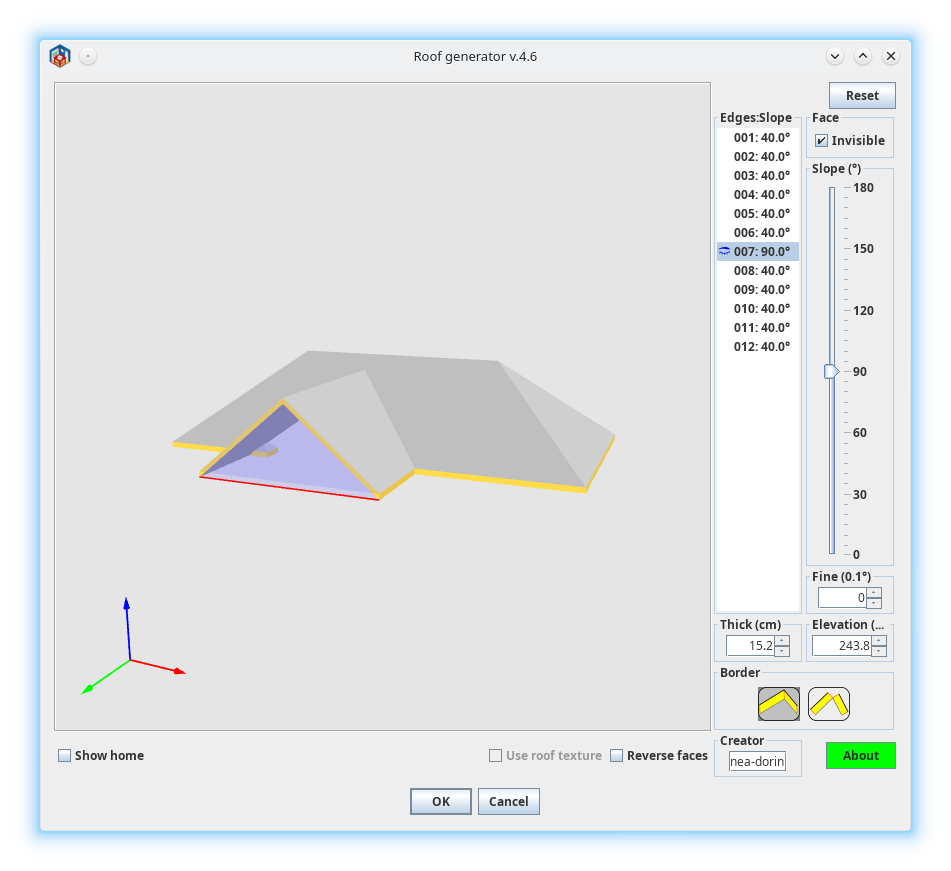
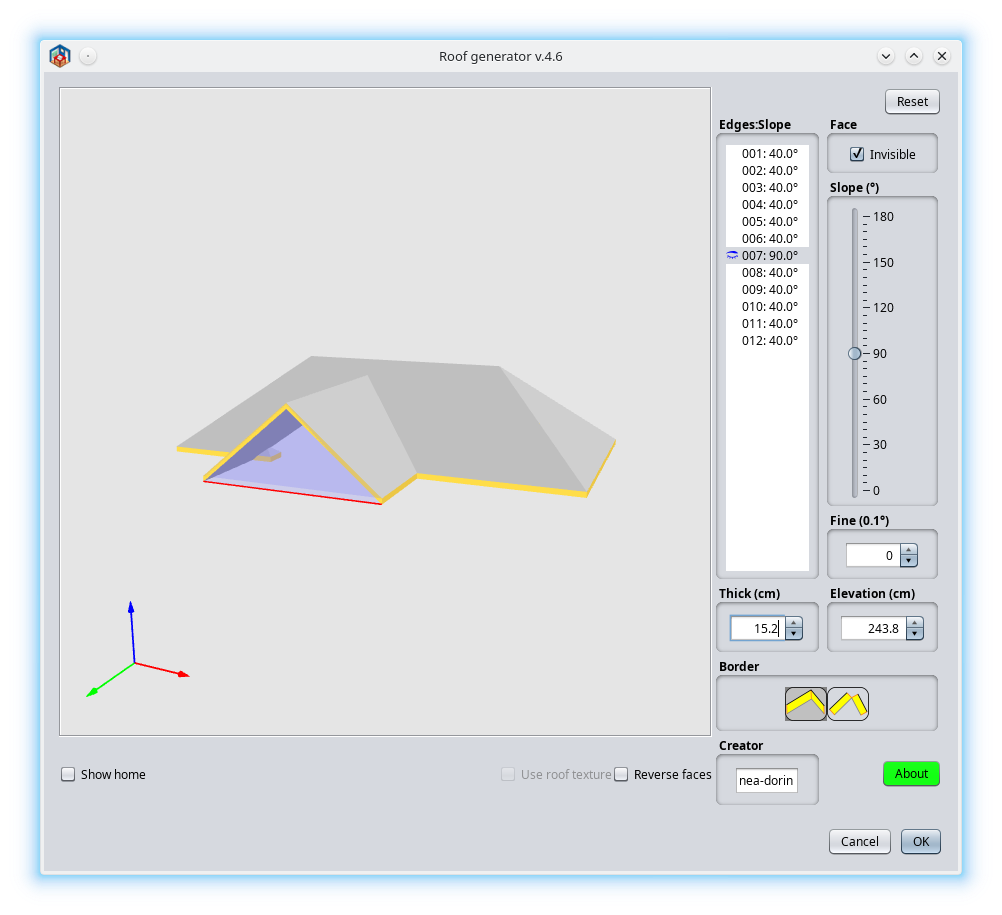
Re: Dark Mode | Some impressions Beta-1 About plugins LaF(particularly Generate Roof). 1. I don't got it this: If you have a huge monitor why you need to have a double size fonts and icons? When I buy a bigger monitor was for to see more information on that not the same but bigger. If so I use zoom or batter eyes glasses. It doesn't matter! 2. On defaults it have to look like this (metal and nimbus): ![]() ![]() On macOS it looks similar (not exactly) as Nimbus. If under FlatDarkLaf or other LaF don't look OK (columns wide, fonts, borders, icons size etc) I suspect it is the fault of LaF not of the applications. I think (rarely) it is easiest to correct the theme than to modify 100+ applications. No offense, it is only my wrong opinion. ---------------------------------------- A computer program does what you tell it to do, not what you want it to do. Murphy's Law When all else fails, read the instructions. Murphy's Law If you don't like "AS IS", DIY. Dorin's law |
| Posted by Keet at Jun 15, 2024, 11:38:42 PM |
|
Re: Dark Mode | Some impressions Beta-1 I think (rarely) it is easiest to correct the theme than to modify 100+ applications. That's the right opinion. I ran into this when I was trying to set this up. I stopped when I discovered that every program affected needs a special version. That will completely ruin the updates through the plugin manager unless there is maintenance for two different versions. That is not going to happen and rightfully so. A theme has to work on unchanged applications and only affect the display. It should not depend on what monitor(s) I have. That would mean changing code/settings with every monitor change and for every individual user. Basically I want a dark theme changing the color palette. Not bigger/smaller fonts or icons, only colors. I'm going to look into that but I'm incredibly busy at the moment.No offense, it is only my wrong opinion. Still, this looks very good so we'll see where it goes. A simple drop-in of a theme file as intended is the best result we can hope for. ---------------------------------------- Dodecagon.nl 1300+ 3D models, manuals, and projects |
| Posted by byDMA at Jun 16, 2024, 1:59:25 AM |
|
Re: Dark Mode | Some impressions Beta-1 If under FlatDarkLaf or other LaF don't look OK (columns wide, fonts, borders, icons size etc) I suspect it is the fault of LaF not of the applications. No. This has nothing to do with FlatLaf at all. Set MetalLookAndFeel again and you will see that it has nothing to do with the topic. This is exactly how it behaves here and there. I don't want to discuss scaling. ![]() 1. start with scaling 2x 2. start GR plugin 3. maximize the plugin window 4. then make it smaller again -> the frames are going through each other. You can no longer set the normal view manually. You have to close the plugin and restart it. Without scaling, this works well and the window gets smaller again and the frames are ok, only the font... you can't see anything ;-) https://sun9-61.userapi.com/impg/DZvWA-3Q3gxu...5fd70a1307&type=album |
| Posted by byDMA at Jun 16, 2024, 2:08:22 AM |
|
Re: Dark Mode | Some impressions Beta-1 But in full modus with Flatlaf looks great :) ![]() |
| Posted by ganonderp at Mar 7, 2025, 11:41:21 AM |
|
Re: Dark Mode | Some impressions Beta-1 Any progress with this? I literally cannot use the app at all without a dark mode, I'm legally blind and dark mode is an absolute requirement for me... as it is, I'm completely cut off from using this software due to the lack of dark mode... can anyone help this blind guy out? |
| Posted by byDMA at Mar 14, 2025, 4:22:03 PM |
|
Re: Dark Mode | Some impressions Beta-1 Any progress with this? What do you mean by progress? It is still running. Where are there problems? It doesn't go over the surface. You have to adjust it as I described it. |
|
|
Current timezone is GMT Dec 16, 2025, 11:31:31 PM |