Print at Dec 26, 2025, 4:43:46 PM
Posted by Walter125 at Sep 11, 2023, 2:22:07 PM
Linux, slow actions in 2D area.
Hi,

I'm using linux, and I'm experiencing slow actions in the 2D area, where we design the house.

So I have edited the script that launch SweetHome3D, adding "-Dsun.java2d.opengl=true", just before "-Xmx2g".

With this parameter, the actions in the 2D area are a lot faster, but the logo of SweetHome3D is not displayed correctly at the launch of the program.

Posted by Keet at Sep 12, 2023, 11:18:58 AM
Re: Linux, slow actions in 2D area.
Weird, anything slow I always experienced in the 3D area, not the 2D area.
I know the 2D can get a little slow with many very long walls so I'm going to experiment with your suggestion and see if it helps.
----------------------------------------
Dodecagon.nl
1300+ 3D models, manuals, and projects

Posted by LaVache at Sep 12, 2023, 12:08:58 PM
Re: Linux, slow actions in 2D area.
[…] just before "-Xmx2g" […]

Wouldn't it be better to increase the "-Xmx2g" value?

Posted by Walter125 at Sep 12, 2023, 12:11:01 PM
Re: Linux, slow actions in 2D area.
My computer is not very powerful, it is a 4 core celeron J4105.

The more there are objects and funitures in the house, the more it is slow.

But with the opengl parameter, the speed when moving objects is correct even with a house with a lot of objects.

Posted by Walter125 at Sep 12, 2023, 12:16:50 PM
Re: Linux, slow actions in 2D area.
@LaVache

I tried with "-Xmx4g", but it was still slow.

Posted by LaVache at Sep 12, 2023, 1:21:18 PM
Re: Linux, slow actions in 2D area.
I suppose that if the plan is quite full, it can slow things down. Personally, I've assigned 16GB to SH3D.

Posted by Keet at Sep 12, 2023, 2:02:39 PM
Re: Linux, slow actions in 2D area.
Are you sure that it's the 2D View that is slow? The 3D View updates every time you make a change in the 2D View and usually the 3D View rendering uses more processor power which means more time.

You might want to try the new 7.2 beta version . That is the first version where the 3D View update is halted when you collapse the pane (the small arrows in the pane border) which should prevent the 3D View taking processor power that can be used for the 2D view. When you expand the 3D pane it will render your latest 2D plan without rendering all the steps in between. Especially on slower machines this should speed up things considerably.
----------------------------------------
Dodecagon.nl
1300+ 3D models, manuals, and projects

Posted by Walter125 at Sep 12, 2023, 2:54:07 PM
Re: Linux, slow actions in 2D area.
Maybe it is the 3D view that slows down the 2D view, but the name of the parameter I added talks about java2d.

So, I think the problem comes from the default 2D renderer that seems to be slower than opengl, at least on my linux system, with this low power computer.

Posted by Waldemar.Hersacher at Jan 6, 2024, 10:40:56 AM
Re: Linux, slow actions in 2D area.
I have the same experience. I don't have an exact way to produce it. I feel that saving with "Save as..." and loading with "Open recent home..." might be a reason. I'm closing all unused instances so only one is open.
Also I have seen that the java process needs more and more memory.
Starting with no home it is 180 MB, with the first home it is about 500 MB, with the second it is 680 MB, opening the first one again I'm at 900 MB.
----------------------------------------
MSI GP60, Linux Mint 21.3 Virginia base: Ubuntu 22.04 jammy, SH3D 7.5 with Photo-video rendering 2.8

Posted by Keet at Jan 6, 2024, 1:36:55 PM
Re: Linux, slow actions in 2D area.
How much memory is used only has partially influence on speed, mainly you should have enough. As mentioned in previous posts in this thread you can increase the allowed memory use with the -Xmx parameter in the startup script, for example -Xmx4g.
What makes a lot more difference in the slowness of the 2Dview is what you have in your project.

Example on Debian with -Xmx6g set: I just started a new project that so far only has walls and a few dimension lines, no other furniture: a whopping 151.1kB on disk. And it uses 5.3GB memory! Why? First I allowed max 6GB memory use and Java WILL use it when given (of course). Second, there are many very long walls and I know that causes slowness. If I shorten every wall to one-tenth it's size it becomes considerably faster. That is just an example, different furniture results in different rendering times in both the 2D and 3D views. Just giving more and more memory will not solve that. On the other hand, allowing not enough memory will possibly cause heavy swapping and the garbage collector will kick in many times more than with more memory (the garbage collector frees memory that is no longer used, with less memory to work with this has to happen more often).

Some options that might help speed up things:
Make levels that you don't need for the current task invisible.
Close the 3Dview when don't need it (the tiny arrow on the splitter between the 2D and 3D panes). The 3Dview rendering uses the processor, not the GPU.
In some cases it it's beneficial to place part of a level on a separate level with the same elevation so you can make that part invisible. Invisible = not having to draw it.
In your preferences you can set Furniture icons in plan to Catalog icon or Top view. Usually the Catalog icons setting works faster.

Mind you, these are tricks you shouldn't normally need and it highly depends on your project which tricks have any effect. I work a lot with very large (in meters) projects and have learned what (sometimes) works.
----------------------------------------
Dodecagon.nl
1300+ 3D models, manuals, and projects

Posted by Waldemar.Hersacher at Jan 7, 2024, 11:18:53 AM
Re: Linux, slow actions in 2D area.
Thank you for the explanations.

1. Memory
I was programming in NI LabVIEW and for the last 10 years in C# for the .Net Framework. Both running on Windows. In both environments the garbage collector will decrease memory when the new loaded file needs less objects than the old one.
I never programmed in Java so I don't have any experience with it. But I expected when starting SH3D the memory is b. Loading Home1 it is b + h1. Loading Home2 giving a second instance of SH3D it is b + h1 + h2. Removing the instance of Home 1 it will give b + h2 + r. I think r is management information for the objects which is also be used by Home 2.

2. 3D View
I was always asking myself how I can close the 3D View. I see the three dots on the three splitter bars (the vertical one and the two horizontal). But I don't see an arrow even not in GIMP with 400 % scaling.
----------------------------------------
MSI GP60, Linux Mint 21.3 Virginia base: Ubuntu 22.04 jammy, SH3D 7.5 with Photo-video rendering 2.8

Posted by Keet at Jan 7, 2024, 1:35:32 PM
Re: Linux, slow actions in 2D area.
Same here, 30+ years C#, multiple other languages but not Java. The point was that collecting garbage takes time, even if it's so little you should hardly notice it. More collections = more time. How much memory really is freed or not is not that important nowadays as long as you have enough memory for the job. Working without enough memory will cause swapping and THAT is really slow.

The 2D and 3D panes are separated with a thin splitter bar. On the left of that bar you should see two tiny arrows. You can drag the splitter bar up and down or use the tiny arrows to fully open/close one of the panes. Same with the left and right panes. That splitter bar has the tiny arrows at the top of the bar.
----------------------------------------
Dodecagon.nl
1300+ 3D models, manuals, and projects

Posted by Waldemar.Hersacher at Jan 7, 2024, 2:43:30 PM
Re: Linux, slow actions in 2D area.
They should be located at the left or right end of the bar or at the top or bottom. But I'm missing them.
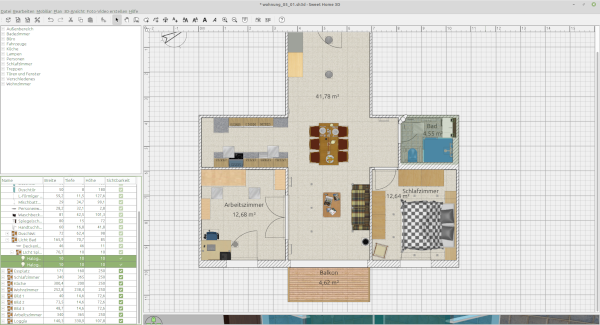
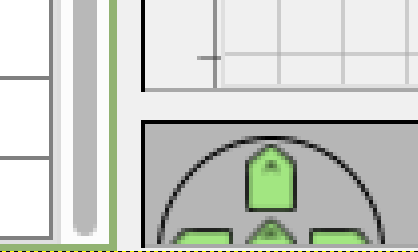


And it doesn't matter which pane is active. I miss them even if the 3D view is active.
----------------------------------------
MSI GP60, Linux Mint 21.3 Virginia base: Ubuntu 22.04 jammy, SH3D 7.5 with Photo-video rendering 2.8

Posted by Keet at Jan 7, 2024, 4:03:06 PM
Re: Linux, slow actions in 2D area.
You're right, they should be visible but aren't. This remains even after restarting Sweet Home 3D?
You can try to detach/re-attach the 3D pane. Right-click in the 3Dview window and select "Display in separate window". Then right click in the 3DView window again and select "Display in main window". With a little luck the arrows will appear, otherwise the separate window is possibly an option for you.
I have Sweet Home 3D running on several versions of Debian with the Mate desktop and have never lost the arrows. Maybe it's a specific problem with your Linux desktop or desktop theme. Try the default theme and see if the arrows appear.
----------------------------------------
Dodecagon.nl
1300+ 3D models, manuals, and projects

Posted by sjb007 at Jan 7, 2024, 6:17:40 PM
Re: Linux, slow actions in 2D area.
This is the fault of the GTK Look and Feel that is used by default in Ubuntu. You have two options:

1) Use Ctrl-Space. This will hide the 3D pane effectively. I can't find a shortcut to bring it back, so you would have to drag it up. There might be one, I just can't find it right now.

2) Disable the GTK theme so you see the arrows on the splitter. Warning: Ugly UI ahead! Just add the following comand line option in the SweetHome3D startup script:
-Dswing.defaultlaf=javax.swing.plaf.metal.MetalLookAndFeel


Posted by Keet at Jan 7, 2024, 6:37:02 PM
Re: Linux, slow actions in 2D area.
A long list of Sweet Home 3D keyboard shortcuts: https://www.sweethome3d.com/blog/2019/03/29/sweet_home_3d_shortcuts.html
By-the-way, Ctrl Space is not in that list and neither is its reversal.
----------------------------------------
Dodecagon.nl
1300+ 3D models, manuals, and projects