|
Sweet Home 3D Forum » List all forums » » Forum: New versions » » » Thread: Sweet Home 3D 7.2 |
|
| Print at Dec 19, 2025, 7:57:50 PM | |
| Posted by Puybaret at Aug 8, 2023, 9:58:50 PM |
|
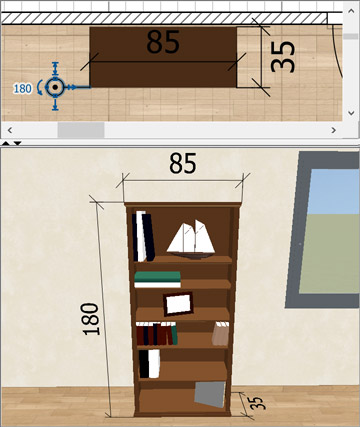
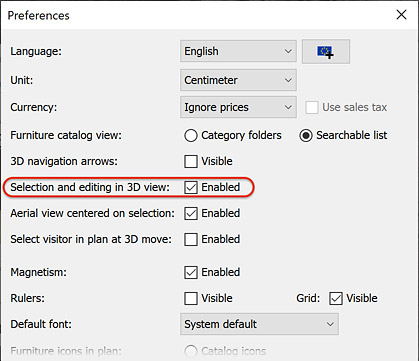
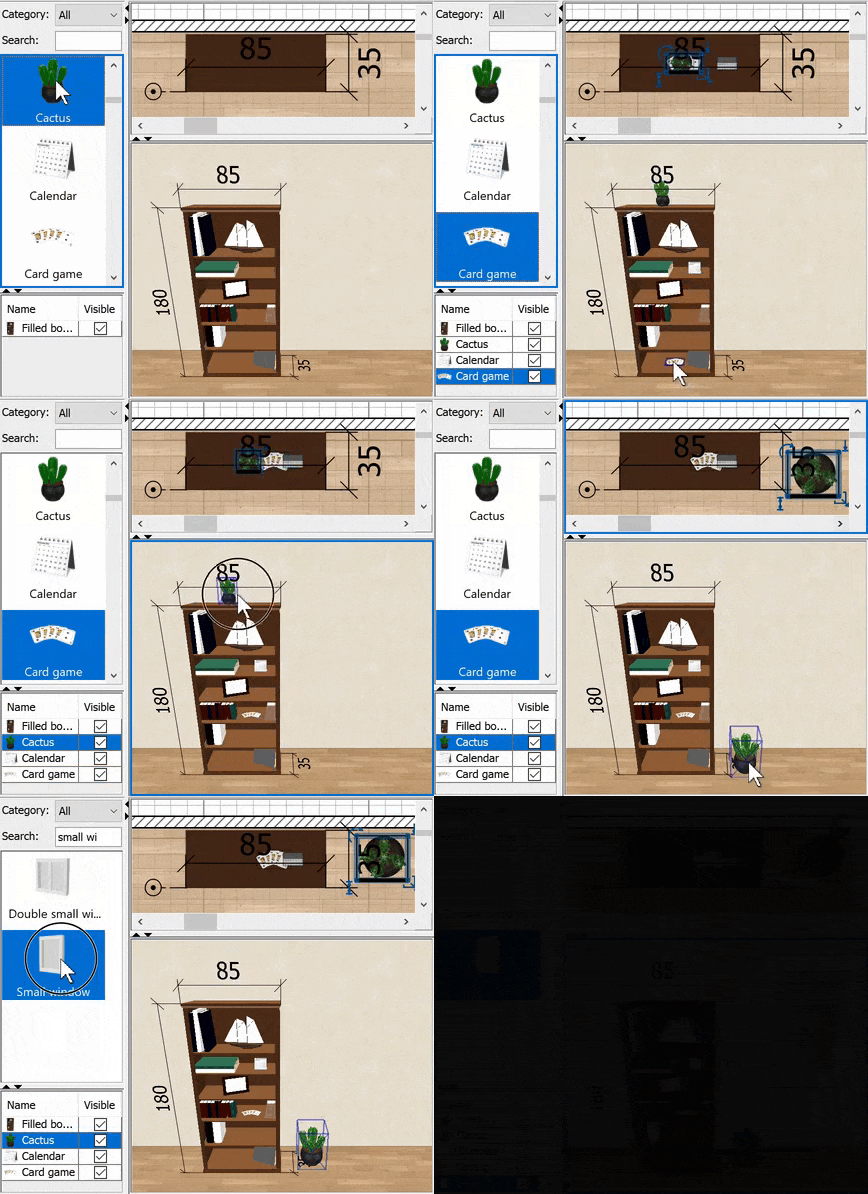
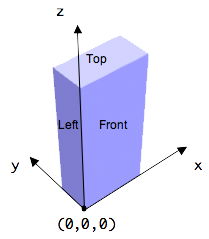
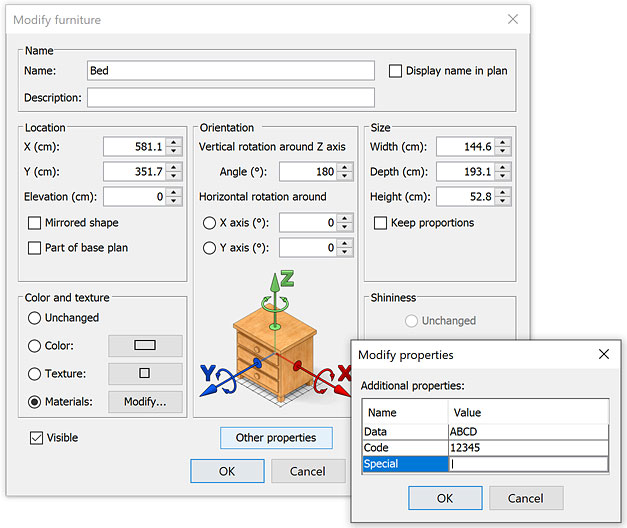
Sweet Home 3D 7.2 Hi, Sweet Home 3D 7.2 is on its way and comes with some important improvements among which: - a new modification dialog box to edit dimensions - creation of elevation dimensions - the ability to directly handle items in the 3D view - magnetism on shelf units Interested? Here are the details, after a disclaimer: If you use Pan3dView plug-in developed by Daniels118, be sure to update it if you want to continue to use it with Sweet Home 3D 7.2. - Editing dimensions and elevation dimensions: The new Plan > Modify dimensions menu item or a double click on a dimension now displays a modification dialog box to let you enter directly its coordinates. When you modify two or more dimensions with this pane, the Distance between end points field won't be shown because it's often too complicated to handle such modifications. This pane lets you change the coordinates, the font size and the color of the dimensions, as well as choose if dimensions should be visible in the 3D view. When a dimension is visible in the 3D view, it's possible to change its elevation and the text of its length is always written in the correct direction whatever the current point of view. This pane proposes also to choose whether a dimension should be a Plan dimension or an Elevation dimension, i.e. a dimension starting and ending at the same X / Y coordinates but spreading vertically between two elevations along a given distance, as shown in the following image for the selected dimension 180. ![]() An elevation dimension is displayed in the plan with the following symbol showing two circles (something like an arrow seen from top) and an extension line. ![]() When selected, an elevation dimension shows its height and 4 indicators to set the elevation of its start point, its height, the offset of the extension lines and its angle around elevation axis. You may create elevation dimensions directly with Dimensions creation tool if you press the Ctrl key (alt/option key under macOS) while clicking at the first point of the dimension in the plan. In that case, the Dimension pane will be shown after the click with Elevation dimension and Visible in 3D view selected options and a default distance between end points equal to home wall height. Just adjust the values and confirm your choice to create the elevation dimension accordingly. Dimensions visible in the 3D view will be rendered in the photo creation tool too, but only at the two lower quality levels. It wouldn't be impossible to handle them at the higher quality levels, put I think it's not interesting and dimensions shadows might just add confusion. - Handling items in the 3D view: The new Selection and editing in 3D view option was added in the preferences pane. ![]() When this option is enabled, you'll be able to: • select objets in the 3D view with a simple click (Shift + click to toggle its selection). Selected objects are surrounded by a half transparent blue line and the front face of selected furniture shows crossed lines. • modify an object by double clicking on it • use the items of Edit menu when the 3D view has focus • move selected furniture in the 3D view with a drag and drop, where magnetism (toggled with Alt key / command key under macOS), alignment along X / Y axes (Shift key after you started to move the mouse), duplication (Ctrl key / option key under macOS after you started to move the mouse) works like in the plan. Moved furniture remain at the same elevation, and their x / y coordinates are updated according to the current view angle, while vertical mouse moves are converted to moves along the depth. Only furniture can move because I feel that there are too many circumstances where you wouldn't be able to navigate in the 3D view if other selected items like walls or rooms could be moved too. • elevate the selected piece of furniture or furniture group by pressing the Ctrl key / option key under macOS before you start to move it • drag and drop an item of the catalog in the 3D view to add it to the plan. Objects dropped on a wall appear along that wall or in the wall for doors and windows. An object dropped on an other piece will be elevated at the elevation defined by the dropOnTopElevation property if defined, and an object dropped on a shelf unit defining a shelfElevations or shelfBoxes property (see below) will appear at the elevation of the shelf where the object was dropped and at the middle of the shelf unit depth. It would be probably nice to have some feedback when you drop an object from the catalog in the 3D view, for example by showing the contour of its bounds where it will actually appear. Maybe for an other version... meanwhile keep in mind that the piece of furniture on which you want to drop a catalog item must be under the mouse cursor to be taken into account. The following clip shows on it works. ![]() - Magnetism on shelf units: Sweet Home 3D proposes the two new properties shelfElevations and shelfBoxes to define the locations of shelves in a shelf unit. If either of properties is defined for a piece of furniture, magnetism on its shelves will be applied on the objects placed on them when you change their elevation, like the card game in the previous clip. • shelfElevations property is defined with a list of numbers in cm from the lowest to the highest elevation, like the bedside table, the bookcase, the glass door cabinet and bunk beds found in the default furniture catalog. • shelfBoxes property lists the coordinates of the boxes where objects can be placed, each box being defined by 6 values matching the (x, y, z) coordinates in cm of the left, front, bottom lower point and the right, back, top upper opposite point of the box. When you move an object placed on a shelf unit defining shelfBoxes# property, it's magnetized within the limits of each box of the shelf unit. Keep in mind that when defining these coordinates, axis directions and origin of the describe box are as in the following image. If you have 4 boxes, you'll have to enter 24 values in the shelfBoxes property field. To help you recognize groups of 6 values, you may add spaces between values. If you wan't to be able to place objects on the top of the shelf unit, the bottom of the last shelf box should match the top of the shelf unit. ![]() For example, the filled book case shown in above clip and available in the default furniture catalog defines the following shelfBoxes property value: 2.3 1.4 5.4 53.2 33.8 33.5 21.8 1.4 34.8 82.7 33.8 63.4 38.3 1.4 64.7 68 33.8 87.7 2.3 1.4 89 26.3 33.8 114 52.2 1.4 89 82.7 33.8 114 40.9 1.4 115.3 82.7 33.8 134.7 19.3 1.4 136 29.3 33.8 176.6 68.8 1.4 136 82.7 33.8 176.6 0 0 180 85 35 250 When the card game is moved to the right on the third shelf in the clip, you'll see that it's magnetized to the left border of the box defined by the coordinates (38.3 1.4 64.7) and (68 33.8 87.7). This is helpful to fill a bookcase more quickly, but depends also on how patient you'll be to define all these shelf boxes in the 3D models you'll create. Anyway, you always have the choice to define shelfElevations easier property instead. If you want to try with more shelf units or furniture containing shelves, I already defined the shelfElevations or shelfBoxes property of the 44 ones found in the Contributors library that you may try with the Beta version 1.9.1 of furniture libraries. - Other features: • You may recompute the points of the selected room with the new Recompute room points item added to plan contextual menu. If this item doesn't appear, it means that you didn't right click on the selected room or that the point where you right clicked isn't surrounded by a closed set of walls. • 3D updates process will be now deactived when the 3D view is hidden. No need to relaunch the program! • The Description information recently added to furniture can now be displayed in the furniture table with the Furniture > Display column > Description menu item. • The license property was added to furniture libraries and you can view this information with Furniture > Display column > License menu item if it exists (I'll add the property on all the items of the furniture libraries distributed on sweethome3d.com). I could show the license information in the information tool tip of the catalog too, but I'm a little reluctant to make this tool tip grow once more. • It's possible to define additional furniture properties to handle customized user data associated to the objects added to your home. This data may be displayed in the furniture list, modified in the furniture dialog box and/or exported to CSV. For the moment, there's no user interface to define these properties and they must be cited in the System property named "com.eteks.sweethome3d.additionalFurnitureProperties", each property being separated from others with a coma like in "Data, Code, Special" which describes 3 new properties. Setting this System property can be done with the -D Java option in a SweetHome3D.l4j.ini file stored in the same folder as SweetHome3D.exe under Windows, in SweetHome3D.cfg configuration file found in Sweet Home 3D.app folder under macOS or by modifying java command line in Sweet Home 3D script under Linux. The additional properties can also be set from plug-ins using the methods getFurnitureAdditionalProperties / setFurnitureAdditionalProperties added to Home class. The added furniture properties will appear in the Furniture > Sort by and Furniture > Display column menus to let you display them in the furniture list like in the following screenshot, which handles the three columns in SweetHome3D.l4j.ini file with the line: -Dcom.eteks.sweethome3d.additionalFurnitureProperties="Data, Code, Special" You will be also able to modify the property values for each piece of furniture thanks to the new Other properties button added at the bottom of the Modify furniture dialog box, when such properties are defined. As the value of additional properties set in a furniture library will be copied to a new home object when it's added to the plan from version 7.2, you may give the initial value of these properties in a SH3F file. By default, additional properties and their values are exported to CSV files too. But com.eteks.sweethome3d.additionalFurnitureProperties System property can also describe the type of each property and whether it should be displayable in the furniture list, modifiable in furniture modification pane and exportable to a CSV file. It can also describe the label of the property which should be displayed in the user interface. To use these features, a property must be followed by the following information ( | symbol means or): :ANY | STRING | BOOLEAN | INTEGER | NUMBER | PRICE | LENGTH | PERCENTAGE | DATE | CONTENT For example, if com.eteks.sweethome3d.additionalFurnitureProperties System property is equal to: "AltCode:INTEGER modifiable=false displayedName=Alt. code"If com.eteks.sweethome3d.additionalFurnitureProperties System property is equal to: "QR:CONTENT displayedName=QR Code, Rebate: PERCENTAGE"By default, the type of a furniture property is ANY, i.e. it can handle any type of value. However, when the furniture list is sorted on a property of type ANY, values containing numbers will be sorted in correct order (meaning 100 will appear after 12 in ascending order). As shown in the following screenshot, the Value column of Modify properties dialog box will show: 1. a Modify button with the selected image for a type equal to CONTENT, 2. a check box for BOOLEAN type, 3. and a formatted text for the INTEGER, NUMBER, PRICE, LENGTH, PERCENTAGE and DATE types. Selecting the later types will also force the user to enter the correct information. Additional content values will be saved in the .SH3D file, values of type LENGTH will be saved in centimeter and values of type DATE will be saved in the format yyyy-MM-dd (for example, 2023-05-20). Finally, this new version handles also correctly objects showing some textures with a transparency in YafaRay renderer, and the 64 bit and ARM versions of Sweet Home 3D installers come with the JOGL update 20230521-v2.5.0-rc. Please, report any issue you encountered if the 3D view doesn't seem to work correctly (or it works better too). All these new features come also with the ability to edit any property in the Furniture Library Editor and view dimensions in the SideView plug-in. But that's enough for me today, and I will explain these other things tomorrow. Hope you'll like this new version ![]() [Note: the final version of Sweet Home 3D 7.2, along with updated furniture libraries were released on 09/22/2023] ---------------------------------------- Emmanuel Puybaret, Sweet Home 3D creator |
| Posted by Keet at Aug 8, 2023, 10:48:56 PM |
|
Re: Sweet Home 3D 7.2 A lot of very interesting additions! After a quick read I can scratch at least two items from my wishlist (3D update suspended when the window is closed and per object license in the furniture libraries). Probably more after a more thorough evaluation. The custom properties add a very powerful mechanism to Sweet Home 3D, especially since they can be strong typed. Initially not many users will understand it's power but that will become clear in time when plug-ins start making use of additional properties and creating all kinds of smart solutions (wirings plugin: connect a on/off switch to a lamp through custom properties?) ---------------------------------------- Dodecagon.nl 1300+ 3D models, manuals, and projects |
| Posted by JonnyD at Aug 9, 2023, 10:17:04 AM |
|
Re: Sweet Home 3D 7.2 This looks brilliant! |
| Posted by hansmex at Aug 9, 2023, 10:26:07 AM |
|
Re: Sweet Home 3D 7.2 Xmas in August? Impressive work, again! A few observations. As always - probably I'm doing something wrong, but I can't fail to notice that... (see image below) DIMENSIONS ![]() The orange, horizontal dimension has the lines displayed at the bottom of the room and the digits at the top of the room. The black, vertical dimension has a similar problem - a large distance between the lines and the digits. I feel that the Dimensions dialogue is easier to understand if start and end point coordinates are diplayed directly after each other (as in walls, furniture, etc.). The elevation comes directly after the coordinates. 3D VIEW TOGGLE When I shift-click nothing happens? RECOMPUTE ROOMS (super-super feature!!) I would love to see this option also in the Modify Rooms dialogue. H ---------------------------------------- Hans new website - under constuction hansdirkse.info |
| Posted by Puybaret at Aug 9, 2023, 12:13:23 PM |
|
Re: Sweet Home 3D 7.2 Thanks for your first feedbacks ![]() The orange, horizontal dimension has the lines displayed at the bottom of the room and the digits at the top of the room. This dimension seems to be elevated since its left point is at half height of the wall. But texts are too far. Strange... I never encountered this issue. Could you send me you file (or a simplified version) so I can check on my side?I feel that the Dimensions dialogue is easier to understand if start and end point coordinates are diplayed directly after each other (as in walls, furniture, etc.). The elevation comes directly after the coordinates. Sorry, but I tend to disagree. Elevation is part of 3D coordinates and it's relative to Start point section in the dialog box.3D VIEW TOGGLE It's probably because you didn't remove Pan3dView plug-in, did you?When I shift-click nothing happens? RECOMPUTE ROOMS (super-super feature!!) It's not possible to have this feature in room modification dialog box or in Plan menu because it needs a reference point to work. It's the reason why it didn't appear yet in Sweet Home 3D until... I had the idea to program it in the contextual menu which can use the point where you right click as a reference point.I would love to see this option also in the Modify Rooms dialogue. ---------------------------------------- Emmanuel Puybaret, Sweet Home 3D creator |
| Posted by Puybaret at Aug 9, 2023, 6:57:09 PM |
|
Re: Sweet Home 3D 7.2 And here are the links about Furniture Library Editor 2.0 and SideView plug-in 1.1 which offer features bound to Sweet Home 3D 7.2. Enjoy! ![]() ---------------------------------------- Emmanuel Puybaret, Sweet Home 3D creator |
| Posted by Puybaret at Aug 9, 2023, 8:03:50 PM |
|
Re: Sweet Home 3D 7.2 Thanks Hans for your test file. I found the bug due to the fact that the dimensions you drew belonged to an elevated level. As simple as that! I'm so ashamed that I generated a Beta 2 right away and changed the first post with updated links. ---------------------------------------- Emmanuel Puybaret, Sweet Home 3D creator |
| Posted by hansmex at Aug 10, 2023, 10:27:18 AM |
|
Re: Sweet Home 3D 7.2 Emmanuel, Thank you for your superfast fix. Dimensions work now as they should. I have one wish regaring Dimensions: always black in 2D, chosen colour only in 3D. Reason: colour and/or contrast needs are very different in 2D and 3D. Background in 2D preview pane is (always) white, in 3D it's very variable and depends on floor or wall colour and the orientation of aerial view or virtual visitor. H ---------------------------------------- Hans new website - under constuction hansdirkse.info |
| Posted by Puybaret at Aug 12, 2023, 9:15:04 PM |
|
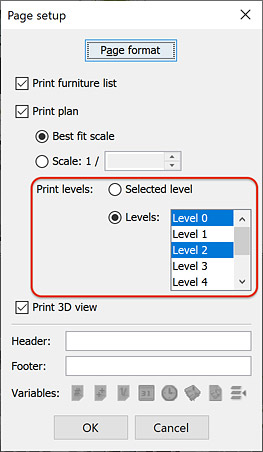
Re: Sweet Home 3D 7.2 Hello, Tonight, the Beta 3 (see updated links in the first post of this thread) brings the following improvements: - Support for multi level printing: when you home contains more than a level, a new section Print levels appears in the page setup dialog box to let you choose the levels you want to print during the same printing session. - Preset deformations: when some modelPresetTransformationsName_xxx and modelPresetTransformations_xxx are defined for a model in a furniture library, they will appear in the Preset shapes drop down list of the Modify deformation dialog box, making it more easier to prepare some postures of mannequins. The previous screenshot shows two preset postures for the mannequin available in the default catalog. It remains to prepare all the preset postures for the 6 adjustable mannequins available in furniture libraries, but VeroniQ is on it. Thanks to her! - When you import a 3D model, its default category is now User (or its translation in other languages). This will avoid new users to complain about the Bathroom category where they import their first models. - Dimension lines are excluded from OBJ export. I felt it wasn't necessary, and anyway, the PNG images of the dimension lengths don't seem to be handled correctly in Blender. Have a nice week-end ![]() ---------------------------------------- Emmanuel Puybaret, Sweet Home 3D creator |
| Posted by Keet at Aug 12, 2023, 9:32:57 PM |
|
Re: Sweet Home 3D 7.2 - When you import a 3D model, its default category is now User (or its translation in other languages). This will avoid new users to complain about the Bathroom category where they import their first models. Can you read minds? That's another one I can scratch of my wishlist! Great work. Thank you!---------------------------------------- Dodecagon.nl 1300+ 3D models, manuals, and projects |
| Posted by Vinci68 at Aug 13, 2023, 3:32:30 PM |
Re: Sweet Home 3D 7.2The art of using your vacation to benefit the community. Thank you Emmanuel for this version; it's a real treat in the middle of summer. |
| Posted by Hamiko at Aug 13, 2023, 5:09:27 PM |
|
Re: Sweet Home 3D 7.2 Hi, noticed that the path in the video window is no longer shown when you create a video. |
| Posted by Puybaret at Aug 13, 2023, 7:43:31 PM |
|
Re: Sweet Home 3D 7.2 Thanks for your nice comments ![]() The video path is back in the version Beta 4 (see updated links in the first post of this thread). This version fixes also the list of printed furniture when levels are selected in the page setup dialog box, and adds a few more preset shapes for the mannequin of the default catalog. ---------------------------------------- Emmanuel Puybaret, Sweet Home 3D creator |
| Posted by crackwood01 at Aug 14, 2023, 7:19:45 AM |
|
Re: Sweet Home 3D 7.2 Pardon my ignorance, but i've downloaded the 7.2 Beta 2 file for windows. After my installation i have a (no plugin 7.2 version) and another 7.1.1 version with plugins installed. how can i install plugins in 7.2 p.s. my 7.1.1 is a piad version from the microsoft store |
| Posted by GaudiGalopin3324 at Aug 16, 2023, 12:23:57 PM |
|
Re: Sweet Home 3D 7.2 Thank you Emmanuel. Translucent models are perfectly obtained in the Yafaray version. There are a lot of possibilities now. |
| Posted by hansmex at Aug 17, 2023, 11:44:02 AM |
|
Re: Sweet Home 3D 7.2 I'm not sure if it's related to the new version... When I make a staircase, I can't modify it anymore. I tried several formats of staircase, in existing or new/blank instance of SH3D, but the result is the same. I can generate the staircase, and in the right-click pop-up menu Modify Furniture is available, but nothing happens. Same result when double-clicking the generated staircase. I have sent the file to your email. ---------------------------------------- Hans new website - under constuction hansdirkse.info |
| Posted by Puybaret at Aug 17, 2023, 7:08:04 PM |
|
Re: Sweet Home 3D 7.2 Thanks for your reports. The bug reported by Hans is fixed in the version 7.2 Beta 5, and can be tested with the updated download links in the first post of this thread. This update fixes also some bugs in the modification of multiple dimension lines and comes with a version of JOGL updated to v2.5.0-rc-20230813. crackwood01, I thought that the free version and Windows Store version shared the same private data folders but it doesn't seem to be always the case... You can find their location by clicking on the links showed in the Libraries in use pane, displayed by clicking on the Libraries... button at bottom of About dialog box. If this button is missing, just install a furniture library. ---------------------------------------- Emmanuel Puybaret, Sweet Home 3D creator |
| Posted by hansmex at Aug 17, 2023, 8:11:30 PM |
|
Re: Sweet Home 3D 7.2 Thank you very much for your super fast solution. Will test it tomorrow. H ---------------------------------------- Hans new website - under constuction hansdirkse.info |
| Posted by mirakels at Aug 20, 2023, 1:32:01 PM |
|
Re: Sweet Home 3D 7.2 Nice improvements! Wouldn't the changes to dimension lines (elevation) also not make it easy to create 3 dimensional poylines (i.e. adding elevation to each of the polyline points). Guess that would also make the 3D-wiring plugin much simpler and beter integrated with the core SH3D. |
| Posted by Puybaret at Aug 20, 2023, 10:05:43 PM |
|
Re: Sweet Home 3D 7.2 Polylines and dimensions are handled differently in 3D: polylines have a variable width in 2D and dash style, but no thickness in 3D, whereas dimensions are lines of fixed thickness with no dash, much more simple and faster to draw! ---------------------------------------- Emmanuel Puybaret, Sweet Home 3D creator |
| Posted by Keet at Aug 20, 2023, 10:16:11 PM |
|
Re: Sweet Home 3D 7.2 Wouldn't the changes to dimension lines (elevation) also not make it easy to create 3 dimensional poylines (i.e. adding elevation to each of the polyline points). Guess that would also make the 3D-wiring plugin much simpler and beter integrated with the core SH3D. If I need an 'elevated poly line' I use a very thin and narrow but very wide box That 'poly line' I can elevate, change it's dimensions and position easily, and align with other 'box poly lines' and of course other furniture. Something you can't do with real poly lines. Of course useless for the wiring plug-in but the added ways for manipulation are very useful. ---------------------------------------- Dodecagon.nl 1300+ 3D models, manuals, and projects |
| Posted by dorin at Aug 29, 2023, 8:00:28 PM |
|
Re: Sweet Home 3D 7.2 A problem with opening furniture. When opened the furniture has a different bounding box. SH3D adjusts X and Y accordingly to keep the base (fixed) part at the correct position. Not the same with Z. When the bounding box is changed in the downward direction, the elevation remains the same and as a result the entire window rises. It happens especially with the turn window when it is used as a roof window. I have to adjust the window elevation after every opening modification. Of course the new elevation must be >=0 which is a correct principle. ---------------------------------------- A computer program does what you tell it to do, not what you want it to do. Murphy's Law When all else fails, read the instructions. Murphy's Law If you don't like "AS IS", DIY. Dorin's law |
| Posted by Puybaret at Sep 4, 2023, 2:45:52 PM |
|
Re: Sweet Home 3D 7.2 Today, the Beta 6 brings translation updates in Dutch, Italian, Polish, Portuguese, Russian and Swedish (see updated links in the first post of this thread). It also comes with the final release of JOGL 2.5.0. Dorin, I'm not sure to understand your issue. X and Y coordinates has always designated the center in plan of a piece of furniture, whereas elevation is the lowest point of a piece. Rotating a piece around a horizontal axis doesn't change its elevation to ensure it remains on the ground or the furniture where it's placed. ---------------------------------------- Emmanuel Puybaret, Sweet Home 3D creator |
| Posted by dorin at Sep 5, 2023, 9:27:29 AM |
|
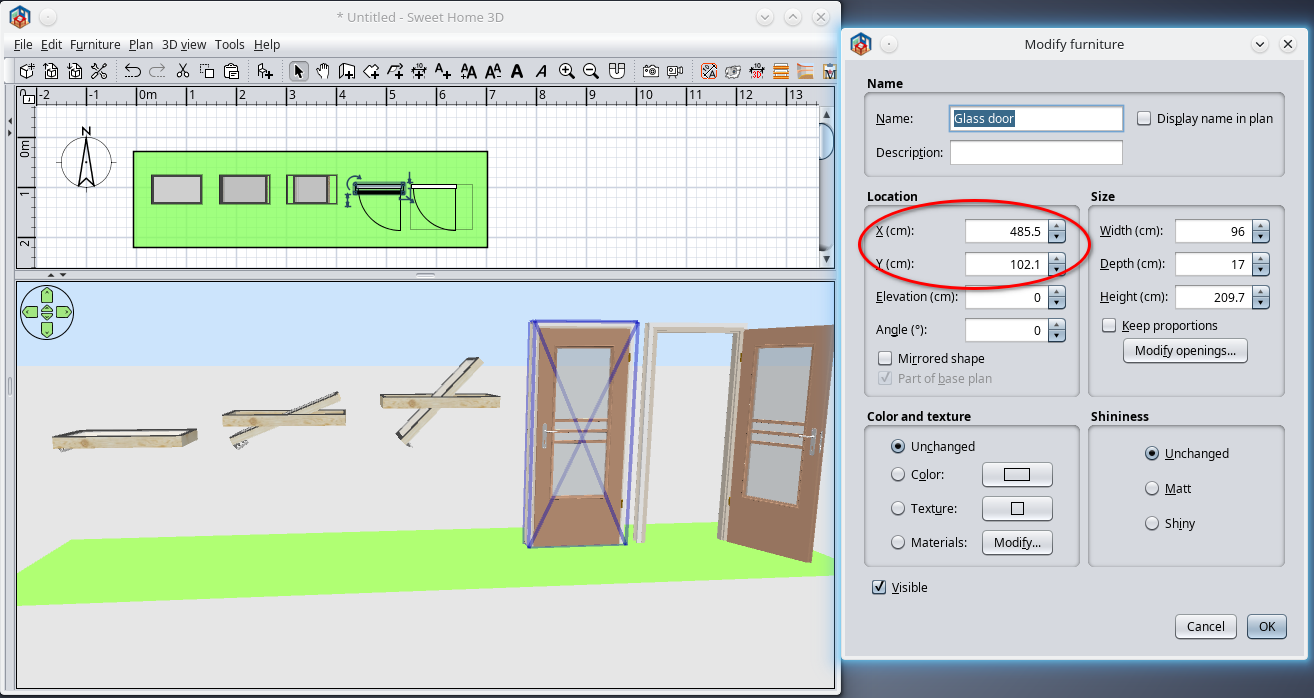
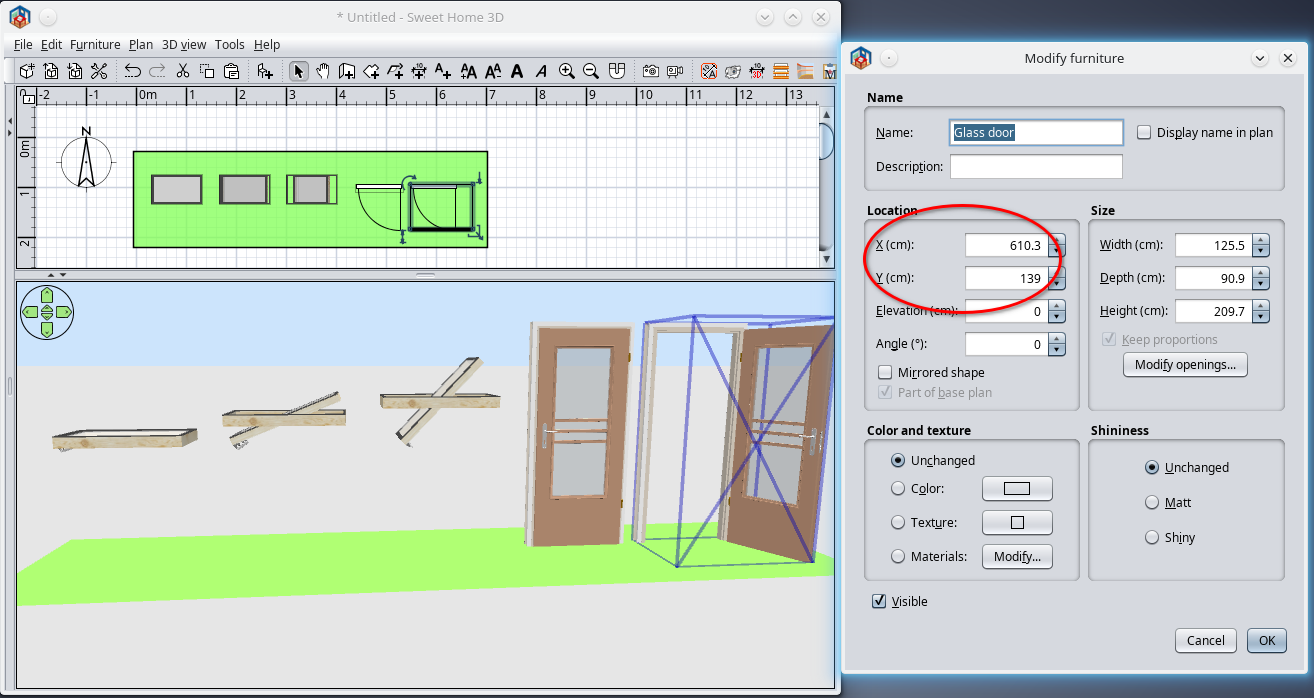
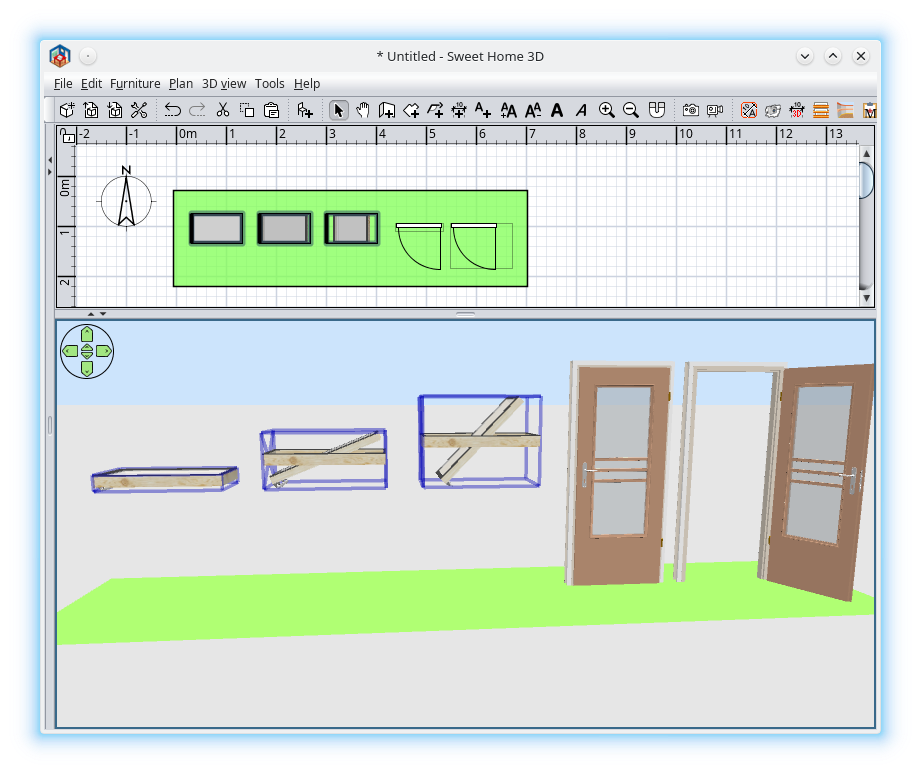
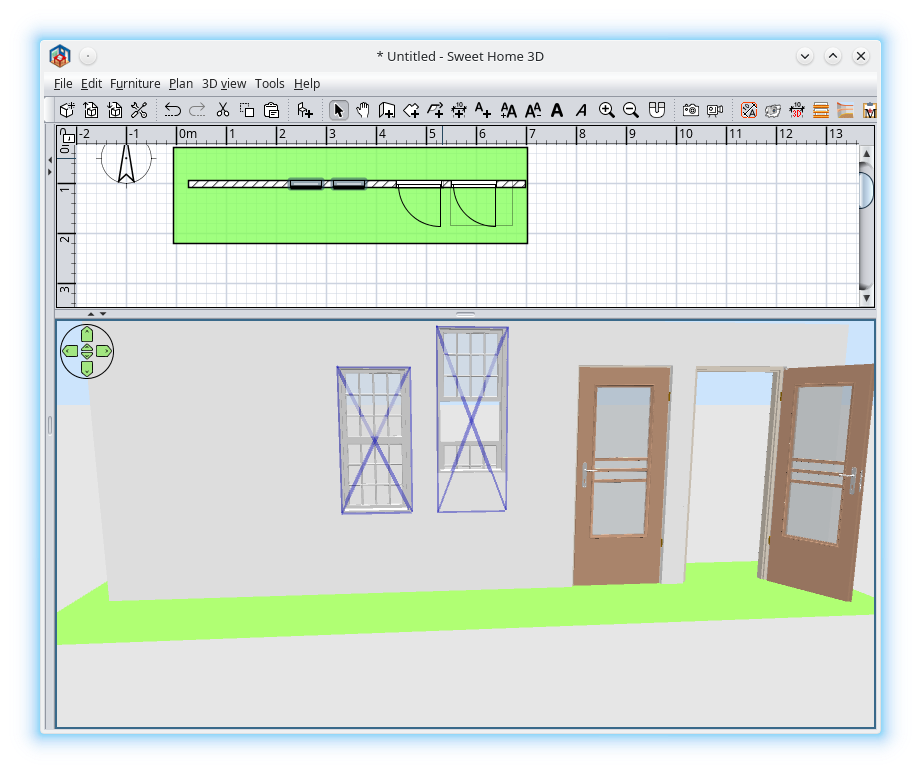
Re: Sweet Home 3D 7.2 That is what I want to say: 1. For X and Y position you have applied the corrections which it is OK. The fixed door frame appear in the correct position when open the door. ![]() 2. For Z it is not the same. The fixed window frame appear upper and upper. After every modify opening I have to manually adjust the elevation. 3. The same happen with Double-hung window when is slides down. ![]() I hope now I've explain correctly what I want to say. Many Thanks for this future version which have a lot of good improvements. I will need same time to discover and correctly use them .---------------------------------------- A computer program does what you tell it to do, not what you want it to do. Murphy's Law When all else fails, read the instructions. Murphy's Law If you don't like "AS IS", DIY. Dorin's law |
| Posted by Keet at Sep 5, 2023, 10:05:15 AM |
|
Re: Sweet Home 3D 7.2 I think what dorin wants to express is that an object doesn't remain in it's (vertical/Z) position when a deformation changes it's height. So no problem with the door because it stays the same height but the elevation of the velux window changes when opened. The non-deforming part of the window should remain at it's original position. From what I can see on the images the deformed furniture has it's bottom at the same elevation as the non-deformed was, which is not correct. ---------------------------------------- Dodecagon.nl 1300+ 3D models, manuals, and projects |
| Posted by dorin at Sep 5, 2023, 7:32:03 PM |
|
Re: Sweet Home 3D 7.2 @Keet You have partially right. So no problem with the door because it stays the same height Indeed but at different X and Y. If you look closely to my first two picture you could see I've arranged the doors at same Y and the corresponding X. After I open the door (Thanks God wasn't a Window ) the bounding box has been modified and of course the X and Y BUT,somewhere in the code Emmanuel compute the necessarily corrections so the door frame appear to stay in their position and only the door has been moved. I need this correction to be made also for Z. I've tried to find the responsible part of code but maybe I've don't try hard enough. ---------------------------------------- A computer program does what you tell it to do, not what you want it to do. Murphy's Law When all else fails, read the instructions. Murphy's Law If you don't like "AS IS", DIY. Dorin's law |
| Posted by Puybaret at Sep 13, 2023, 12:07:47 PM |
|
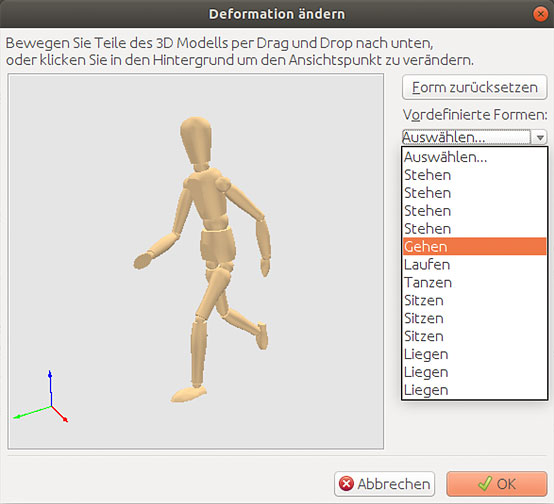
Re: Sweet Home 3D 7.2 Today, the Beta 8 updates the help in English and French and translations in almost languages (see updated links in the first post of this thread). Traditional and Simplified Chinese translations are still missing. If anybody want to help, Chinese speaking users would surely appreciate your contribution. German contributors weren't available this time too, therefore I translated the new words myself and with the help of web translation tools, I hope the translation is quite accurate (I studied German during 5 years at school and that should help to avoid main grammar faults). I have mostly some doubts about how to present the list of postures. At the moment, I used verbs as shown in the following image but I'm not sure it's correct. What do you think? ![]() Dorin, I was able to reproduce the issue you reported on double-hung windows but I don't find it's really a problem, since you obtain this error when you move a window part lower than the bottom of the window, a position which has no meaning. ---------------------------------------- Emmanuel Puybaret, Sweet Home 3D creator |
| Posted by Keet at Sep 13, 2023, 1:07:23 PM |
|
Re: Sweet Home 3D 7.2 Dorin, I was able to reproduce the issue you reported on double-hung windows but I don't find it's really a problem, since you obtain this error when you move a window part lower than the bottom of the window, a position which has no meaning. How is this not a problem? I agree that a deformed object should elevate if the deformation would make the elevation of the new bounding box negative. This situation could be resolved by placing the furniture on a lower level and raise the elevation to its original elevation on the higher level, IF it worked correctly.Take this example: A cabinet with a door with the hinge at the bottom. So the door folds down from vertical in front of the cabinet to vertical 'hanging' from the bottom of the cabinet. I've seen this type of furniture where the 'door' becomes a writing table but can also be lowered completely down. As long as the bottom of the opened 'hanging' door doesn't make the elevation of the new bounding box negative the cabinet itself should remain at it's position. In short: If a deformation doesn't cause a negative elevation, the non-deformed part should remain at its position, including the vertical position. By-the-way, this is not a specific 7.2 problem since the same happens in 7.1. ---------------------------------------- Dodecagon.nl 1300+ 3D models, manuals, and projects |
| Posted by dorin at Sep 13, 2023, 2:38:34 PM |
|
Re: Sweet Home 3D 7.2 you move a window part lower than the bottom of the window, a position which has no meaning. 1. Correct, but what if it is a pocket window? 2. If you use a roof part with a window already inserted (from a wall) will be also no problem. 3. If you make a hole in the roof and insert manually a closed turn window (like in this post ) you will have problems with the elevation every time you open the window. Anyway in the future release of RG-4.5 the holes and windows are automatically created and inserted on the roof in the correct position but I can't avoid future window elevation modifications. My workaround was to mentioned this in the future user manual of RG. Probably I will need to elaborate a little the operation for users: new elevation = old elevation - (new High - old High)/2 or something similarly with more screenshots. As you can see there it is solutions for everything ![]() ---------------------------------------- A computer program does what you tell it to do, not what you want it to do. Murphy's Law When all else fails, read the instructions. Murphy's Law If you don't like "AS IS", DIY. Dorin's law |
| Posted by Keet at Sep 13, 2023, 2:58:47 PM |
|
Re: Sweet Home 3D 7.2 new elevation = old elevation - (new High - old High)/2 If it were only that simple This is correct if the deformation extends both up and down with the same length. But take the example I gave in my previous post and the deformation goes 100% down. Same if you have an elevator escape hatch where the hatch door 'falls' down, so again 100% down. With the Velux window it could be 50/50 if the hinge is at the center of the rotating part AND at the center of the rest of the window, but even that is not always the case with this type of window. It's pretty difficult to determine what percentage extends up and down. After that the calculation to retain the elevation for the non-deformed part is trivial. It should be possible because similar calculations are done for left/right with doors and windows to keep the non-deforming part in place. The same can be used to retain the elevation. ---------------------------------------- Dodecagon.nl 1300+ 3D models, manuals, and projects |
| Posted by YGYL at Sep 14, 2023, 11:54:51 AM |
|
Re: Sweet Home 3D 7.2 Today, the Beta 8 updates the help in English and French and translations in almost languages (see updated links in the first post of this thread). Traditional and Simplified Chinese translations are still missing. If anybody want to help, Chinese speaking users would surely appreciate your contribution. Very willing to provide translations in Simplified Chinese. How exactly can I help you? |
| Posted by Keet at Sep 14, 2023, 2:03:13 PM |
|
Re: Sweet Home 3D 7.2 There's a nice Translation Guide that describes how you can create translations. ---------------------------------------- Dodecagon.nl 1300+ 3D models, manuals, and projects |
| Posted by Puybaret at Sep 14, 2023, 3:03:59 PM |
|
Re: Sweet Home 3D 7.2 The translation guide is mostly useful to start a new translation. As I finally tried to update Chinese translation from words existing in Sweet Home 3D + some very cautious use of web translation tools, it's almost ready (except for posture names) and I mostly need YGYL to check if it's ok. May I write you directly? ---------------------------------------- Emmanuel Puybaret, Sweet Home 3D creator |
| Posted by YGYL at Sep 14, 2023, 6:06:50 PM |
|
Re: Sweet Home 3D 7.2 The translation guide is mostly useful to start a new translation. As I finally tried to update Chinese translation from words existing in Sweet Home 3D + some very cautious use of web translation tools, it's almost ready (except for posture names) and I mostly need YGYL to check if it's ok. May I write you directly? Yes, my email is [email protected] I'm not sure if you can receive a reply |
| Posted by dorin at Sep 15, 2023, 8:23:06 PM |
|
Re: Sweet Home 3D 7.2 If it were only that simple You and Emmanuel have wright.![]() I've tried to find a general formula but I've fail (until now). A possibly workaround could be to have a specific prefix for fixed part (only one) on every adjustable model prefixed with sweethome3d_fixed_[part-name] like sweethome3d_fixed_exterior-frame which could be used as references for YXZ. I could also to add another custom property to roof windows and, to plugin, a deformation listener but this will produce a significant slowing of the entire program. So, at that moment, I will let it as is. With/Without this I'm wait the final 7.2 release to enjoy discovering the news ![]() ---------------------------------------- A computer program does what you tell it to do, not what you want it to do. Murphy's Law When all else fails, read the instructions. Murphy's Law If you don't like "AS IS", DIY. Dorin's law |
| Posted by Puybaret at Sep 20, 2023, 7:22:12 PM |
|
Re: Sweet Home 3D 7.2 Hello, Here's the last beta of Sweet Home 3D 7.2 (I hope). It provides last translations (thanks YGYL) and improvements in the 3D view handling. Moved objects should now better follow the mouse cursor along the horizontal axis, and I also added the ability to rotate the selected piece of furniture in the 3D view when you press Ctrl + Shift keys before pressing the mouse button to rotate it (alt / option + shift under macOS). Thanks for your tests. ---------------------------------------- Emmanuel Puybaret, Sweet Home 3D creator |
| Posted by Keet at Sep 20, 2023, 8:18:42 PM |
|
Re: Sweet Home 3D 7.2 A possibly workaround could be to have a specific prefix for fixed part (only one) on every adjustable model prefixed with sweethome3d_fixed_[part-name] like sweethome3d_fixed_exterior-frame No need for that. If a part doesn't have a deformation string it should stay where it is, 'simple' as that. Only the deformation parts should move.---------------------------------------- Dodecagon.nl 1300+ 3D models, manuals, and projects |
| Posted by Keet at Sep 20, 2023, 8:20:07 PM |
|
Re: Sweet Home 3D 7.2 Here's the last beta of Sweet Home 3D 7.2 (I hope): I'm going to try it. The previous beta worked quite nicely as well.---------------------------------------- Dodecagon.nl 1300+ 3D models, manuals, and projects |
| Posted by Puybaret at Sep 22, 2023, 8:05:55 PM |
|
Re: Sweet Home 3D 7.2 The final version of Sweet Home 3D 7.2 is out with a few more corrections in 3D handling. Thanks to all for your feedback and your tests ![]() ---------------------------------------- Emmanuel Puybaret, Sweet Home 3D creator |
| Posted by JonnyD at Sep 23, 2023, 9:57:39 AM |
|
Re: Sweet Home 3D 7.2 HI Emanuel - how long before it's on the Mac App Store please? |
| Posted by Puybaret at Sep 23, 2023, 12:26:45 PM |
|
Re: Sweet Home 3D 7.2 Probably 2 or 3 days ---------------------------------------- Emmanuel Puybaret, Sweet Home 3D creator |
| Posted by JonnyD at Sep 23, 2023, 2:29:18 PM |
|
Re: Sweet Home 3D 7.2 Can’t wait! I just posted a good review because I was fed up with some of those I’d read, where people just haven’t bothered to learn how to use SH3D |
| Posted by Daniels118 at Sep 23, 2023, 2:51:31 PM |
|
Re: Sweet Home 3D 7.2 For anyone who is not whatching the dedicated thread, I inform you that I've just released the version 4.0 of Pan 3D View plugin which is compatible with SweetHome3D 7.2. If you use Wirings and/or 3D dimension lines plugins, please update these too to the latest release available. A note about 3D dimension lines: since SH3D now supports vertical dimension lines, the plugin is no longer required for most cases, however it is still useful to draw dimension lines with generic orientation in space. |
| Posted by enkonyito at Sep 26, 2023, 6:35:05 AM |
|
Re: Sweet Home 3D 7.2 The final version of Sweet Home 3D 7.2 is out with a few more corrections in 3D handling. Thanks to all for your feedback and your tests ![]() As Keet noted here, I was able to add a new property to my library lights to replace the use of the Description property which can be changed by the user. By using the system property com.eteks.sweethome3d.additionalFurnitureProperties in a configuration file for the installer or as a JAR executable parameter, it is possible to display the new property column without it being editable because in this case the Other properties button does not appear. As for the management of this new property by the rendering plug-in, simply retrieve the object property from its name and test the values. ---------------------------------------- EnkoNyito |
| Posted by Keet at Sep 26, 2023, 10:39:30 AM |
|
Re: Sweet Home 3D 7.2 Great, I was already using the Description field to show the originating library (in bold) in the catalog tooltip. Without your change that would have interfered if I did that with your library. ---------------------------------------- Dodecagon.nl 1300+ 3D models, manuals, and projects |
| Posted by enkonyito at Sep 27, 2023, 10:41:55 PM |
|
Re: Sweet Home 3D 7.2 @Keet The Description field is accessible and editable for users since SH3D-7.1. For variable lights (automatic or daylight), there was a risk of interfering with the management of the rendering plug-in. Even if I had no feedback in this direction, I preferred to "secure" this management by updating the library with the new option proposed by SH3D-7.2. According to my tests, several additional properties can have the same name because their identifier is different when they are created. ---------------------------------------- EnkoNyito |
| Posted by Keet at Sep 28, 2023, 9:52:23 AM |
|
Re: Sweet Home 3D 7.2 Yes, the Description field was already available in 7.1., I've been using it since it first became available through the Furniture Library Editor. Until the new features in 7.2. you had no other choice than to use some field to store the data for you lights. Although it worked it was a solution out of necessity, one I as a developer try to avoid whenever possible. You seem to be of the same opinion since you made the effort to make it right. Most users will not realize how powerful this new addition to Sweet Home 3D is since it will mostly be used by plug-in developers. They now have to tools to add custom properties with a meaningful name and have control over them within their plug-ins. It gave you the option to create lights with custom properties not available in Sweet Home 3D. Great work and excellent use of the new custom properties! As far as I know you are the first one to use these custom properties in furniture available for Sweet Home 3D. ---------------------------------------- Dodecagon.nl 1300+ 3D models, manuals, and projects |
| Posted by INABCinema at Oct 17, 2023, 6:16:18 PM |
|
Re: Sweet Home 3D 7.2 Thank you so much for the 3D viewable measurements! This is something I have wished for years. I do have one additional wish, can the measurements have an end point elevation so we can do sloped (angled) measurements? Once again, thank you so much for this great feature. |
| Posted by Daniels118 at Oct 18, 2023, 8:17:50 AM |
|
Re: Sweet Home 3D 7.2 @INABCinema You can do it using the 3D dimension lines plugin: https://www.sweethome3d.com/support/forum/viewthread_thread,11543#53739 |
| Posted by vl4d at Oct 29, 2023, 7:26:49 PM |
|
Re: Sweet Home 3D 7.2 I have found minor problem In the furniture list order by level does not actually work ![]() (yes, i'm not using sweet home 3d for completely different use then it is meant to be used, but I kinda at least know how to use this sw) |
| Posted by Puybaret at Oct 30, 2023, 9:03:31 AM |
|
Re: Sweet Home 3D 7.2 Do you use levels at the same elevation? I see that the procedure which compares levels for sorting furniture might need some refinement because it doesn’t take into account level index at the same elevation. ---------------------------------------- Emmanuel Puybaret, Sweet Home 3D creator |
| Posted by Keet at Oct 30, 2023, 1:52:07 PM |
|
Re: Sweet Home 3D 7.2 Wouldn't the best way to sort levels be elevation+levelname? That would sort the levels from lowest to highest level and sort the levels at the same elevation by their name. Alternatively the levels could be sorted using the order of the level tabs which would nicely follow the order the user organized his levels. ---------------------------------------- Dodecagon.nl 1300+ 3D models, manuals, and projects |
| Posted by sjb007 at Oct 30, 2023, 4:20:02 PM |
|
Re: Sweet Home 3D 7.2 If we're collecting votes, then definitely use the ordering of the tabs. I was always of the opinion that the levels could be integrated into the furniture list as a single tree anyway. My model has a lot of levels and ends up over 4 rows of tabs. It eats important vertical space and is irritating from a usability point of view as the rows jump around when clicked. It would also make finding a particular levels furniture in the list much easier. |
| Posted by vl4d at Oct 30, 2023, 11:54:14 PM |
|
Re: Sweet Home 3D 7.2 Yes I do use levels at the same elevation. It is very minor issue, i do export it to csv and work with that, but for me verifying if I have all items i need to order (pipes, fittings, valves, ...) it is easier to just go trough the "level" and list of items directly in the sweet home 3d as it highlights me what the items in on the plan. |
| Posted by Puybaret at Nov 6, 2023, 12:50:43 PM |
|
Re: Sweet Home 3D 7.2 I corrected the order issue in the furniture list and the correction will be available in the next version. Levels in the list will be sorted in the same order as level tabs for consistency. ---------------------------------------- Emmanuel Puybaret, Sweet Home 3D creator |
| Posted by Keet at Nov 6, 2023, 1:48:47 PM |
|
Re: Sweet Home 3D 7.2 Great! Thank you. ---------------------------------------- Dodecagon.nl 1300+ 3D models, manuals, and projects |
| Posted by snmavronis at Feb 21, 2024, 12:05:57 AM |
|
Re: Sweet Home 3D 7.2 I have the newest 7.2 installed and even did a clean install. Just curious if SH3D has memory usage limits and/or file size limits? Still get that issue where I can load a large complex 233mb fie but can't do save-as or normal furniture file import without using drag and drop instead. I know building my home 3D model is not optimized like a pro (had someone here look at it) but the save-as not working (ignores me clicking on the menu option) is my big issue. Maybe if I combine multiple custom structures like stair steps into single models might help or do i have to dumb down the detail? My PC has 32gb RAM and an i7- 12700kf 3.6ghz CPU and AMD Radeon RX 6950 XT GPU and NVMe SSD drives. Maybe something to ponder for a future 7.3 version... ---------------------------------------- Steve N Mavronis - Retired PC Tech |
| Posted by Daniels118 at Feb 21, 2024, 7:19:22 AM |
|
Re: Sweet Home 3D 7.2 Yes, there is a configurable limit for the memory usage. Search for "How can I adjust the memory used by Sweet Home 3D?" in the FAQ. |
| Posted by Puybaret at Feb 21, 2024, 11:29:18 AM |
|
Re: Sweet Home 3D 7.2 By default, Sweet Home 3D 64 bit is configured to use up to 50% of free RAM under Windows so I'm not sure it's a memory problem. Could you report what information memory information is displayed in About dialog box, in the line indicating the Java used version? ---------------------------------------- Emmanuel Puybaret, Sweet Home 3D creator |
| Posted by snmavronis at Feb 21, 2024, 3:00:11 PM |
|
Re: Sweet Home 3D 7.2 Sweet Home 3D ® Version 7.2 OpenJDK version 11.0.18 - 64bit - 0.1 / 11.9 GB provided by Azul Systems, Inc. Java 3D version 1.6.2a - JOGL 2.5.0 provided by JogAmp Community PDF print provided by iText SVG export provided by FreeHEP SVG path compilation provided by Batik Photo rendering provided by SunFlow and YafaRay Please, visit http://www.sweethome3d.com/ for software updates and bug report. © Copyright 2006-2023 eTeks <[email protected]> Distributed under GNU General Public License ---------------------------------------- Steve N Mavronis - Retired PC Tech |
| Posted by snmavronis at Feb 21, 2024, 3:12:32 PM |
|
Re: Sweet Home 3D 7.2 Also I'm not using the Java Web Start version. ---------------------------------------- Steve N Mavronis - Retired PC Tech |
| Posted by Puybaret at Feb 21, 2024, 6:32:12 PM |
|
Re: Sweet Home 3D 7.2 It could be a special 3D model you imported, maybe a large one but not necessarily the largest one. Display the Model size column, sort the furniture list on this criterion and hide the largest ones until your 3D view runs normally, then make them visible one by one and check which one slows down the 3D view. But it could be also the number of objects in your project. ---------------------------------------- Emmanuel Puybaret, Sweet Home 3D creator |
| Posted by snmavronis at Feb 21, 2024, 8:26:32 PM |
|
Re: Sweet Home 3D 7.2 Okay I'll try hiding the largest models and test for that. I could see if it slowed down the 3D view but mine runs pretty fast. But not sure how that would make the save-as option not work. I can do a regular save and save compressed. I'll let you know when I get a chance to do some testing as you suggest. Thanks. ---------------------------------------- Steve N Mavronis - Retired PC Tech |
| Posted by Puybaret at Feb 21, 2024, 9:34:35 PM |
|
Re: Sweet Home 3D 7.2 If it’s just an issue with Save as menu item, it’s certainly another issue, maybe a permission issue in Windows. If you can still save with Save menu item, I would simply rename the file in Windows Explorer before saving the project. This will have the same effect as Save as menu item. ---------------------------------------- Emmanuel Puybaret, Sweet Home 3D creator |
| Posted by snmavronis at Feb 21, 2024, 10:25:48 PM |
|
Re: Sweet Home 3D 7.2 That's what I've been doing. It's just a major annoyance. Also the furniture import doesn't work either and when I do a 3D render I can't save the image. I have to make a screenshot of the preview window resized instead which probably isn't the better quality image. No other app on my Windows 11 Pro computer has such issues. This didn't happen on my Windows 10 computer from a year ago but I no longer have that system. Could be any of the Windows Updates during the year too. I used the regular Windows installer for SH3D and don't have Java installed. When I tried to reinstall before with the Java Web Start version SH3D keep trying to launching incorrectly in a web browser, I think. I have to go back and review my old forum posts when I complained about my issue before for the exact symptoms. Not sure what can be done on my end. I love this program and would hate to resort to learning a different app instead. I'd probably give it up and build cardboard models instead LOL. ---------------------------------------- Steve N Mavronis - Retired PC Tech |
| Posted by snmavronis at Feb 21, 2024, 11:25:09 PM |
|
Re: Sweet Home 3D 7.2 Another thing is I have tons of dimensions in my floor plans. Is that a bad thing? ---------------------------------------- Steve N Mavronis - Retired PC Tech |
| Posted by Puybaret at Feb 22, 2024, 12:27:10 AM |
|
Re: Sweet Home 3D 7.2 Did you try the suggestions in the FAQ Sweet Home 3D refuses to save a file I created. How can I fix this issue? By the way, can’t you import a 3D model by dragging its file from Windows explorer onto the plan in Sweet Home 3D window? ---------------------------------------- Emmanuel Puybaret, Sweet Home 3D creator |
| Posted by snmavronis at Feb 22, 2024, 4:28:44 AM |
|
Re: Sweet Home 3D 7.2 Yes I tried that with various memory settings, no effect on my issue. I tried it with and without the latest Java installed. Like I said I'm not running the Java Web Start version so don't know if that is required to use the .ini file. The drag and drop method works for the import stuff. Just makes it awkward and counter-intuitive. ---------------------------------------- Steve N Mavronis - Retired PC Tech |
| Posted by snmavronis at Feb 22, 2024, 4:32:05 AM |
|
Re: Sweet Home 3D 7.2 Also Controlled Folder Access is set to OFF. ---------------------------------------- Steve N Mavronis - Retired PC Tech |
| Posted by Puybaret at Feb 22, 2024, 8:47:06 AM |
|
Re: Sweet Home 3D 7.2 Are you able to save a new home? ---------------------------------------- Emmanuel Puybaret, Sweet Home 3D creator |
| Posted by snmavronis at Feb 22, 2024, 11:03:35 PM |
|
Re: Sweet Home 3D 7.2 I can do a regular file/save of my home from within SH3D, but can't do a file/save-as nor able to save a 3D rendering from the save button. The button does nothing. Obviously it's not folder permissions if I can do a regular save there and copy files there. ---------------------------------------- Steve N Mavronis - Retired PC Tech |
| Posted by Puybaret at Feb 23, 2024, 12:01:42 AM |
|
Re: Sweet Home 3D 7.2 But are you able to create a brand new home then save it? ---------------------------------------- Emmanuel Puybaret, Sweet Home 3D creator |
| Posted by snmavronis at Feb 23, 2024, 6:02:05 PM |
|
Re: Sweet Home 3D 7.2 I just created a 12'x12' room with walls and attempted to save it. Nothing happened. When I exit SH3D it asks, do you want to save home? I click save the dialog box goes away. I then go to exit SH3D and it keeps asking me to save it or changes will be lost. The only way I can exit is to click on cancel or do not save and then exit. Yet on my large home model I can open it and it does at least let me "save" changes but not do a save-as so I can give it a new name without overwriting the old one. Strange... I don't know if there is something within my Windows 11 Pro installation blocking SH3D features but this is the only program to have any sort of problem. Here is a list of all installed programs on my PC: Name & Version Intel(R) Wireless Bluetooth(R) 22.230.0.2 AMD WVR64 1.0.2 Intel(R) Management Engine Components 1.0.0.0 AMD Radeon USB LED Application 1.0.1 Microsoft Visual C++ 2010 x64 Redistributable - 10.0.40219 10.0.40219 Microsoft Visual C++ 2010 x86 Redistributable - 10.0.40219 10.0.40219 Microsoft Visual C++ 2013 x86 Minimum Runtime - 12.0.21005 12.0.21005 Microsoft Visual C++ 2013 x86 Additional Runtime - 12.0.21005 12.0.21005 AMD Settings 2024.0111.1250.2016 Microsoft Visual C++ 2022 X64 Additional Runtime - 14.36.32532 14.36.32532 Apple Software Update 2.7.0.3 iTunes 12.13.0.9 LibreOffice 24.2.0.3 24.2.0.3 ENE_X_AIC_HAL 1.0.6.3 AMD DVR64 1.0.2 WD_BLACK AN1500 1.0.12.0 Microsoft Visual C++ 2013 x64 Additional Runtime - 12.0.21005 12.0.21005 WD_BLACK D50 1.0.9.0 Verbatim_SureFireGaming_Product 1.0.3.11 Microsoft Visual C++ 2013 x64 Minimum Runtime - 12.0.21005 12.0.21005 Dynamic Application Loader Host Interface Service 1.0.0.0 Microsoft Visual C++ 2012 x64 Additional Runtime - 11.0.61030 11.0.61030 Documentation Manager 22.180.0.4 Ableton Push Driver v5.50.0 5.50.0 Intel(R) Icls 1.0.0.0 Bonjour 3.1.0.1 Apple Mobile Device Support 17.0.0.21 Intel(R) ME WMI Provider 1.0.0.0 Intel(R) Chipset Device Software 10.1.19376.8374 ENE_MousePad_HAL 1.0.2.0 4K Video Downloader 4.24.4.5430 Microsoft Visual C++ 2022 X86 Additional Runtime - 14.36.32532 14.36.32532 Microsoft Visual C++ 2012 x86 Additional Runtime - 11.0.61030 11.0.61030 Microsoft Visual C++ 2012 x64 Minimum Runtime - 11.0.61030 11.0.61030 ENE Video Capture Box HAL 1.0.5.15 Intel(R) Management Engine Driver 1.0.0.0 Ableton Live 11 Lite 11.0.0.0 Microsoft Visual C++ 2012 x86 Minimum Runtime - 11.0.61030 11.0.61030 Microsoft Update Health Tools 5.72.0.0 Microsoft Visual C++ 2022 X86 Minimum Runtime - 14.36.32532 14.36.32532 WD P40 Game Drive 1.0.2.18 Branding64 1.00.0009 ENE_External_Device_HAL 1.0.11.1 Microsoft Visual C++ 2022 X64 Minimum Runtime - 14.36.32532 14.36.32532 ENE_EHD_M2_HAL 1.0.12.2 AMD User Experience Program Installer 2340.0.0.111 ---------------------------------------- Steve N Mavronis - Retired PC Tech |
| Posted by Keet at Feb 23, 2024, 6:40:43 PM |
|
Re: Sweet Home 3D 7.2 If windows complains about that you know it's something with windows and not Sweet Home 3D. Maybe file creation rights in windows. ETA: oeps, missed that is not save-as for the project but for renderings. Ignore my post. ---------------------------------------- Dodecagon.nl 1300+ 3D models, manuals, and projects |
| Posted by Puybaret at Feb 23, 2024, 6:54:16 PM |
|
Re: Sweet Home 3D 7.2 Keet, this solution won't fix Steve's problem to save photos. It looks like Sweet Home 3D is just unable to display a file dialog box in Steve's case. Steve, could you check if there's some error log that could explain your issue? Please open a cmd window and run Sweet Home 3D redirecting errors to a file with a command like: "C:\Program Files\Sweet Home 3D\SweetHome3D.exe" 2>Desktop\log.txt---------------------------------------- Emmanuel Puybaret, Sweet Home 3D creator |
| Posted by Daniels118 at Feb 23, 2024, 6:59:26 PM |
|
Re: Sweet Home 3D 7.2 If we are lucky then there will be some java stacktrace written to stderr. You may apply the following steps to help us identify the problem: 1) Download this plugin and place it under "C:\Users\your_username\eTeks\Sweet Home 3D\plugins". 2) Start SH3D and reproduce the problem, then close SH3D (press cancel if required). 3) Open the file "C:\Users\your_username\eTeks\Sweet Home 3D\log.txt", copy the content and post it here (please use the Code button to format the text). P.S. for Emmanuel: sorry, we have written at the same time. |
| Posted by snmavronis at Feb 23, 2024, 11:32:14 PM |
|
Re: Sweet Home 3D 7.2 I just realized the text export I did was not the main software list. It must be dependent sub-programs and other stuff. Here is a list that I just hand typed because you can't copy/paste from the Settings screens: 4K Video Downloader Abelton Live 11 Lite AMD Product Verification Tool AMD Software Apple Mobile Device Support Apple Software Update Arcade Game Series: Galaga Arcade Game Series: Ms. Pac-Man ASIO4All Audacity Bonjour Canon IJ Printer Assistant Tool Canon IJ Scan Utility Canon TS6400 Series Driver Corsair iCUE5 Software CPUID CPU-Z MSI Dashboard DesktopOK Discord DOOM Flight Of Nova Demo Focusrite Audio drivers GIMP Google Calendar Google Chrome Guitar Pro 8 Intel(R) Chipset Device Software Intel(R) Wireless Bluetooth(R) Intel Management Engine Components iTunes LibreOffice MalwareBytes Pro Microsoft Edge Microsoft Edge WebView2 Runtime Microsoft Update Health Tools Microsoft Visual C++ 2010 x64 Redistributable Microsoft Visual C++ 2010 x86 Redistributable Microsoft Visual C++ 2012 Redistributable (x64) Microsoft Visual C++ 2012 Redistributable (x86) Microsoft Visual C++ 2013 Redistributable (x64) Microsoft Visual C++ 2013 Redistributable (x86) Microsoft Visual C++ 2015-2022 Redistributable (x64) Microsoft Visual C++ 2015-2022 Redistributable (x86) MSI Center SDK Notepad++ (64-bit x64) OpenShot Video Editor Pinball Arcade Quake Quake Champions Quake Live Realtek Audio Driver Remote Desktop Connection Standard Soundbank Steam Sweet Home 3D VLC Media Player ---------------------------------------- Steve N Mavronis - Retired PC Tech |
| Posted by Puybaret at Feb 23, 2024, 11:50:42 PM |
|
Re: Sweet Home 3D 7.2 Thanks for this list but it won’t help me to solve your issue (yet). Please try to get the error logs as explained in my previous post. ---------------------------------------- Emmanuel Puybaret, Sweet Home 3D creator |
| Posted by snmavronis at Feb 23, 2024, 11:58:56 PM |
|
Re: Sweet Home 3D 7.2 I installed the plugin but I can't find the log.txt file that would have been created today. I searched my entire computer. Just to note the SH3D program on my PC is installed at: "D:\Program Files (x86)\Sweet Home 3D" All my saved data (house plans folder) files, renders, plugins etc. are located at these locations: "C:\Users\snmav\Pictures\House Plans" "C:\Users\snmav\Pictures\House Plans\Custom" "C:\Users\snmav\Pictures\House Plans\Models" "C:\Users\snmav\Pictures\House Plans\OldSH3D" "C:\Users\snmav\Pictures\House Plans\Plug-ins" "C:\Users\snmav\Pictures\House Plans\Renders" "C:\Users\snmav\Pictures\House Plans\SH3D Models" "C:\Users\snmav\Pictures\House Plans\SH3D Textures" By default, homes and renders are saved (save-as when it's working) in the House Plans folder. Late I move them into other folders for organization. Do you think I should move these folders under my main Documents library folder? It started as images in the "house plans" folder for my home remodeling related projects before I ever heard of Sweet Home 3D and just kept using it after installing SH3D. ---------------------------------------- Steve N Mavronis - Retired PC Tech |
| Posted by snmavronis at Feb 24, 2024, 12:02:46 AM |
|
Re: Sweet Home 3D 7.2 Microsoft Windows [Version 10.0.22631.3155] (c) Microsoft Corporation. All rights reserved. C:\Windows\System32>"C:\Users\snmav\eTeks\Sweet Home 3D\log.txt" The system cannot find the path specified. There is no eTeks folder. ---------------------------------------- Steve N Mavronis - Retired PC Tech |
| Posted by snmavronis at Feb 24, 2024, 12:22:25 AM |
|
Re: Sweet Home 3D 7.2 P.S. Wish I could edit my posts. Maybe it would be better if I uninstall Sweet Home 3D. Reinstall it under it's normal default paths which should create the eTeks\Sweet Home 3D folders and install all the SH3D plugins to start over. My other data folders should be accessible. I feel it's had a short circuit maybe registry settings are borked. What to you think? ---------------------------------------- Steve N Mavronis - Retired PC Tech |
| Posted by Puybaret at Feb 24, 2024, 1:32:34 AM |
|
Re: Sweet Home 3D 7.2 Installing the program again won’t change anything. Pleeeaaase, run the program from a cmd window like I proposed. ---------------------------------------- Emmanuel Puybaret, Sweet Home 3D creator |
| Posted by sjb007 at Feb 24, 2024, 1:59:44 AM |
|
Re: Sweet Home 3D 7.2 @snmavronis Daniels gave you an incorrect path to find the log.txt file. This is strange as he wrote that little plugin C:\Users\<your username>\AppData\Roaming\eTeks\Sweet Home 3D\log.txtAppData is hidden by default in windows file explorer, so you may need to set explorer to show hidden files if you can't see it. Or just run the command like Emmanuel asked. Either one should give us more info. |
| Posted by snmavronis at Feb 24, 2024, 2:05:44 AM |
|
Re: Sweet Home 3D 7.2 C:\Windows\System32>"D:\Program Files (x86)\Sweet Home 3D\SweetHome3D.exe" 2>"C:\Users\snmav\Desktop\log.txt" WARNING: An illegal reflective access operation has occurred WARNING: Illegal reflective access by javax.media.j3d.JoglPipeline (file:/D:/Program%20Files%20(x86)/Sweet%20Home%203D/lib/java3d-1.6/j3dcore.jar) to method sun.awt.AppContext.getAppContext() WARNING: Please consider reporting this to the maintainers of javax.media.j3d.JoglPipeline WARNING: Use --illegal-access=warn to enable warnings of further illegal reflective access operations WARNING: All illegal access operations will be denied in a future release ---------------------------------------- Steve N Mavronis - Retired PC Tech |
| Posted by snmavronis at Feb 24, 2024, 2:08:01 AM |
|
Re: Sweet Home 3D 7.2 Here's the hidden AppData log.txt file: Exception in thread "AWT-EventQueue-0" java.lang.RuntimeException: java.lang.reflect.InvocationTargetException at com.eteks.sweethome3d.swing.ControllerAction.actionPerformed(Unknown Source) at com.eteks.sweethome3d.swing.ResourceAction$AbstractDecoratedAction.actionPerformed(Unknown Source) at java.desktop/javax.swing.AbstractButton.fireActionPerformed(AbstractButton.java:1967) at java.desktop/javax.swing.AbstractButton$Handler.actionPerformed(AbstractButton.java:2308) at java.desktop/javax.swing.DefaultButtonModel.fireActionPerformed(DefaultButtonModel.java:405) at java.desktop/javax.swing.DefaultButtonModel.setPressed(DefaultButtonModel.java:262) at java.desktop/javax.swing.AbstractButton.doClick(AbstractButton.java:369) at java.desktop/javax.swing.plaf.basic.BasicMenuItemUI.doClick(BasicMenuItemUI.java:1020) at java.desktop/javax.swing.plaf.basic.BasicMenuItemUI$Handler.mouseReleased(BasicMenuItemUI.java:1064) at java.desktop/java.awt.AWTEventMulticaster.mouseReleased(AWTEventMulticaster.java:297) at java.desktop/java.awt.Component.processMouseEvent(Component.java:6635) at java.desktop/javax.swing.JComponent.processMouseEvent(JComponent.java:3342) at java.desktop/java.awt.Component.processEvent(Component.java:6400) at java.desktop/java.awt.Container.processEvent(Container.java:2263) at java.desktop/java.awt.Component.dispatchEventImpl(Component.java:5011) at java.desktop/java.awt.Container.dispatchEventImpl(Container.java:2321) at java.desktop/java.awt.Component.dispatchEvent(Component.java:4843) at java.desktop/java.awt.LightweightDispatcher.retargetMouseEvent(Container.java:4918) at java.desktop/java.awt.LightweightDispatcher.processMouseEvent(Container.java:4547) at java.desktop/java.awt.LightweightDispatcher.dispatchEvent(Container.java:4488) at java.desktop/java.awt.Container.dispatchEventImpl(Container.java:2307) at java.desktop/java.awt.Window.dispatchEventImpl(Window.java:2772) at java.desktop/java.awt.Component.dispatchEvent(Component.java:4843) at java.desktop/java.awt.EventQueue.dispatchEventImpl(EventQueue.java:772) at java.desktop/java.awt.EventQueue$4.run(EventQueue.java:721) at java.desktop/java.awt.EventQueue$4.run(EventQueue.java:715) at java.base/java.security.AccessController.doPrivileged(Native Method) at java.base/java.security.ProtectionDomain$JavaSecurityAccessImpl.doIntersectionPrivilege(ProtectionDomain.java:85) at java.base/java.security.ProtectionDomain$JavaSecurityAccessImpl.doIntersectionPrivilege(ProtectionDomain.java:95) at java.desktop/java.awt.EventQueue$5.run(EventQueue.java:745) at java.desktop/java.awt.EventQueue$5.run(EventQueue.java:743) at java.base/java.security.AccessController.doPrivileged(Native Method) at java.base/java.security.ProtectionDomain$JavaSecurityAccessImpl.doIntersectionPrivilege(ProtectionDomain.java:85) at java.desktop/java.awt.EventQueue.dispatchEvent(EventQueue.java:742) at java.desktop/java.awt.EventDispatchThread.pumpOneEventForFilters(EventDispatchThread.java:203) at java.desktop/java.awt.EventDispatchThread.pumpEventsForFilter(EventDispatchThread.java:124) at java.desktop/java.awt.EventDispatchThread.pumpEventsForHierarchy(EventDispatchThread.java:113) at java.desktop/java.awt.EventDispatchThread.pumpEvents(EventDispatchThread.java:109) at java.desktop/java.awt.EventDispatchThread.pumpEvents(EventDispatchThread.java:101) at java.desktop/java.awt.EventDispatchThread.run(EventDispatchThread.java:90) Caused by: java.lang.reflect.InvocationTargetException at java.base/jdk.internal.reflect.NativeMethodAccessorImpl.invoke0(Native Method) at java.base/jdk.internal.reflect.NativeMethodAccessorImpl.invoke(NativeMethodAccessorImpl.java:62) at java.base/jdk.internal.reflect.DelegatingMethodAccessorImpl.invoke(DelegatingMethodAccessorImpl.java:43) at java.base/java.lang.reflect.Method.invoke(Method.java:566) ... 40 more Caused by: java.lang.IllegalArgumentException: Comparison method violates its general contract! at java.base/java.util.ComparableTimSort.mergeHi(ComparableTimSort.java:870) at java.base/java.util.ComparableTimSort.mergeAt(ComparableTimSort.java:487) at java.base/java.util.ComparableTimSort.mergeForceCollapse(ComparableTimSort.java:426) at java.base/java.util.ComparableTimSort.sort(ComparableTimSort.java:222) at java.base/java.util.Arrays.sort(Arrays.java:1249) at java.desktop/sun.awt.shell.Win32ShellFolderManager2.get(Win32ShellFolderManager2.java:313) at java.desktop/sun.awt.shell.ShellFolder.get(ShellFolder.java:259) at java.desktop/com.sun.java.swing.plaf.windows.WindowsFileChooserUI$DirectoryComboBoxModel.addItem(WindowsFileChooserUI.java:1087) at java.desktop/com.sun.java.swing.plaf.windows.WindowsFileChooserUI.doDirectoryChanged(WindowsFileChooserUI.java:74 1) at java.desktop/com.sun.java.swing.plaf.windows.WindowsFileChooserUI$11.propertyChange(WindowsFileChooserUI.java:832) at java.desktop/java.beans.PropertyChangeSupport.fire(PropertyChangeSupport.java:341) at java.desktop/java.beans.PropertyChangeSupport.firePropertyChange(PropertyChangeSupport.java:333) at java.desktop/java.beans.PropertyChangeSupport.firePropertyChange(PropertyChangeSupport.java:266) at java.desktop/java.awt.Component.firePropertyChange(Component.java:8731) at java.desktop/javax.swing.JFileChooser.setCurrentDirectory(JFileChooser.java:608) at java.desktop/javax.swing.JFileChooser.<init>(JFileChooser.java:362) at java.desktop/javax.swing.JFileChooser.<init>(JFileChooser.java:308) at com.eteks.sweethome3d.swing.FileContentManager.showFileChooser(Unknown Source) at com.eteks.sweethome3d.swing.FileContentManager.showSaveDialog(Unknown Source) at com.eteks.sweethome3d.swing.HomePane.showSaveDialog(Unknown Source) at com.eteks.sweethome3d.viewcontroller.HomeController.saveAs(Unknown Source) at com.eteks.sweethome3d.viewcontroller.HomeController.saveAs(Unknown Source) ... 44 more Exception in thread "AWT-EventQueue-0" java.lang.RuntimeException: java.lang.reflect.InvocationTargetException at com.eteks.sweethome3d.swing.ControllerAction.actionPerformed(Unknown Source) at com.eteks.sweethome3d.swing.ResourceAction$AbstractDecoratedAction.actionPerformed(Unknown Source) at java.desktop/javax.swing.AbstractButton.fireActionPerformed(AbstractButton.java:1967) at java.desktop/javax.swing.AbstractButton$Handler.actionPerformed(AbstractButton.java:2308) at java.desktop/javax.swing.DefaultButtonModel.fireActionPerformed(DefaultButtonModel.java:405) at java.desktop/javax.swing.DefaultButtonModel.setPressed(DefaultButtonModel.java:262) at java.desktop/javax.swing.AbstractButton.doClick(AbstractButton.java:369) at java.desktop/javax.swing.plaf.basic.BasicMenuItemUI.doClick(BasicMenuItemUI.java:1020) at java.desktop/javax.swing.plaf.basic.BasicMenuItemUI$Handler.mouseReleased(BasicMenuItemUI.java:1064) at java.desktop/java.awt.AWTEventMulticaster.mouseReleased(AWTEventMulticaster.java:297) at java.desktop/java.awt.Component.processMouseEvent(Component.java:6635) at java.desktop/javax.swing.JComponent.processMouseEvent(JComponent.java:3342) at java.desktop/java.awt.Component.processEvent(Component.java:6400) at java.desktop/java.awt.Container.processEvent(Container.java:2263) at java.desktop/java.awt.Component.dispatchEventImpl(Component.java:5011) at java.desktop/java.awt.Container.dispatchEventImpl(Container.java:2321) at java.desktop/java.awt.Component.dispatchEvent(Component.java:4843) at java.desktop/java.awt.LightweightDispatcher.retargetMouseEvent(Container.java:4918) at java.desktop/java.awt.LightweightDispatcher.processMouseEvent(Container.java:4547) at java.desktop/java.awt.LightweightDispatcher.dispatchEvent(Container.java:4488) at java.desktop/java.awt.Container.dispatchEventImpl(Container.java:2307) at java.desktop/java.awt.Window.dispatchEventImpl(Window.java:2772) at java.desktop/java.awt.Component.dispatchEvent(Component.java:4843) at java.desktop/java.awt.EventQueue.dispatchEventImpl(EventQueue.java:772) at java.desktop/java.awt.EventQueue$4.run(EventQueue.java:721) at java.desktop/java.awt.EventQueue$4.run(EventQueue.java:715) at java.base/java.security.AccessController.doPrivileged(Native Method) at java.base/java.security.ProtectionDomain$JavaSecurityAccessImpl.doIntersectionPrivilege(ProtectionDomain.java:85) at java.base/java.security.ProtectionDomain$JavaSecurityAccessImpl.doIntersectionPrivilege(ProtectionDomain.java:95) at java.desktop/java.awt.EventQueue$5.run(EventQueue.java:745) at java.desktop/java.awt.EventQueue$5.run(EventQueue.java:743) at java.base/java.security.AccessController.doPrivileged(Native Method) at java.base/java.security.ProtectionDomain$JavaSecurityAccessImpl.doIntersectionPrivilege(ProtectionDomain.java:85) at java.desktop/java.awt.EventQueue.dispatchEvent(EventQueue.java:742) at java.desktop/java.awt.EventDispatchThread.pumpOneEventForFilters(EventDispatchThread.java:203) at java.desktop/java.awt.EventDispatchThread.pumpEventsForFilter(EventDispatchThread.java:124) at java.desktop/java.awt.EventDispatchThread.pumpEventsForHierarchy(EventDispatchThread.java:113) at java.desktop/java.awt.EventDispatchThread.pumpEvents(EventDispatchThread.java:109) at java.desktop/java.awt.EventDispatchThread.pumpEvents(EventDispatchThread.java:101) at java.desktop/java.awt.EventDispatchThread.run(EventDispatchThread.java:90) Caused by: java.lang.reflect.InvocationTargetException at java.base/jdk.internal.reflect.NativeMethodAccessorImpl.invoke0(Native Method) at java.base/jdk.internal.reflect.NativeMethodAccessorImpl.invoke(NativeMethodAccessorImpl.java:62) at java.base/jdk.internal.reflect.DelegatingMethodAccessorImpl.invoke(DelegatingMethodAccessorImpl.java:43) at java.base/java.lang.reflect.Method.invoke(Method.java:566) ... 40 more Caused by: java.lang.IllegalArgumentException: Comparison method violates its general contract! at java.base/java.util.ComparableTimSort.mergeHi(ComparableTimSort.java:870) at java.base/java.util.ComparableTimSort.mergeAt(ComparableTimSort.java:487) at java.base/java.util.ComparableTimSort.mergeForceCollapse(ComparableTimSort.java:426) at java.base/java.util.ComparableTimSort.sort(ComparableTimSort.java:222) at java.base/java.util.Arrays.sort(Arrays.java:1249) at java.desktop/sun.awt.shell.Win32ShellFolderManager2.get(Win32ShellFolderManager2.java:313) at java.desktop/sun.awt.shell.ShellFolder.get(ShellFolder.java:259) at java.desktop/com.sun.java.swing.plaf.windows.WindowsFileChooserUI$DirectoryComboBoxModel.addItem(WindowsFileChooserUI.java:1087) at java.desktop/com.sun.java.swing.plaf.windows.WindowsFileChooserUI.doDirectoryChanged(WindowsFileChooserUI.java:74 1) at java.desktop/com.sun.java.swing.plaf.windows.WindowsFileChooserUI$11.propertyChange(WindowsFileChooserUI.java:832) at java.desktop/java.beans.PropertyChangeSupport.fire(PropertyChangeSupport.java:341) at java.desktop/java.beans.PropertyChangeSupport.firePropertyChange(PropertyChangeSupport.java:333) at java.desktop/java.beans.PropertyChangeSupport.firePropertyChange(PropertyChangeSupport.java:266) at java.desktop/java.awt.Component.firePropertyChange(Component.java:8731) at java.desktop/javax.swing.JFileChooser.setCurrentDirectory(JFileChooser.java:608) at java.desktop/javax.swing.JFileChooser.<init>(JFileChooser.java:362) at java.desktop/javax.swing.JFileChooser.<init>(JFileChooser.java:308) at com.eteks.sweethome3d.swing.FileContentManager.showFileChooser(Unknown Source) at com.eteks.sweethome3d.swing.FileContentManager.showSaveDialog(Unknown Source) at com.eteks.sweethome3d.swing.HomePane.showSaveDialog(Unknown Source) at com.eteks.sweethome3d.viewcontroller.HomeController.saveAs(Unknown Source) at com.eteks.sweethome3d.viewcontroller.HomeController.saveAs(Unknown Source) ... 44 more ---------------------------------------- Steve N Mavronis - Retired PC Tech |
| Posted by Daniels118 at Feb 24, 2024, 1:13:35 PM |
|
Re: Sweet Home 3D 7.2 @sbj007 My plugin uses the same method used by SH3D to get the output folder, it is the result of a computation, so it may vary depending on the environment. @snmavronis Btw, the plugin and the output redirection method from the command line are mutually exclusive, so only one should be used. @snmavronis, @PUYBARET The specific problem it is described here: https://bugs.openjdk.org/browse/JDK-8305072 and a possible workaround that may be applied without waiting for a bug fix is here (but I'm not able to test it): https://github.com/apache/netbeans/discussions/6361 It would be nice to see which files are actually breking the file dialog. |
| Posted by Puybaret at Feb 24, 2024, 4:26:25 PM |
|
Re: Sweet Home 3D 7.2 Thanks Steve, that's the information I was looking for. You may not understand a word of it, but for Java programmers, it contains the information that will help them to fix your issue. I'm pretty sure you actually encountered the bug #8305072 in Java mentioned by Daniele, which is not fixed yet. Reading the comments of that bug report, it seems to be an issue bound to homonyms in the file system. Very strange, since a file name is supposed to be unique in a directory, but that could be half true from a user's point of view when localization is involved. Could you check in the folder where you expect to save your files if there are some homonyms or files named with unconventional names? ---------------------------------------- Emmanuel Puybaret, Sweet Home 3D creator |
| Posted by snmavronis at Feb 24, 2024, 5:09:47 PM |
|
Re: Sweet Home 3D 7.2 I appreciate you guys spending time of this. I can't find any files with the same name within a folder. Sub-folders shouldn't matter but Windows won't allow that anyway, it would ask to overwrite or rename. In my home save folder I tried renaming some files that were home remodeling quotes containing # and ( ) and , symbols even though they are legal filename characters. Then I moved all unnecessary files into sub-folders. I also deleted some models in my home; computer equipment that was on a desk and a regular save. No change, can't do a save-as, no error on-screen it just ignores the menu selection. Here is a current directory list: C:\Users\snmav\Pictures\House Plans>dir Volume in drive C is Windows Volume Serial Number is 2E85-8F3A Directory of C:\Users\snmav\Pictures\House Plans 02/24/2024 11:00 AM <DIR> . 11/23/2023 04:15 PM <DIR> .. 02/24/2024 10:49 AM 195,217,656 3200future156.sh3d 11/03/2022 04:45 PM 259,695,828 3200SH3Dfuture144.sh3d 02/25/2023 06:20 PM 259,698,668 3200SH3Dfuture145.sh3d 03/31/2023 09:47 PM 259,698,674 3200SH3Dfuture146.sh3d 06/24/2023 09:50 PM 270,073,104 3200SH3Dfuture147.sh3d 07/11/2023 11:00 AM 272,234,491 3200SH3Dfuture148.sh3d 07/23/2023 05:27 PM 289,812,997 3200SH3Dfuture149.sh3d 08/10/2023 01:22 PM 312,102,837 3200SH3Dfuture150.sh3d 08/16/2023 08:39 PM 244,547,641 3200SH3Dfuture151.sh3d 08/18/2023 10:30 AM 244,548,342 3200SH3Dfuture152.sh3d 02/21/2024 05:02 PM 241,391,825 3200SH3Dfuture153.sh3d 02/21/2024 10:47 PM 241,391,873 3200SH3Dfuture154TV.sh3d 02/24/2024 09:21 AM 241,401,991 3200SH3Dfuture155TV.sh3d 07/29/2023 08:04 PM <DIR> Custom 02/24/2024 10:59 AM <DIR> Diagrams 02/24/2024 11:00 AM <DIR> Misc 01/16/2024 11:40 AM <DIR> Models 02/21/2024 11:13 PM <DIR> OldSH3D 02/23/2024 05:34 PM <DIR> Plug-ins 02/21/2024 10:58 PM <DIR> Renders 02/24/2024 10:42 AM <DIR> SH3D Models 08/19/2023 04:49 PM <DIR> SH3D Textures 02/23/2024 05:40 PM 11,384 test.sh3d 02/24/2024 10:42 AM <DIR> Textures 14 File(s) 3,331,827,311 bytes 12 Dir(s) 404,607,152,128 bytes free ---------------------------------------- Steve N Mavronis - Retired PC Tech |
| Posted by Puybaret at Feb 24, 2024, 6:38:54 PM |
|
Re: Sweet Home 3D 7.2 Steve, I sent you an email with a special version which may fix your issue, using a FileDialog rather than a JFileChooser instance in case the error you reported happens. If it works, I'll commit the change in source code. ---------------------------------------- Emmanuel Puybaret, Sweet Home 3D creator |
| Posted by Puybaret at Feb 24, 2024, 7:32:54 PM |
|
Re: Sweet Home 3D 7.2 As I fear that the Java bug #8305072 takes a long a long time to be fixed (it seems complicated to reproduce), I chose to circumvent it by using a FileDialog rather than a JFileChooser instance in case this error happens (see commit #8910). Steve confirmed that it fixed his problem. I'll publish a version 7.3 Beta soon with other small changes. ---------------------------------------- Emmanuel Puybaret, Sweet Home 3D creator |
| Posted by snmavronis at Feb 24, 2024, 8:21:05 PM |
|
Re: Sweet Home 3D 7.2 Thank you so much! This has been plaguing me for a year and glad your beta version fixed the issue. The final test will be when I do a render again and make sure that allows me to save it vs resorting to a preview screenshot. But I'm confident that your switch to FileDialog nixed the issue. ---------------------------------------- Steve N Mavronis - Retired PC Tech |
|
|
Current timezone is GMT Dec 19, 2025, 7:57:50 PM |