Hi All !
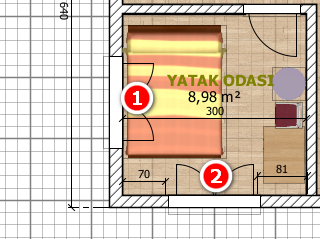
Can we turn off window opening directions in Plan?
Thank you.
|
Sweet Home 3D Forum » List all forums » » Forum: 3D models and textures » » » Thread: Window opening directions |
|
| Print at Sep 21, 2026, 7:19:10 AM | |
| Posted by k005 at Sep 9, 2022, 10:58:52 AM |
|
Window opening directions Hi All ! Can we turn off window opening directions in Plan? Thank you. |
| Posted by Puybaret at Sep 9, 2022, 12:06:37 PM |
|
Re: Window opening directions You'll have to modify the furniture library SH3F file where these windows come from, removing the properties starting by doorOrWindowSash from the PluginFurnitureCatalog.properties file found in the SH3F file (see also this thread) For the windows in the default catalog, change the same properties in the DefaultFurnitureCatalog.properties file found in Furniture.jar file. This file can be found in the installation folder of Sweet Home 3D. If you want to turn off this drawing from a plug-in, it's not possible. ---------------------------------------- Emmanuel Puybaret, Sweet Home 3D creator |
| Posted by k005 at Sep 9, 2022, 2:01:23 PM |
|
Re: Window opening directions Understood. Thank you. |
| Posted by Keet at Sep 9, 2022, 3:33:00 PM |
|
Re: Window opening directions I don't know why you would want to erase the display of the opening but there is a workaround to achieve this. Export the door or window and import it again as door or window. Since it now doesn't come from the furniture library it also doesn't have the extra properties to display the opening. Make sure you give it a recognizable name because it will look the same as the original furniture but without the display of the opening in the 2D view. ---------------------------------------- Dodecagon.nl 1300+ 3D models, manuals, and projects |
| Posted by k005 at Sep 9, 2022, 4:10:28 PM |
|
Re: Window opening directions The reason why I don't want the opening direction is that I'm confusing it with the opening directions of the doors... and we didn't specify the opening direction for the windows many years ago when we were drawing with a rapido pen... * Now if I do as you have done, what automatic division does the wall do? |
| Posted by shoulders at Oct 16, 2022, 5:05:57 PM |
|
Re: Window opening directions This is a useful method if you want to use windows to make a conservatory but without all of the window openings. |
| Posted by Keet at Oct 17, 2022, 10:23:59 AM |
|
Re: Window opening directions This is a useful method if you want to use windows to make a conservatory but without all of the window openings. If you are creating your own custom conservatory I wouldn't use windows. Just create glass walls using boxes and glass. Your model will be smaller and without the unneeded opening displays.To create glass use a box the size of the glass you need. Export the box and name it "Glass.obj". Edit the Glass.obj and Glass.mtl files like this: Edit the Glass.obj file and replace "usemtl bottom", "usemtl top", "usemtl left", "usemtl right", "usemtl back", and "usemtl front" with "usemtl Glass". This should result in having 6 times "usemtl Glass" in the Glass.obj file. Save the file. Edit the Glass.mtl file and remove everything under the top comment lines (#), then insert this block of code: newmtl GlassImport the Glass.obj file and you have a Glass object that you can resize to any format. You can still change the color of the glass. You can use this same glass object for any other furniture you create that needs glass. You now also know how to change a property in existing furniture to glass. ---------------------------------------- Dodecagon.nl 1300+ 3D models, manuals, and projects |
| Posted by shoulders at Oct 18, 2022, 10:51:26 AM |
|
Re: Window opening directions thanks Keet, I will have a look at this method. |

|
Current timezone is GMT Sep 21, 2026, 7:19:10 AM |