Print at Jan 21, 2026, 7:51:48 AM
Posts: 11   Pages: 2   [ 1 2 | Next Page ]
View all posts in this thread on one page
Posted by k005 at Aug 25, 2022, 8:37:33 AM
Plugin Load
Hello everyone

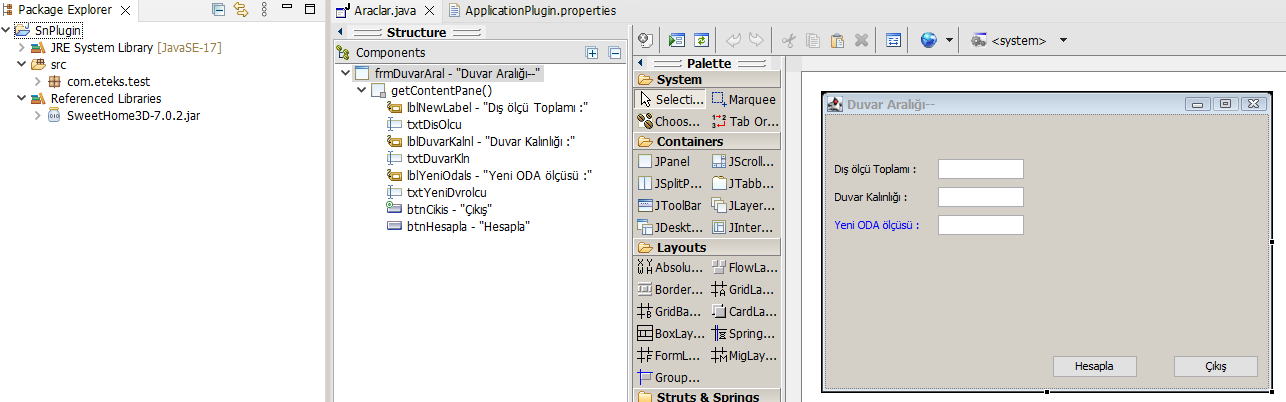
In this way, I created an application window consisting of a window and texboxes.

I want to run it as a plugin on sweet home.

for example placing it in the tools menu.

Which codes should I add to which class?

*****
import javax.swing.JOptionPane;
import com.eteks.sweethome3d.plugin.Plugin;
import com.eteks.sweethome3d.plugin.PluginAction;


public Action() {
putPropertyValue(Property.NAME, "window-1");
putPropertyValue(Property.MENU, "Tools");

setEnabled(true);
}
****


Posted by k005 at Aug 25, 2022, 8:40:16 AM
Re: Plugin Load


Posted by Daniels118 at Aug 25, 2022, 11:58:40 AM
Re: Plugin Load
Maybe you should first understand the workflow.

You have to create at least 2 classes:
- a class which extends Plugin;
- one or more classes which extend PluginAction. One for each menu entry or toolbar button.

The first class must implement the getActions method, which must return an array of instances of the second classes (one instance for each of them). Each of these instances will be rendered as a menu item or a toolbar button. These classes must implement the execute method which will be called whenever the user clicks on the corresponding menu item/toolbar button.
What to do in this method is up to you, you may open a window or shutdown the user's pc, it depends on what your plugin should do.

Read the developer's guide for further details.

Posted by k005 at Aug 25, 2022, 8:03:55 PM
Re: Plugin Load
Now, by simplifying what you wrote, I think let's go straight to action.

What I want to do is for this form to work on sweet for now.

if you can tell me where to write the required code and in which class this will work... can you help me at this point?

I read the part you mentioned.

Thank you.

Posted by Puybaret at Aug 25, 2022, 11:45:19 PM
Re: Plugin Load
You could try to modify the execute method in the Volume plug-in you succeeded to generate, but if you’re new to Java and don’t understand its statements, I fear you won’t go very far. What about learning more Java and Swing on your side first?
----------------------------------------
Emmanuel Puybaret, Sweet Home 3D creator

Posted by k005 at Aug 26, 2022, 8:03:58 AM
Re: Plugin Load
Yes, you are right.

I'm beginner level. Now tell me, I have an idea about it.

If I send you my work, can you make the missing parts work in sweet home and send it to me?

this would be a start for me to learn java.

Thank you.

Posted by Puybaret at Aug 26, 2022, 10:16:56 AM
Re: Plugin Load
Sorry, even if I teach Java from time to time, my support on this forum doesn’t consist of helping users learning a programming language, and certainly not programming for them.
----------------------------------------
Emmanuel Puybaret, Sweet Home 3D creator

Posted by k005 at Aug 26, 2022, 10:48:39 AM
Re: Plugin Load
OK. Thank you

Posted by k005 at Aug 29, 2022, 8:40:41 PM
Re: Plugin Load
Yes. My first plugin is ready. it was nice.

Thanks to the helpful friends.


Posted by Puybaret at Aug 29, 2022, 9:25:31 PM
Re: Plugin Load
Congratulations!
What does it do?
----------------------------------------
Emmanuel Puybaret, Sweet Home 3D creator

Posts: 11   Pages: 2   [ 1 2 | Next Page ]