Print at Dec 16, 2025, 10:06:54 AM View all posts in this thread on one page
Posted by drag at Oct 18, 2009, 12:11:22 AM
confused   Changing the Floor size..?
When I Create Photo I see my ground texture extend all the way to the horizon...

How do I either adjust the Horizon or force the ground texture to match that of my floor plan?

I also would like to put a photo of my view from my apartment out the window but when I import it as a texture. The bottom of the image is displayed at the horizon... So knowing how to adjust the horizon would be helpful too...

I couldn't find anything in the help or the forums on this.

Thanks!
Posted by Puybaret at Oct 19, 2009, 3:35:43 PM
Re: Changing the Floor size..?
You have to create a room and change its floor texture.
If you want a surface that covers all your home, double-click on one of its walls when the create room tool is selected.
----------------------------------------
Emmanuel Puybaret, Sweet Home 3D creator

Posted by drag at Oct 20, 2009, 1:35:29 AM
Re: Changing the Floor size..?
Great.. thank you!

Can you tell me about the horizon as well? I'd like to have the view of buildings out the apartment window...

Posted by Puybaret at Oct 20, 2009, 10:05:13 AM
Re: Changing the Floor size..?
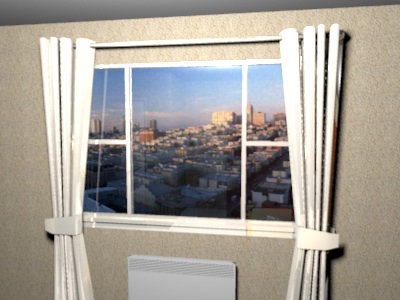
I think the best tip to get a nice horizon is to apply a photo on a dummy wall at the exterior.
For example, to create the following image


I created a wall at the exterior of the room and changed the side texture of the wall with an imported photo. When I imported that photo as a texture, I set the same height as the one of the wall (250 cm).
A last tip : to ensure the exterior view is correctly enlighted, I put a dummy ceiling close to it (Sweet Home 3D creates a new light in the middle of each ceiling).

I created the previous image with the HotelRoom.sh3d file joined to this message.
----------------------------------------
Attachment HotelRoom.sh3d (577085 bytes) (Download count: 5534) (Horizon with a photo on a dummy wall)

----------------------------------------
Emmanuel Puybaret, Sweet Home 3D creator