|
Sweet Home 3D Forum » List all forums » » Forum: Features use and tips » » » Thread: Best Render Settings |
|
| Print at Dec 16, 2025, 10:36:34 AM | View all posts in this thread on one page |
| Posted by snmavronis at Mar 19, 2021, 1:34:03 PM |
|
Best Render Settings Any tips or your personal preferences on best quality render settings using Sunflow? I am reading this PDF - Configuring Sunflow Rendering Engine I didn't realize some filter settings have blur and non-blur effects! I think my main problems are with some downloaded furniture models. Some faces render triangulated shading instead of flat plane, for example the gas range stove I'm using because it closely matches the real one in our kitchen. I've tried substituting textures for colors (to see if random inverted faces go away) but in this case doesn't change anything because it must be in the mesh geometry of the model. Either way I'd be interested in reading about your rendering setting preferences to get the best quality photo-realistic image. ---------------------------------------- Steve N Mavronis - Retired PC Tech |
| Posted by SeppoV12 at Mar 19, 2021, 5:19:58 PM |
|
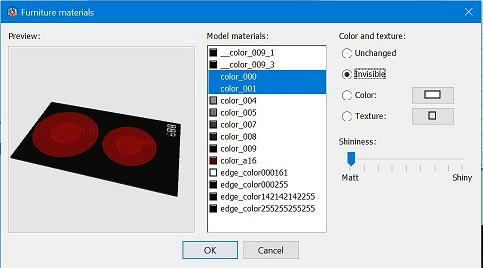
Re: Best Render Settings I think my main problems are with some downloaded furniture models. Some faces render triangulated shading instead of flat plane, I gues you already have modified materials of imported model so that unwanted materials hiding inside the model are made invisible? If not, it's worth to try. 3D view in these cases are OK but rendering might bring them visible. |
| Posted by snmavronis at Mar 20, 2021, 12:33:22 AM |
|
Re: Best Render Settings I always make edges invisible. They are annoying to look at anyway. ---------------------------------------- Steve N Mavronis - Retired PC Tech |
| Posted by snmavronis at Mar 20, 2021, 6:08:24 PM |
|
Re: Best Render Settings New photo render I did in Sweet Home 3D simulating our kitchen remodel which hopefully will be finished in a few weeks. All the cabinets, pendant light, and countertops I made from scratch. I'm still having issues with the downloaded gas stove model rendering intermittent unwanted triangle faces. [Sunflow 2-4 AA 12:19 minutes] ![]() ---------------------------------------- Steve N Mavronis - Retired PC Tech |
| Posted by snmavronis at Mar 21, 2021, 4:59:45 AM |
|
Re: Best Render Settings I fixed having issues with the downloaded gas stove model rendering intermittent unwanted triangle faces. After I exported it as OBJ and imported it again there were extra black materials that I changed to white. Now it's not messing up anymore. I added a white control panel texture like I did with the microwave to represent my real appliances. I'm not sure about the microwave window if it's some reflection or not. I also changed my pendant model to be shorter without the 6" rods to make it now 31.5" above the peninsula which is more practical. [Sunflow 2-4 AA, 12 minutes] ![]() ---------------------------------------- Steve N Mavronis - Retired PC Tech |

| Posted by SeppoV12 at Mar 21, 2021, 11:19:32 AM |
|
Re: Best Render Settings You have solved problem with stove and unwanted triangle faces, great! But I am bit stubborn person, so I want to show what I meant at first time. ![]() Triangles seen on left hotplate disappeared when two colors were made invisible. ![]() Now I am waiting for your finished kitchen.. |
| Posted by snmavronis at Mar 21, 2021, 3:22:22 PM |
|
Re: Best Render Settings Yeah I guess that I could have tried making all the unwanted black material textures invisible instead. Maybe I should test that and export/import to see if they totally go away in the materials list or simply edit the MTL file except I probably wouldn’t know what was what in that list. Easier to check it visually. ---------------------------------------- Steve N Mavronis - Retired PC Tech |
| Posted by snmavronis at Mar 21, 2021, 3:28:25 PM |
|
Re: Best Render Settings Oh I wanted to ask, why are all the high quality filters blur only? Seems counterintuitive. ---------------------------------------- Steve N Mavronis - Retired PC Tech |
|
|
Current timezone is GMT Dec 16, 2025, 10:36:34 AM |