|
Sweet Home 3D Forum » List all forums » » Forum: Features use and tips » » » Thread: fill space in between internal/external walls |
|
| Print at Jan 11, 2026, 11:41:14 PM | View all posts in this thread on one page |
| Posted by andreab82 at Feb 22, 2021, 9:22:01 PM |
|
fill space in between internal/external walls Hi, I drew the external walls from the floor plan. Then I created the rooms with internal walls. Now I find myself with massive gaps which are not nice to look at. Here is what I'm talking about: https://ibb.co/PMsczB2. It's an old house, so some walls are very thick (60/70cm). Also, as you can see form the pic the thickness is not consistent. Continuously changing the wall thickness wasn't very convenient. In summary, is there a way to fill the space in between? The only alternative I can think of (to fix this after the fact) is to set the wall thickness to something average (eg 25cm) and draw layers and layers of walls filling the gaps. It should work, I just thought it's not a very elegant solution. Thanks in advance for any suggestions. Regards, Andrea |
| Posted by Mike53 at Feb 22, 2021, 11:22:49 PM |
|
Re: fill space in between internal/external walls You could try this Create a level 5mm below the height of your wall with the floor thickness set to 5mm draw walls to fill in the gaps create a texture, something like "Paint" draw black diagonal lines on it import the texture and use it as the floor texture remember to un-check the box's for area and ceilings when modifying the room. Here is a very quick attempt ![]() |
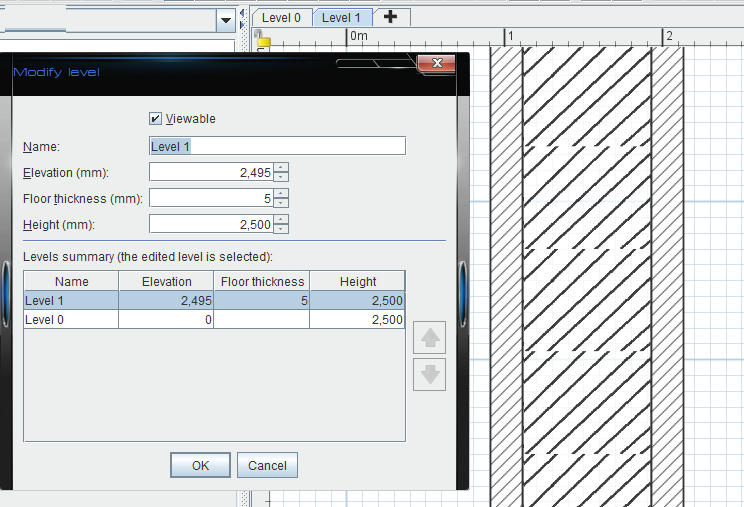
| Posted by andreab82 at Feb 23, 2021, 9:27:18 AM |
|
Re: fill space in between internal/external walls Hi Mike53, If I understand what you suggest correctly, walls will still be empty in the 3D view though. Thanks for your input. Regards, Andrea |
| Posted by andreab82 at Feb 23, 2021, 10:04:41 PM |
|
Re: fill space in between internal/external walls am I right that there is no other way then? :-/ |
| Posted by Mike53 at Feb 25, 2021, 8:35:02 PM |
|
Re: fill space in between internal/external walls Give it a try with any colour or texture applied to the "room" then check the 2 and 3d views |
| Posted by Puybaret at Feb 26, 2021, 11:06:50 AM |
|
Re: fill space in between internal/external walls And why not simply drawing an additional thick wall to fill the space. Walls with the same pattern which overlap are drawn in the plan as it was only one wall. You could also look at this tip. ---------------------------------------- Emmanuel Puybaret, Sweet Home 3D creator |
|
|
Current timezone is GMT Jan 11, 2026, 11:41:14 PM |