|
Sweet Home 3D Forum » List all forums » » Forum: Features use and tips » » » Thread: FreeCAD Model in SH3D |
|
| Print at Dec 19, 2025, 4:00:41 AM | View all posts in this thread on one page |
| Posted by Ferdo at Dec 23, 2020, 8:26:00 AM |
|
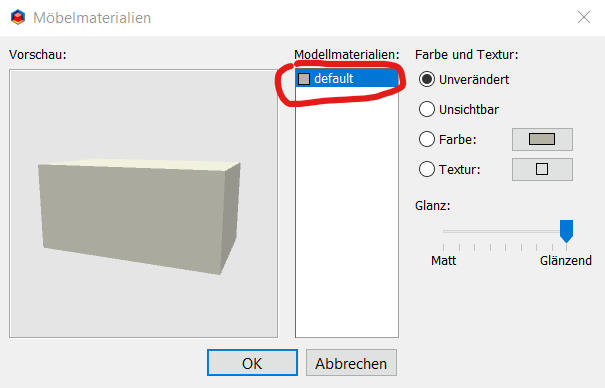
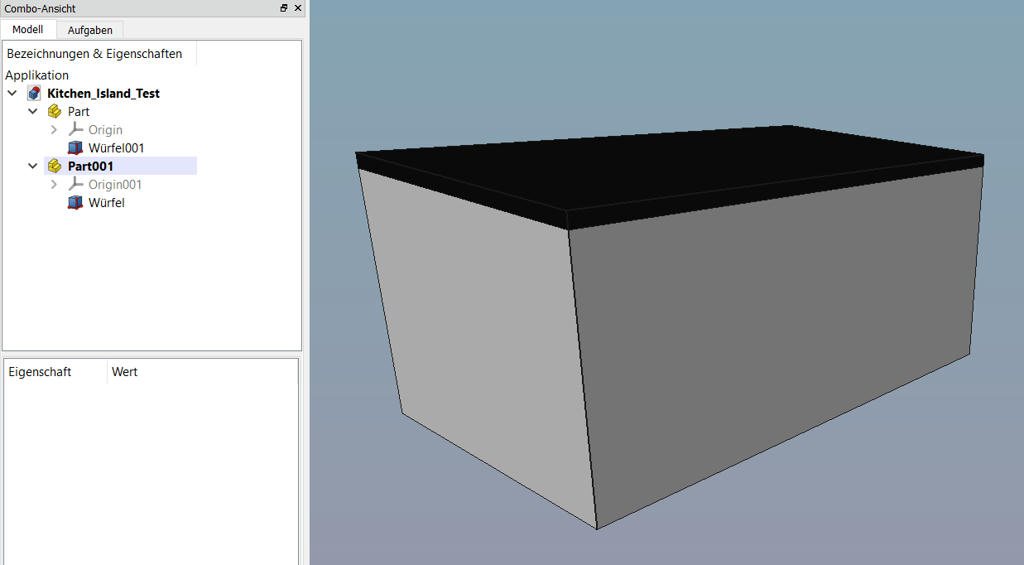
FreeCAD Model in SH3D Hello everyone! This my first post in this forum and I hope one of you can help me. I want to create furniture with the Part Workbench in FreeCAD (v0.18). The import of a simple test model in OBJ format into SH3D worked well basically but originally it had two parts in differnt colors. Now it's all one color and merched to one part. So my question is what needs to be done either in FreeCAD or SH3D to keep the differnt parts and make them selectable for customization. My test model in SH3D. It's in german language but nevertheless it should be recognizable what happened. I expacted to have here the two parts to be selectable. Original model in FreeCAD: ![]() |
| Posted by hansmex at Dec 24, 2020, 12:09:32 PM |
|
Re: FreeCAD Model in SH3D Probable solution: Give both parts a different texture, and they will show up as two parts in SH3D. You can then change colour or texture after importing the model. H ---------------------------------------- Hans new website - under constuction hansdirkse.info |
| Posted by UbuntuBirdy at Dec 24, 2020, 12:48:32 PM |
|
Re: FreeCAD Model in SH3D The easyest way is to make two parts in FreeCAD and rejoin them in SH3D. This is the way I alway go when modeling with FreeCAD for use in SH3D. ---------------------------------------- Pascal SH3D 6.6 / Ubuntu 22.04 (Mainline-Kernel) / Radeon RX580 / Ryzen 7 5800x |
| Posted by Mike53 at Dec 24, 2020, 4:35:07 PM |
|
Re: FreeCAD Model in SH3D might be worth checking that you did export both parts |
| Posted by Ferdo at Dec 27, 2020, 8:42:34 AM |
|
Re: FreeCAD Model in SH3D Give both parts a different texture, and they will show up as two parts in SH3D. This is not working unfortunately. The easyest way is to make two parts in FreeCAD and rejoin them in SH3D. This is the way I alway go when modeling with FreeCAD for use in SH3D. This works. It means you don't see a solution besides this workaround, right? What other tool do you use for modeling? might be worth checking that you did export both parts This was also my first idea. Both parts are there.Thank you all for your answers! |
| Posted by UbuntuBirdy at Dec 27, 2020, 10:22:12 AM |
|
Re: FreeCAD Model in SH3D The easyest way is to make two parts in FreeCAD and rejoin them in SH3D. This is the way I alway go when modeling with FreeCAD for use in SH3D. This works. It means you don't see a solution besides this workaround, right? What other tool do you use for modeling? I have not found another solution until now. But I do not search anymore, because this solution gives also some great options: you can hide easily some parts of your construction; you can easily redesign parts of your construction... ---------------------------------------- Pascal SH3D 6.6 / Ubuntu 22.04 (Mainline-Kernel) / Radeon RX580 / Ryzen 7 5800x |
|
|
Current timezone is GMT Dec 19, 2025, 4:00:41 AM |