Print at Feb 4, 2026, 5:41:41 AM View all posts in this thread on one page
Posted by mousewhite at Oct 31, 2020, 11:40:33 AM
Round room
I created a round wall and I just can't make a room :(
Double click doesn't work!
The multifaceted room does not suit.

Posted by Puybaret at Oct 31, 2020, 2:10:52 PM
Re: Round room
Please keep you file and send it to me so I can check if this is a bug.
----------------------------------------
Emmanuel Puybaret, Sweet Home 3D creator

Posted by mousewhite at Oct 31, 2020, 4:07:35 PM
Re: Round room
Sent a file with a small example by mail.

Posted by Puybaret at Oct 31, 2020, 5:01:58 PM
Re: Round room
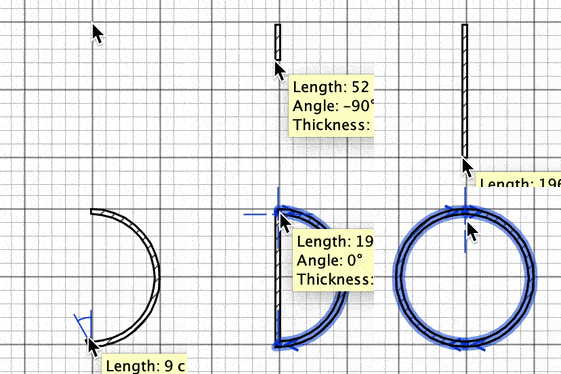
The space inside the walls isn't closed.

Pressing the Ctrl key (alt / option key under macOS) when you click at each wall end while drawing 2 walls, it's pretty fast to draw a closed round space.

----------------------------------------
Emmanuel Puybaret, Sweet Home 3D creator

Posted by mousewhite at Oct 31, 2020, 6:10:50 PM
Re: Round room
Yes, this is my fault. I set the coordinates from the wall properties edit menu. Zooming in, I saw a gap. By removing it with the mouse, I was able to create a circular room. True, in the figure it is displayed multifaceted, but in the general view it is round.