Print at Jan 30, 2026, 9:18:39 PM
Posted by Puybaret at Jul 24, 2020, 3:11:25 PM
Sweet Home 3D JS Online
Hello,

Two days ago, was released the first version of a new Online Editor programmed in JavaScript / WebGL which enables you to create and modify Sweet Home 3D plans on all recent browsers including smartphones and tablets.
This editor can be accessed from the new Sweet Home 3D Online Manager page which looks different whether you're logged in or not.
Disconnected users will view the following page:
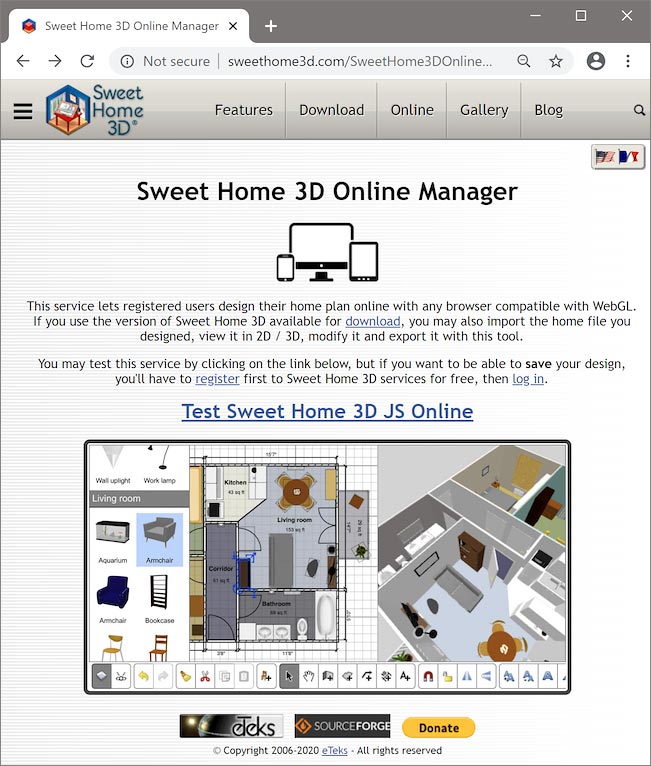


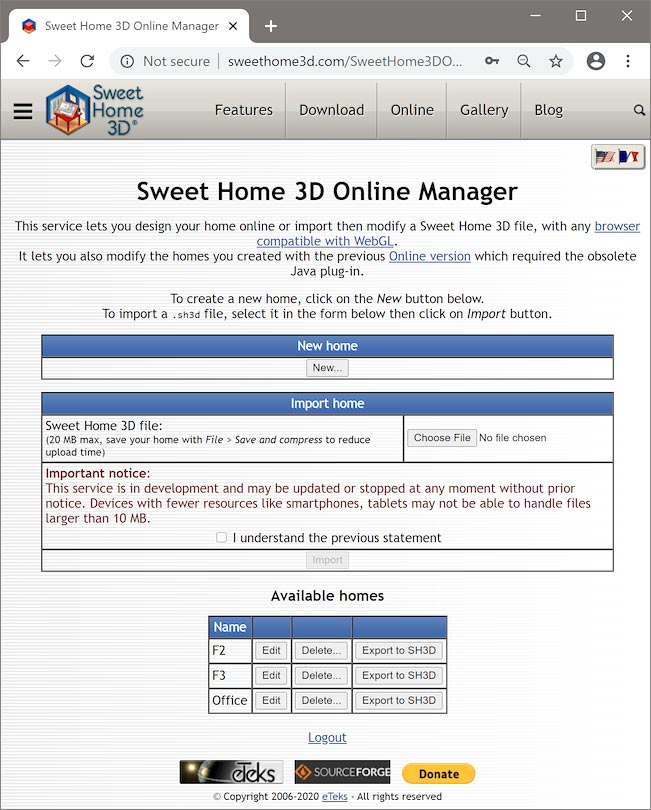
whereas logged in users will view a page that will let them create new homes, import an existing SH3D file, edit their homes, as well as delete them or export them to a SH3D file:


Then, clicking on the test link or creating a new home will show the new Sweet Home 3D JS Online Editor which looks a lot like Sweet Home 3D installer version as you may guess:
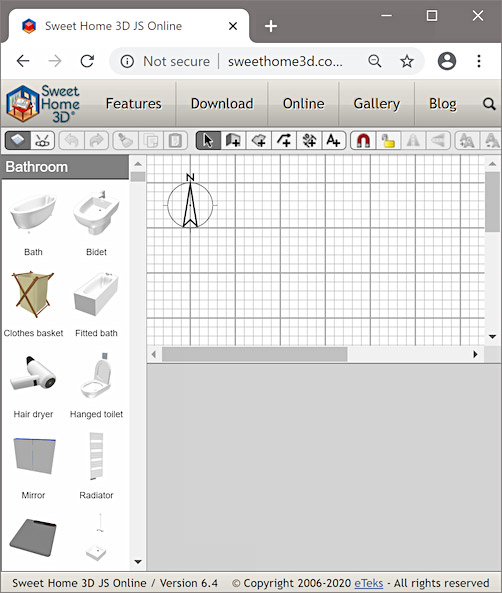


As many features are still missing, like contextual menus and modification dialog boxes, the tool bar is quite different to ensure that this first version can be useful. Therefore, it contains some buttons to switch between Aerial view and Virtual visit modes as well as buttons to toggle magnestism and base plan lock, flip selection and manage levels.



The separators between the furniture catalog, the plan and the 3D view can't be moved yet, so some CSS responsive styles were used to ensure that the space occupied by each panel as well as their layout on the screen make the Editor usable according to the current width and height of the Editor window, but also according to the device where it's used.
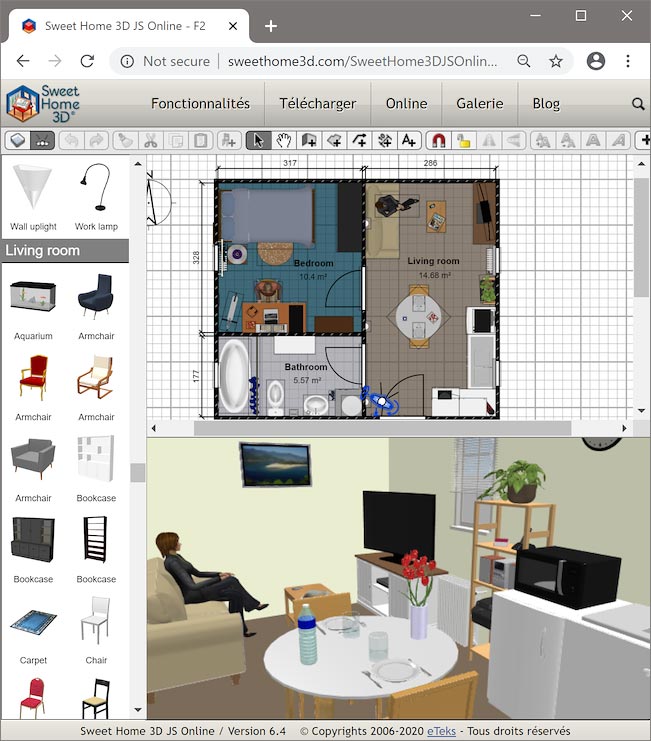
Therefore, on a computer, a home file is displayed with the tool bar at its top with the plan and the 3D view below it, just like in the Sweet Home 3D user interface you are used to:


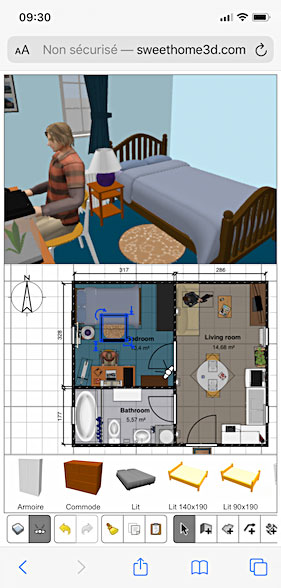
whereas on smartphones and tablets, the tool bar is scrollable and appears at the bottom of the screen with the furniture catalog and the plan just above it in portrait (vertical) orientation, to ensure that they are as close to your fingers as possible:


In landscape (horizontal) orientation, the furniture catalog will be larger and appear in the same row as the plan and the 3D view:
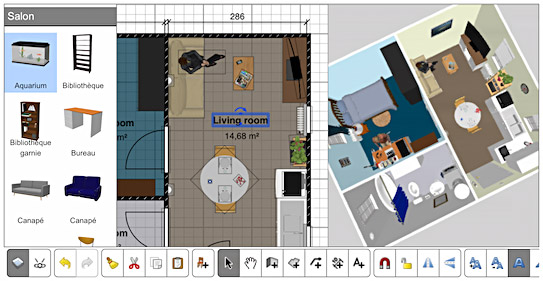


The furniture catalog is different on computers where it contains 375 free pieces, from the one on smartphones and tablets which contains 92 pieces of the default catalog (the light sources are not listed). As these devices have a smaller size and less RAM, the catalog was reduced on them to avoid you spending your time scrolling in it and prevent crashes. Once a search field will be added to the user interface, the catalogs will probably show more pieces.

But, instead of listing all missing features, let's see now what you can actually do with this new Editor:
- First, be reassured, you can save the modifications you make in the home plan. There's no Save button in the tool bar, because saving is performed on sweethome3d.com server each time you modify something or change of point of view. If you are connected to Internet, this behavior ensures that your work is always saved even if the program crashes (one of the main drawbacks of JavaScript programs is that it's impossible to handle missing memory errors, leading to a direct page reload in case of error!).
If you're disconnected from Internet, the program will be able to work and will save your modifications as soon as the connection is established. Just don't quit or reload the Editor page in that case.

- All the drawing tools are functional: you can draw and modify walls, rooms, polylines, dimension lines and texts. Under a computer, the keyboard shortcuts for multi selection, vertical / horizontal moves, duplication and magnetism are the same as in Sweet Home 3D.
On touch screens where there's no keyboard, you can use the Magnetism switch in the tool bar if needed, whereas multi selection and vertical / horizontal moves can be done after waiting at least 1s when you touch the screen with your finger. During this second, an animation showing a circled shift symbol will appear above your finger and you should simply move your finger before the end of the animation to ignore the "Shift" effect.
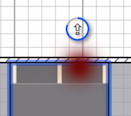


This "Shift" effect can also be useful to toggle the selection with a selection rectangle that will be drawn when you touch the screen on a place where no item is selected and release your finger elsewhere.
Still on touch screens, you must select an item in the plan by touching it and releasing your finger, before you can move it. You may also zoom with a pinch on the screen, and moving your finger on a place with no selected items will move (pan) the plan (except if you wait one second before moving your finger).
Finally, escaping an action can be done by touching the screen with an other finger and a double touch can be replaced by a 1 second touch in which case an animation showing a circled 2 will appear at screen.
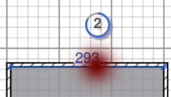


All these behaviors may look quite different from the ones you're used to with a mouse, but they should be quite intuitive compared to the gestures generally used on touch screens.

- Adding furniture from the catalog to the plan can be achieved with a drag and drop, or with the Add furniture button, except under IE 11 and legacy Edge on a touch screen where only the button works. On touch screens, you'll have to select the piece you want to add by pressing and releasing you finger, before you can drag it.

- Three buttons allow you add and delete levels, the second one being used to add a level at the same elevation as the current one.
When there are some levels in your home, you can select a different level with the drop down list displayed at the top right of the plan:
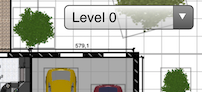


- Modifying the selected item in the plan can be done with its indicators, to let you resize the furniture and adjust walls, rooms and other items.
Again on touch screens, the tolerance used to find the indicator on which you pressed with your finger was greatly increased to ensure that using indicators is usable. The change of cursor used as feedback to indicate that the mouse is located upon an indicator, was replaced on touch screens by showing contextual information and the cursor above your finger when you touch the indicator.
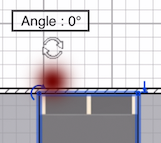


You may also change the content of the selected text or the color of another selected item by double clicking on it, but the latter function is not supported on all devices (it doesn't work under iOS, IE 11 and legacy Edge).
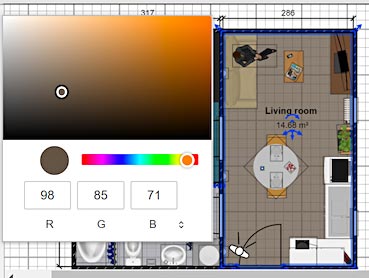


Actually, this feature is temporary and will be replaced by more complete user interface components that will allow to modify all the settings of the selected items. Nevertheless, note that you may still change the color of each side of a wall at this moment, by double clicking (or double touching) on either side of a wall.

So now, it's up to you, and I hope you'll like this new way of drawing plans even if it's still missing some important features. In all cases, don't forget you can export your plan as a SH3D file, so if you need a missing feature, you can continue your work on Sweet Home 3D, and even reimport the modifications in Sweet Home 3D Online Manager afterwards.
This web application was successfully tested on iPhone, iPad, Android, Surface devices and other computers, using Safari, Chrome, FireFox, IE 11, legacy Edge and new Chromium Edge, so you have the choice!
If you're interested, you'll find the source code of the Sweet Home 3D JS project at SourceForge.net, which provides an Ant target able to build a .war web application archive with a simple implementation of the server functions.

All this wouldn't have been possible with the tremendous programming help and advice of Renaud Pawlak, so please give him some warm thanks if you like this new project. smile


As a final word, the new version 6.4 of Sweet Home 3D was released at the same moment to let you benefit of the small bug fixes I programmed while developing the JavaScript Editor. I also preferred to release it now to avoid some compatibility issues with the SH3D files exported from Sweet Home 3D Online Manager.
If you're a developer, note that this new version introduced IDs on all home objects, as well as property change listeners to follow the changes of user properties.
----------------------------------------
Emmanuel Puybaret, Sweet Home 3D creator

Posted by hansmex at Jul 24, 2020, 3:46:53 PM
Re: Sweet Home 3D JS Online
I did a short test on an Android tablet and it works perfect.

You probably need a larger tablet (mine is only 8 inch) to be able to do useful work. Nevertheless I was able to draw walls, a room, add some furniture and change colours.

Compliments!!

H
----------------------------------------
Hans

new website - under constuction
hansdirkse.info

Posted by harbinger at Aug 8, 2020, 2:30:57 AM
Re: Sweet Home 3D JS Online
I downloaded version 6.4 after using 6.0 for a while, and I like the fact that I can now move entries in the furniture list, but it only works when no sorting is being used.

I'd still like to be able to move around entries in the list when under a sorting algorithm. It would allow me to group together furniture or objects that belong to the same floor or room for easy editing end navigation.

Posted by Xiste at Aug 8, 2020, 8:57:28 AM
Re: Sweet Home 3D JS Online
Trying to create a new home:

Error: Error 0 while requesting
http:/sweethome3d/online/reac ( rest is of screen)

id=236877

I'm using iPhone 11 pro max 256gb

Xiste

Posted by Puybaret at Aug 8, 2020, 12:03:47 PM
Re: Sweet Home 3D JS Online
harbinger, sorry but you shouldn’t hope to be able to reorder items in the furniture list when it’s sorted. I understand that when you use groups, reordering can’t be influenced by a sort made on levels in the furniture list, but this would work only if you move items within groups and not out of groups at the root of the list.
By the way, it’s not that I don’t want to program exceptions, but those exceptions must be quite intuitive and easily understood by every user.

Xiste, this error may happen if you remove www. in front of sweethome3d.com. Could you check if it was your case? I’ll try to see how I can add the prefix automatically.
----------------------------------------
Emmanuel Puybaret, Sweet Home 3D creator
Posted by harbinger at Aug 8, 2020, 12:56:08 PM
Re: Sweet Home 3D JS Online
Actually the only reason I was sorting by level was to get all those objects together (on the same floor) and then arrange them by type, purely for finding objects more easily, and using the Group function for those items I wanted to lock together.

It seems like what we need are a few shortcuts for moving entries in the list, such as "move to top", "move to bottom", "move to home", and "move to end".

Posted by Xiste at Aug 10, 2020, 7:56:22 PM
Re: Sweet Home 3D JS Online
The www is not there and it seems the link cannot be edited, but that might be finger trouble on my side since I'm a bit pressed for time.
I shall find the time make another try later.

Posted by Puybaret at Aug 10, 2020, 10:20:43 PM
Re: Sweet Home 3D JS Online
I added the automatic redirection to www.sweethome3d.com for SweetHome3DJSOnline.jsp
----------------------------------------
Emmanuel Puybaret, Sweet Home 3D creator
Posted by Xiste at Aug 11, 2020, 7:47:10 AM
Re: Sweet Home 3D JS Online
Works perfectly well now, and it's really FAST!
Thank you!

Posted by RICHARDpatrck at Nov 12, 2020, 11:28:00 PM
Re: Sweet Home 3D JS Online
bonjour,

merci pour ce pas de géant :-)

je teste l'outil online qui pourrait permettre aux élèves du collège https://martonne.net/sections.php?op=listarticles&secid=5 de continuer chez eux les modélisations commencées au collège.

Par conter je n'ai pas trouvé la modification de l'épaisseur du mur ?

merci beaucoup

Cordialement

Posted by Puybaret at Nov 13, 2020, 6:12:01 PM
Re: Sweet Home 3D JS Online
The wall modification dialog box (and other dialog boxes) is still missing.
But about modifying the width of walls, I had an additional idea: I would like to add another indicator in the middle of the selected wall to change it. The indicator on the right side would let the user change the arc extent like now, and a new indicator on the left side would let him change the thickness of the wall. What do you think of this idea?
----------------------------------------
Emmanuel Puybaret, Sweet Home 3D creator

Posted by emirhanbskc at Jun 13, 2021, 3:37:23 AM
Re: Sweet Home 3D JS Online
Can we use Sweet Home 3D JS Online(not only viewer, I want to use with editor) own site ? Is it open-source. If okay. When I tried to deploy with ant, why only viewer libraries exporting

Posted by Puybaret at Jun 13, 2021, 7:52:55 PM
Re: Sweet Home 3D JS Online
SweetHome3DJS project is distributed under GNU General Public Licence so you can use it on your own site, as long as you respect the terms of that license, i.e. providing the source code of the modifications you may have made to the project for your needs.
Read project build.xml and you’ll see that there are other targets. I guess you look for applicationBuild target.
----------------------------------------
Emmanuel Puybaret, Sweet Home 3D creator

Posted by emirhanbskc at Jun 14, 2021, 5:52:24 PM
Re: Sweet Home 3D JS Online
When I deploy with ant I get SweetHome3DJS-6.5.2-src\tools\JSweet\build\js\bundle.js file error (it doesn't create bundle.js file) and so I can't ant "applicationBuild" files.

Posted by Puybaret at Jun 14, 2021, 6:17:03 PM
Re: Sweet Home 3D JS Online
Did you read (and use) all the instructions in the README.TXT?
----------------------------------------
Emmanuel Puybaret, Sweet Home 3D creator

Posted by emirhanbskc at Jun 14, 2021, 7:26:04 PM
Re: Sweet Home 3D JS Online
Yes, I did everything in the README.TXT in "Sweet Home 3D JS-6.5.2", I'm getting an error while ant.

Posted by Puybaret at Jun 14, 2021, 7:56:00 PM
Re: Sweet Home 3D JS Online
Did you install Node? What error do you exactly get (please do not copy all the log)?
----------------------------------------
Emmanuel Puybaret, Sweet Home 3D creator

Posted by emirhanbskc at Jun 14, 2021, 8:15:59 PM
Re: Sweet Home 3D JS Online
Yes node is installed, when I run ant command in cmd
(BUILD FAILED
C:\Users\Emirhan\Desktop\Art²kAnd\SweetHome3DJS-6.5.2-src\build.xml:79: Warning: Could not find file C:\Users\Emirhan\Desktop\Art²kAnd\SweetHome3DJS-6.5.2-src\ tools\JSweet\build\js\bundle.js to copy.),I get the error.

Posted by emirhanbskc at Jun 15, 2021, 1:28:48 AM
Re: Sweet Home 3D JS Online
I did not get any warning or error on transpiledLibraries section. Also I did not get error for j4ts-batik-svgpathparser-1.10.0-20170726/bundle.js, j4ts-swingundo-1.8.132-20170726/bundle.js and j4ts-awtgeom-1.8.132-20200519/bundle.js. They created but only tools/JSweet/build/js/bundle.js file not created. So ant says I can not move that file(tools/JSweet/build/js/bundle.js).

Posted by Puybaret at Jun 18, 2021, 1:15:56 PM
Re: Sweet Home 3D JS Online
The project was built under Mac OS X and can't be built under Windows and Linux at the moment. We'll hopefully fix that in a coming version.
----------------------------------------
Emmanuel Puybaret, Sweet Home 3D creator

Posted by Puybaret at Jun 18, 2021, 1:57:17 PM
Re: Sweet Home 3D JS Online
Finally, the error under Windows can be fixed easily: in build.xml Ant file, just replace colons (:) in the two following lines
<arg value="../SweetHome3D/src:tools/JSweet/src" />
<arg value="def:com/eteks/sweethome3d/model:com/eteks/sweethome3d/tools:com/eteks/sweethome3d/viewcontroller:com/eteks/sweethome3d/io" />
by ${path.separator} (see fix here).

By the way, if you want to generate SweetHome3DJS.war file, don't forget to run Ant default target in SweetHome3D project too. SweetHome3D.jar is required to generate the war file.
----------------------------------------
Emmanuel Puybaret, Sweet Home 3D creator

Posted by chukwu at Jul 6, 2021, 9:25:54 PM
Re: Sweet Home 3D JS Online
Hello, AMAZING STUFF Puybaret.

I have been having issues building the war file for SweetHome3DJS.

the .jar for SweetHome3D builds successfully, but all the ant commands fail for SweetHome3DJS

BUILD FAILED
/Users/sweethome3d-code-r7868-trunk/SweetHome3DJS/build.xml:88: The following error occurred while executing this line:

Posted by Puybaret at Jul 7, 2021, 4:16:30 PM
Re: Sweet Home 3D JS Online
As you didn't report the error, it's difficult to help you.
Did you read the discussion with emirhanbskc which might help you?
----------------------------------------
Emmanuel Puybaret, Sweet Home 3D creator

Posted by chukwu at Jul 7, 2021, 8:16:16 PM
Re: Sweet Home 3D JS Online
Hello, yes, I read the discussion, i have done everything in the readme, everything else builds, am I meant to put the sweethome3d.jar in any particular folder after building it?

How do i report the error, can i put a log here?

this is where the error starts:

transpiledLibraries:
[javac] /Users/Downloads/sweethome3d-code-r7868-trunk/SweetHome3DJS/build.xml:30: warning: 'includeantruntime' was not set, defaulting to build.sysclasspath=last; set to false for repeatable builds
[java] INFO: JSweet transpiler version 2.4.0-RC1 (build date: 2020-07-21 17:21:35)
[java] 2021-07-07 18:13:40.040 ERROR JSweetConfig:149 - class jdk.internal.loader.ClassLoaders$AppClassLoader cannot be cast to class java.net.URLClassLoader (jdk.internal.loader.ClassLoaders$AppClassLoader and java.net.URLClassLoader are in module java.base of loader 'bootstrap')
[java] java.lang.ClassCastException: class jdk.internal.loader.ClassLoaders$AppClassLoader cannot be cast to class java.net.URLClassLoader (jdk.internal.loader.ClassLoaders$AppClassLoader and java.net.URLClassLoader are in module java.base of loader 'bootstrap')
[java] at org.jsweet.JSweetConfig.initClassPath(JSweetConfig.java:86)
[java] at org.jsweet.JSweetCommandLineLauncher.transpileWithArgs(JSweetCommandLineLauncher.java:270)
[java] at org.jsweet.JSweetCommandLineLauncher.main(JSweetCommandLineLauncher.java:239)
[java] 2021-07-07 18:13:40.040 INFO JSweetCommandLineLauncher:671 - input dirs: [../SweetHome3D/src, tools/JSweet/src]
[java] 2021-07-07 18:13:40.040 INFO JSweetCommandLineLauncher:682 - classpath: null
[java] 2021-07-07 18:13:40.040 INFO JSweetCommandLineLauncher:697 - included: [def.*, com/eteks/sweethome3d/model.*, com/eteks/sweethome3d/tools.*, com/eteks/sweethome3d/viewcontroller.*, com/eteks/sweethome3d/io.*]
[java] 2021-07-07 18:13:40.040 INFO JSweetCommandLineLauncher:698 - excluded: []
[java] 2021-07-07 18:13:40.040 INFO JSweetCommandLineLauncher:747 - ts output dir: tools/JSweet/build/ts
[java] 2021-07-07 18:13:40.040 INFO JSweetCommandLineLauncher:754 - js output dir: tools/JSweet/build/js
[java] java.lang.IllegalAccessError: superclass access check failed: class org.jsweet.transpiler.util.AbstractTreeScanner (in unnamed module @0x2eb231a6) cannot access class com.sun.tools.javac.tree.TreeScanner (in module jdk.compiler) because module jdk.compiler does not export com.sun.tools.javac.tree to unnamed module @0x2eb231a6

warm regards

Posted by Puybaret at Jul 8, 2021, 1:43:29 PM
Re: Sweet Home 3D JS Online
Building Sweet Home 3D JS project requires JDK 8, and not a further version. Is it your case?
[Note that building recent versions requires JDK 11, not JDK 8]
----------------------------------------
Emmanuel Puybaret, Sweet Home 3D creator

Posted by chukwu at Jul 10, 2021, 2:23:08 PM
Re: Sweet Home 3D JS Online
yes please, my mac uses jdk 8. Do I have to put the sweethome3d.jar in any specific folder to aid the building?

Posted by Puybaret at Jul 12, 2021, 5:21:30 PM
Re: Sweet Home 3D JS Online
I'm pretty sure you're not using JDK 8 to build the project. I just tried with JDK 15 and got the same error. If you use Terminal, set JAVA_HOME environment variable to ensure Ant uses the right JDK.
Do I have to put the sweethome3d.jar in any specific folder to aid the building?
No, just leave it in its default place, but SweetHome3D and SweetHom3DJS projects must be in the same folder.
----------------------------------------
Emmanuel Puybaret, Sweet Home 3D creator

Posted by chukwu at Jul 15, 2021, 10:43:29 AM
Re: Sweet Home 3D JS Online
Thanks alot, I eventually used my windows compartment to build it. It works!

Posted by son87a at Oct 29, 2021, 1:18:11 PM
Re: Sweet Home 3D JS Online
Hello,
I try to deploy sweethome3djs online. But i got error:

HTTP Status 500 - Unable to compile class for JSP:
type Exception report

message Unable to compile class for JSP:

description The server encountered an internal error that prevented it from fulfilling this request.

exception

org.apache.jasper.JasperException: Unable to compile class for JSP:

An error occurred at line: 51 in the jsp file: /readHome.jsp
Resource specification not allowed here for source level below 1.7
48: }
49:
50: synchronized (homeFile.getAbsolutePath().intern()) {
51: try (InputStream input = new FileInputStream(homeFile);
52: ByteArrayOutputStream output = new ByteArrayOutputStream()) {
53: byte[] buffer = new byte[8096];
54: int size;


An error occurred at line: 67 in the jsp file: /readHome.jsp
Resource specification not allowed here for source level below 1.7
64:
65: response.setIntHeader("Content-length", homeFileContent.length);
66: response.setHeader("Content-Disposition", "attachment; filename=" + homeFile.getName());
67: try (OutputStream servletOut = response.getOutputStream()) {
68: servletOut.write(homeFileContent);
69: }
70: } %>


Stacktrace:
org.apache.jasper.compiler.DefaultErrorHandler.javacError(DefaultErrorHandler.java:103)
org.apache.jasper.compiler.ErrorDispatcher.javacError(ErrorDispatcher.java:366)
org.apache.jasper.compiler.JDTCompiler.generateClass(JDTCompiler.java:494)
org.apache.jasper.compiler.Compiler.compile(Compiler.java:379)
org.apache.jasper.compiler.Compiler.compile(Compiler.java:354)
org.apache.jasper.compiler.Compiler.compile(Compiler.java:341)
org.apache.jasper.JspCompilationContext.compile(JspCompilationContext.java:662)
org.apache.jasper.servlet.JspServletWrapper.service(JspServletWrapper.java:364)
org.apache.jasper.servlet.JspServlet.serviceJspFile(JspServlet.java:395)
org.apache.jasper.servlet.JspServlet.service(JspServlet.java:339)
javax.servlet.http.HttpServlet.service(HttpServlet.java:731)
org.apache.tomcat.websocket.server.WsFilter.doFilter(WsFilter.java:52)

My java version:

java -version
openjdk version "1.8.0_312"
OpenJDK Runtime Environment (build 1.8.0_312-b07)
OpenJDK 64-Bit Server VM (build 25.312-b07, mixed mode)


My Tomcat version:

Server version: Apache Tomcat/7.0.76
Server built: Nov 16 2020 16:51:26 UTC
Server number: 7.0.76.0
OS Name: Linux
OS Version: 3.10.0-1160.36.2.el7.x86_64
Architecture: amd64
JVM Version: 1.8.0_312-b07
JVM Vendor: Red Hat, Inc.

Can you help me ?

Posted by Puybaret at Oct 29, 2021, 2:06:17 PM
Re: Sweet Home 3D JS Online
It's strange because even if try (resource) { } syntax is allowed only from Java 7, your server seems to use a JDK 8. Maybe try to run the server with JDK 11.
----------------------------------------
Emmanuel Puybaret, Sweet Home 3D creator

Posted by son87a at Oct 29, 2021, 2:49:44 PM
Re: Sweet Home 3D JS Online
I tried edit code after google. Wrap try in {}
Its working but I don't know write in finally statement.
Sorry, I'm working with PHP, and don't know Java.
Can you fix that ?

try {InputStream input = new FileInputStream(homeFile);
ByteArrayOutputStream output = new ByteArrayOutputStream();
byte[] buffer = new byte[8096];
int size;
while ((size = input.read(buffer)) != -1) {
output.write(buffer, 0, size);
}
homeFileContent = output.toByteArray();
}
finally{
// write something here ?
}


try {OutputStream servletOut = response.getOutputStream();
servletOut.write(homeFileContent);
}
finally{
// write something here ?
}


Posted by Puybaret at Oct 29, 2021, 4:12:31 PM
Re: Sweet Home 3D JS Online
You don't have to write anything in finally blocks (note that they don't even exist in the released version of readHome.jsp). I guess you should learn Java before going further...
----------------------------------------
Emmanuel Puybaret, Sweet Home 3D creator

Posted by son87a at Oct 30, 2021, 4:55:30 AM
Re: Sweet Home 3D JS Online
Thank you for your time !

Posted by Puybaret at Nov 15, 2021, 9:24:11 PM
Re: Sweet Home 3D JS Online
A new version of Sweet Home 3D JS Online was released last week-end with many new features. See this blog post for more information.
----------------------------------------
Emmanuel Puybaret, Sweet Home 3D creator

Posted by xato at Apr 28, 2022, 2:21:05 PM
Re: Sweet Home 3D JS Online
Hi, first time forum poster, couldn't see a search option to ask about this, I love your software!!

I was just wondering if there was a reason why it runs soo much faster in the browser than natively.

Is there anything I can do on my M1 Mac to speed it up? Is this a Java issue?

Posted by Puybaret at Aug 11, 2022, 7:04:11 PM
Re: Sweet Home 3D JS Online
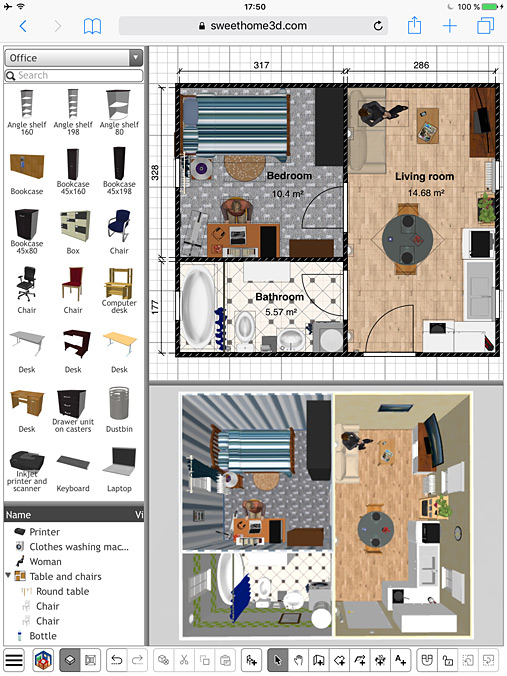
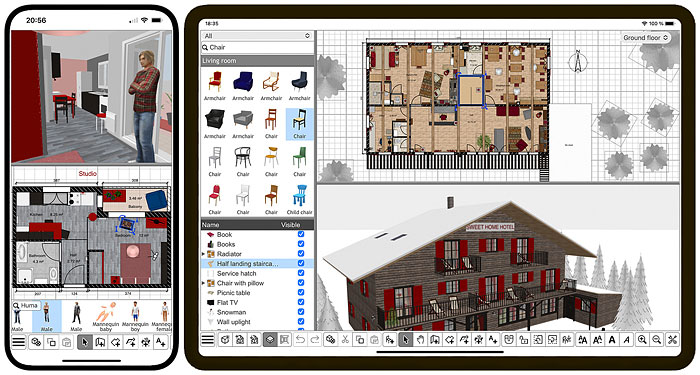
For your information, I just changed the user interface of the Online version for large touch devices like tablets, to take profit of the additional space they propose. It now shows the 4 classical resizable panes of the desktop version and a larger choice of models in the catalog, either in landscape format:


or in portrait format:


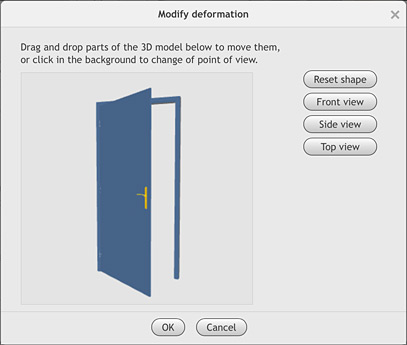
Note also that from the release of version 7.0, it's now possible to modify openings in Sweet Home 3D JS Online and to select a material directly in the 3D model preview in the furniture materials modification dialog box.


I was just wondering if there was a reason why it runs soo much faster in the browser than natively.
I wonder on which particular point you see such a performance difference because I didn't notice it that much.
Loading 3D models is slower with the Online version because Java threads are more efficient than JavaScript workers when there are a lot of data to retrieve (finally I even didn't use JavaScript workers).
The 3D view might run faster at a given size at screen, probably because the WebGL rendering I programmed is simpler than the Java 3D / JOGL / OpenGL layers.
But I also noticed that computing window holes in the walls is much slower in JavaScript and wonder if it's because JavaScript proposes only high precision decimal numbers (you can see this difference when you try to change level in the large building examples of this tip).
----------------------------------------
Emmanuel Puybaret, Sweet Home 3D creator

Posted by Paul6552 at Dec 26, 2022, 1:54:30 PM
Re: Sweet Home 3D JS Online
I plan everything in the online editor but what is incredibly annoying is that the windows (walkthrough and sketch) cannot be placed in their own tabs.

Please separate these two views so that the sketch is on one screen and the rendering (virtual walkthrough of the house) on the other.

Will this feature be available in the next version?

Posted by Puybaret at Dec 26, 2022, 11:59:56 PM
Re: Sweet Home 3D JS Online
Sorry, I don’t think so. You can already change their size with the separator between them.
----------------------------------------
Emmanuel Puybaret, Sweet Home 3D creator

Posted by TwistedLincoln at May 1, 2023, 1:27:59 AM
Re: Sweet Home 3D JS Online
I was able to compile the .war file and get it to run properly using Tomcat. It's fantastic, and incredibly fast! However I can't seem to figure out how to add additional furniture on the server side. Any guidance would be greatly appreciated.

Posted by Puybaret at May 1, 2023, 1:21:12 PM
Re: Sweet Home 3D JS Online
Here are the instructions you can use to add more furniture to the Online version.
First, gather the additional 3D models you want in a SH3F file with the Furniture Library Editor. Let's say you called it additionalLibrary.sh3f.
Then you should use the PropertiesToJson tool included in SweetHome3DJS source code to convert .properties files to their equivalent .json files and extract 3D model and icon files:
- Compile the com.eteks.sweethome3d.json.PropertiesToJson class in SweetHome3DJS root folder with the following command:

javac -cp tools/json/lib/json-20190722.jar -d tools/json/src tools/json/src/com/eteks/sweethome3d/json/PropertiesToJson.java

- In the same folder, run PropertiesToJson with the following command (in one line):

java -cp tools/json/lib/json-20190722.jar:tools/json/src com.eteks.sweethome3d.json.PropertiesToJson
/path/to/the/folder/where/is/stored/additionalLibrary
additionalLibrary.sh3f
/path/to/apache-tomcat-folder/webapps/SweetHome3DJS-7.1/lib/resources
additionalLibrary
/path/to/apache-tomcat-folder/webapps/SweetHome3DJS-7.1/lib/resources/models/additionalLibrary
lib/resources/models/additionalLibrary
true

PropertiesToJson requires the 7 following arguments:
1. the folder where you stored additionalLibrary.sh3f
2. additionalLibrary.sh3f, the furniture library file to convert
3. the output folder where the .json files will be saved (if you used Tomcat to test the war file, it should be the subfolder webapps/SweetHome3DJS-7.1/lib/resources of Tomcat installation folder, but this could be also the subfolder deploy/lib/resources of SweetHome3DJS root folder).
4. additionalLibrary, the base name of the .json files
5. the folder where 3D models and icons will extracted (I recommend to use a subfolder to avoid conflicts with some other libraries stored in models)
6. the path of the 3D models and icons relative to index.jsp (the folder where 3D models can be found from the furnitureResourcesURLBase property added to index.jsp in the following instructions)
7. true (it indicates that 3D models and icons should be extracted, using false won't extract them)

For example, if you try with BlendSwap-CC-0.sh3f available here saved in SweetHome3DJS root folder and Tomcat installation folder in /Applications/apache-tomcat-9.0.41, you'll get the following command:

java -cp tools/json/lib/json-20190722.jar:tools/json/src com.eteks.sweethome3d.json.PropertiesToJson . BlendSwap-CC-0.sh3f /Applications/apache-tomcat-9.0.41/webapps/SweetHome3DJS-7.1/lib/resources BlendSwap-CC-0 /Applications/apache-tomcat-9.0.41/webapps/SweetHome3DJS-7.1/lib/resources/models/BlendSwap-CC-0 lib/resources/models/BlendSwap-CC-0 true


Once, your .json, 3D models and icons files are ready, you'll have to tell the Online version to take them into account with the two following changes:
- around the end of index.jsp, add furnitureCatalogURLs and furnitureResourcesURLBase properties to JavaScript application configuration, to specify the list of furniture catalogs and the base URL for their 3D models and icons.
For example, the beginning of application declaration:

var application = new SweetHome3DJSApplication(
{readHomeURL: urlBase + "/readHome.jsp?home=%s",

should become:

var application = new SweetHome3DJSApplication(
{furnitureCatalogURLs: [urlBase + "/lib/resources/DefaultFurnitureCatalog.json",
urlBase + "/lib/resources/additionalLibrary.json"],
furnitureResourcesURLBase: urlBase + "/",
readHomeURL: urlBase + "/readHome.jsp?home=%s",

And if you try with BlendSwap-CC-0 library, it will become:

var application = new SweetHome3DJSApplication(
{furnitureCatalogURLs: [urlBase + "/lib/resources/DefaultFurnitureCatalog.json",
urlBase + "/lib/resources/BlendSwap-CC-0.json"],
furnitureResourcesURLBase: urlBase + "/",
readHomeURL: urlBase + "/readHome.jsp?home=%s",

(citing DefaultFurnitureCatalog.json isn't mandatory if you don't want to keep the default library).

- The additional library managed by user preferences in writeHomeEdits.jsp should be added in the declaration of serverUserPreferences instance.
Therefore, the following declaration:

serverUserPreferences = new ServerUserPreferences(
new URL [] {new URL(serverBaseUrl, "lib/resources/DefaultFurnitureCatalog.json")}, serverBaseUrl,
new URL [] {new URL(serverBaseUrl, "lib/resources/DefaultTexturesCatalog.json")}, serverBaseUrl);

should become:

serverUserPreferences = new ServerUserPreferences(
new URL [] {new URL(serverBaseUrl, "lib/resources/DefaultFurnitureCatalog.json"),
new URL(serverBaseUrl, "lib/resources/additionalLibrary.json")}, serverBaseUrl,
new URL [] {new URL(serverBaseUrl, "lib/resources/DefaultTexturesCatalog.json")}, serverBaseUrl);


And for BlendSwap-CC-0 library, it will become:

serverUserPreferences = new ServerUserPreferences(
new URL [] {new URL(serverBaseUrl, "lib/resources/DefaultFurnitureCatalog.json"),
new URL(serverBaseUrl, "lib/resources/BlendSwap-CC-0.json")}, serverBaseUrl,
new URL [] {new URL(serverBaseUrl, "lib/resources/DefaultTexturesCatalog.json")}, serverBaseUrl);


Hope you can handle it.
There are other way to generate .json files without a SH3F file, but it depends on your furniture library configuration.
----------------------------------------
Emmanuel Puybaret, Sweet Home 3D creator

Posted by Puybaret at May 1, 2023, 9:11:12 PM
Re: Sweet Home 3D JS Online
I forgot to mention textures libraries. Actually, it works more or less the same with SH3T files and the two additional texturesCatalogURLs / texturesResourcesURLBase to configure application JavaScript variable in index.jsp.

For example, if you try with Contributions.sh3t available here saved in SweetHome3DJS root folder and Tomcat installation folder in /Applications/apache-tomcat-9.0.41, the following PropertiesToJson command will extract .json and texture image files :

java -cp tools/json/lib/json-20190722.jar:tools/json/src com.eteks.sweethome3d.json.PropertiesToJson . Contributions.sh3t /Applications/apache-tomcat-9.0.41/webapps/SweetHome3DJS-7.1/lib/resources Contributions /Applications/apache-tomcat-9.0.41/webapps/SweetHome3DJS-7.1/lib/resources/textures/Contributions lib/resources/textures/Contributions true

Comparing with the PropertiesToJson command previously used for furniture libraries, you just need to change file and folder names.

Then, adding the Contributions library to the configuration of JavaScript application in index.jsp will give:

var application = new SweetHome3DJSApplication(
{furnitureCatalogURLs: [urlBase + "/lib/resources/DefaultFurnitureCatalog.json",
urlBase + "/lib/resources/BlendSwap-CC-0.json"],
furnitureResourcesURLBase: urlBase + "/",
texturesCatalogURLs: [urlBase + "/lib/resources/DefaultTexturesCatalog.json",
urlBase + "/lib/resources/Contributions.json"],
texturesResourcesURLBase: urlBase + "/",
readHomeURL: urlBase + "/readHome.jsp?home=%s",

and adding it to the textures libraries managed by user preferences in writeHomeEdits.jsp will lead to the following declaration:

serverUserPreferences = new ServerUserPreferences(
new URL [] {new URL(serverBaseUrl, "lib/resources/DefaultFurnitureCatalog.json"),
new URL(serverBaseUrl, "lib/resources/BlendSwap-CC-0.json")}, serverBaseUrl,
new URL [] {new URL(serverBaseUrl, "lib/resources/DefaultTexturesCatalog.json"),
new URL(serverBaseUrl, "lib/resources/Contributions.json")}, serverBaseUrl);

Good luck!
----------------------------------------
Emmanuel Puybaret, Sweet Home 3D creator

Posted by son87a at May 4, 2023, 4:32:09 PM
Re: Sweet Home 3D JS Online
I see the model file can be in zip format, I thought it is possible to add a password to zip the file to protect my proprietary model files? Do you have any suggestions?

Posted by Puybaret at May 4, 2023, 6:01:19 PM
Re: Sweet Home 3D JS Online
You could grant the right to download 3D model zip files only to some identified people.
If needed, the URLs in furniture libraries can be more complex URLs which call a service on the server, similarly to the service specified by readResourceURL property in application configuration on the Online version of this server. It uses the JSP page readResource.jsp?path=xxx to ensure that only a given user can access to the resources he imported.
----------------------------------------
Emmanuel Puybaret, Sweet Home 3D creator

Posted by Puybaret at May 4, 2023, 11:16:44 PM
Re: Sweet Home 3D JS Online
And about protecting your model file with a password, this is not possible because JSZip doesn't support this feature yet, and even when it will be supported, Sweet Home 3D JS would need that password to decode the model files.
Therefore, the password would have to be available somewhere in the configuration of Sweet Home 3D JS, making it also available to anyone wanting to find it.
----------------------------------------
Emmanuel Puybaret, Sweet Home 3D creator

Posted by Puybaret at Sep 7, 2023, 8:31:44 PM
Re: Sweet Home 3D JS Online
Hello,

I’m happy to announce that I just released two new apps based on Sweet Home 3D JS, one for iOS and the other for Android.
As explained in this article, these apps don’t require a connection to Internet to work and are able to import and export SH3D / SH3X files to share your designs on another smartphone, tablet or computer where Sweet Home 3D is installed or within a browser running Sweet Home 3D Online.


These apps are not free but remain based on the free version of Sweet Home 3D JS that I improved with the following features:
- A new About dialog box was added and replaces the status bar in the Online version.
- Sweet Home 3D JS now includes some new APIs to store home data using IndexedDB storage with auto recovery management.
- Drag and drop support was added to images import process of the Online version.
- Panes in Online version under tablets are now arranged the same way as in desktop version.
- Application "sandwich" menu of the Online version is displayed in a separate div to ensure it's always visible in the toolbar.
- Sort and Display column menus were added on tablets.
- Combo boxes closing was fixed.
- The last touched point is now used as the final point when wall, room, polyline and dimension creation tools are used and the user clicks on another tool.
- Keeping the finger on a button of the 3D navigation panel on touch device now repeats rotation or zoom.

All these changes were released in Sweet Home 3D JS 7.1.2, still based on Sweet Home 3D 7.1 and can be tested in Sweet Home 3D Online which was updated too.

Hope you'll like this new version smile
----------------------------------------
Emmanuel Puybaret, Sweet Home 3D creator

Posted by JonnyD at Sep 7, 2023, 9:32:51 PM
Re: Sweet Home 3D JS Online
I’ve just bought it 😁

Posted by Puybaret at Sep 8, 2023, 2:33:57 AM
Re: Sweet Home 3D JS Online
Thanks JonnyD. Hope you’ll like it and find it useful!
----------------------------------------
Emmanuel Puybaret, Sweet Home 3D creator

Posted by Paul6552 at Apr 3, 2024, 4:45:04 PM
Re: Sweet Home 3D JS Online
This is wonderful software. Thanks for that. Although I dont need the app, I'm going to buy the app today to give you some support!

Why are you actually developing two programs? Once as an installation and once on the web?

Isn't it incredibly time-consuming to maintain/develop two things?

Is the project somewhere on Github? I'm a Javascript / React developer myself and maybe I can contribute something.

Posted by Puybaret at Apr 6, 2024, 2:16:07 PM
Re: Sweet Home 3D JS Online
Thank you Paul.

The two JS solutions don't provide the same way to save files: the Online version saves your design on sweethome3d.com server, whereas the App stores applications save them in local files (IndexedDB or plain files) without the need of a connection to Internet and registration.

This takes some time to develop these solutions, but this was interesting to develop and the App stores sales bring some revenues which help me to spend more time on improving and maintaining Sweet Home 3D.

The project isn't on GitHub, but on SourceForge.
----------------------------------------
Emmanuel Puybaret, Sweet Home 3D creator

Posted by TwistedLincoln at Sep 25, 2024, 4:11:52 PM
Re: Sweet Home 3D JS Online
Recently after a server reboot, the JS applet no longer saves changes to the home. Instead every time it's loaded it reverts to the state it was before the reboot. Everything else on the Tomcat server works fine. I checked the file permissions on the .sh3d file and they are correct.

Any idea what might be going on or where I should start looking? This hasn't happened before in the many months I've had this install running, so I'm not sure what could have changed.

Posted by Puybaret at Sep 26, 2024, 12:00:16 AM
Re: Sweet Home 3D JS Online
Maybe you upgraded the Java version. Check you use Java 11.
----------------------------------------
Emmanuel Puybaret, Sweet Home 3D creator

Posted by TwistedLincoln at Sep 26, 2024, 4:41:51 PM
Re: Sweet Home 3D JS Online
I didn't update anything, and am running Java 11, so that wasn't it.

I "fixed" this issue, though still don't know how it happened to begin with.

After checking my Tomcat logs, there was an error referencing an invalid SSL certificate when accessing the JS applet. I use a self-signed one, but it has always worked fine before so this seemed odd.

I accessed the applet using the regular non-SSL link, and things worked fine again -- even when switching back to the SSL method. I didn't actually change anything. Odd.