|
Posted by Puybaret
at May 1, 2023, 1:21:12 PM
|
Re: Sweet Home 3D JS Online
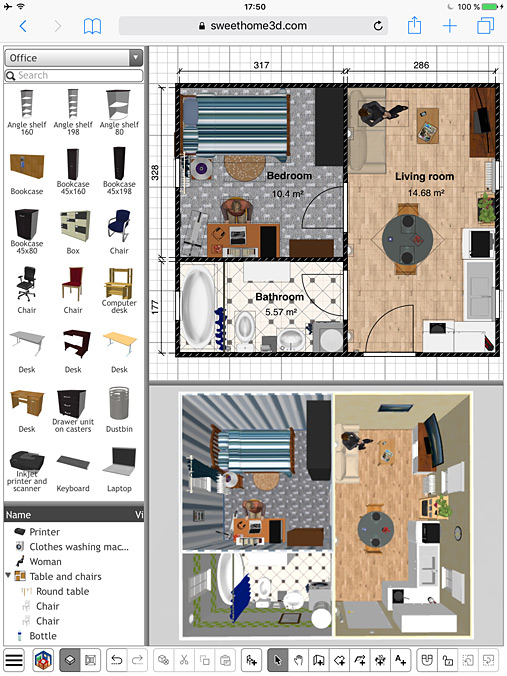
Here are the instructions you can use to add more furniture to the Online version.
First, gather the additional 3D models you want in a SH3F file with the Furniture Library Editor. Let's say you called it additionalLibrary.sh3f.
Then you should use the PropertiesToJson tool included in SweetHome3DJS source code to convert .properties files to their equivalent .json files and extract 3D model and icon files:
- Compile the com.eteks.sweethome3d.json.PropertiesToJson class in SweetHome3DJS root folder with the following command:
javac -cp tools/json/lib/json-20190722.jar -d tools/json/src tools/json/src/com/eteks/sweethome3d/json/PropertiesToJson.java
- In the same folder, run PropertiesToJson with the following command (in one line):
java -cp tools/json/lib/json-20190722.jar:tools/json/src com.eteks.sweethome3d.json.PropertiesToJson
/path/to/the/folder/where/is/stored/additionalLibrary
additionalLibrary.sh3f
/path/to/apache-tomcat-folder/webapps/SweetHome3DJS-7.1/lib/resources
additionalLibrary
/path/to/apache-tomcat-folder/webapps/SweetHome3DJS-7.1/lib/resources/models/additionalLibrary
lib/resources/models/additionalLibrary
true
PropertiesToJson requires the 7 following arguments:
1. the folder where you stored additionalLibrary.sh3f
2. additionalLibrary.sh3f, the furniture library file to convert
3. the output folder where the .json files will be saved (if you used Tomcat to test the war file, it should be the subfolder webapps/SweetHome3DJS-7.1/lib/resources of Tomcat installation folder, but this could be also the subfolder deploy/lib/resources of SweetHome3DJS root folder).
4. additionalLibrary, the base name of the .json files
5. the folder where 3D models and icons will extracted (I recommend to use a subfolder to avoid conflicts with some other libraries stored in models)
6. the path of the 3D models and icons relative to index.jsp (the folder where 3D models can be found from the furnitureResourcesURLBase property added to index.jsp in the following instructions)
7. true (it indicates that 3D models and icons should be extracted, using false won't extract them)
For example, if you try with BlendSwap-CC-0.sh3f available here saved in SweetHome3DJS root folder and Tomcat installation folder in /Applications/apache-tomcat-9.0.41, you'll get the following command:
java -cp tools/json/lib/json-20190722.jar:tools/json/src com.eteks.sweethome3d.json.PropertiesToJson . BlendSwap-CC-0.sh3f /Applications/apache-tomcat-9.0.41/webapps/SweetHome3DJS-7.1/lib/resources BlendSwap-CC-0 /Applications/apache-tomcat-9.0.41/webapps/SweetHome3DJS-7.1/lib/resources/models/BlendSwap-CC-0 lib/resources/models/BlendSwap-CC-0 true
Once, your .json, 3D models and icons files are ready, you'll have to tell the Online version to take them into account with the two following changes:
- around the end of index.jsp, add furnitureCatalogURLs and furnitureResourcesURLBase properties to JavaScript application configuration, to specify the list of furniture catalogs and the base URL for their 3D models and icons.
For example, the beginning of application declaration:
var application = new SweetHome3DJSApplication(
    {readHomeURL: urlBase + "/readHome.jsp?home=%s",
should become:
var application = new SweetHome3DJSApplication(
    {furnitureCatalogURLs: [urlBase + "/lib/resources/DefaultFurnitureCatalog.json",
                            urlBase + "/lib/resources/additionalLibrary.json"],
     furnitureResourcesURLBase: urlBase + "/",
     readHomeURL: urlBase + "/readHome.jsp?home=%s",
And if you try with BlendSwap-CC-0 library, it will become:
var application = new SweetHome3DJSApplication(
    {furnitureCatalogURLs: [urlBase + "/lib/resources/DefaultFurnitureCatalog.json",
                            urlBase + "/lib/resources/BlendSwap-CC-0.json"],
     furnitureResourcesURLBase: urlBase + "/",
     readHomeURL: urlBase + "/readHome.jsp?home=%s",
(citing DefaultFurnitureCatalog.json isn't mandatory if you don't want to keep the default library).
- The additional library managed by user preferences in writeHomeEdits.jsp should be added in the declaration of serverUserPreferences instance.
Therefore, the following declaration:
serverUserPreferences = new ServerUserPreferences(
    new URL [] {new URL(serverBaseUrl, "lib/resources/DefaultFurnitureCatalog.json")}, serverBaseUrl,
    new URL [] {new URL(serverBaseUrl, "lib/resources/DefaultTexturesCatalog.json")}, serverBaseUrl);
should become:
serverUserPreferences = new ServerUserPreferences(
    new URL [] {new URL(serverBaseUrl, "lib/resources/DefaultFurnitureCatalog.json"),
                new URL(serverBaseUrl, "lib/resources/additionalLibrary.json")}, serverBaseUrl,
    new URL [] {new URL(serverBaseUrl, "lib/resources/DefaultTexturesCatalog.json")}, serverBaseUrl);
And for BlendSwap-CC-0 library, it will become:
serverUserPreferences = new ServerUserPreferences(
    new URL [] {new URL(serverBaseUrl, "lib/resources/DefaultFurnitureCatalog.json"),
                new URL(serverBaseUrl, "lib/resources/BlendSwap-CC-0.json")}, serverBaseUrl,
    new URL [] {new URL(serverBaseUrl, "lib/resources/DefaultTexturesCatalog.json")}, serverBaseUrl);
Hope you can handle it.
There are other way to generate .json files without a SH3F file, but it depends on your furniture library configuration.
----------------------------------------
Emmanuel Puybaret, Sweet Home 3D creator
|