Print at Jan 30, 2026, 4:58:00 PM
Posts: 13   Pages: 2   [ 1 2 | Next Page ]
View all posts in this thread on one page
Posted by Ceciliabr at Jul 16, 2020, 9:42:55 PM
Glare effect
“The glare effect that comes from watching a bright light, is a result of imperfect eyesight. “

“On photographs, this effect comes from using cheap optics.”


Searching the web for info about how to create a 3D glare effect, these are two of the “facts” that popped up.
Nevertheless, a lot of people are evidently requesting this effect, and there are also some programs that can offer this effect, like Blender and 3DS Max.
I like this effect, maybe because my eyesight has always been a bit weak.

I have made an earlier attempt to achieve this effect, and I have gotten some comments about it.
In a project I have been working on recently, I wanted to give myself another chance to make the effect a bit better than what I managed the last time.
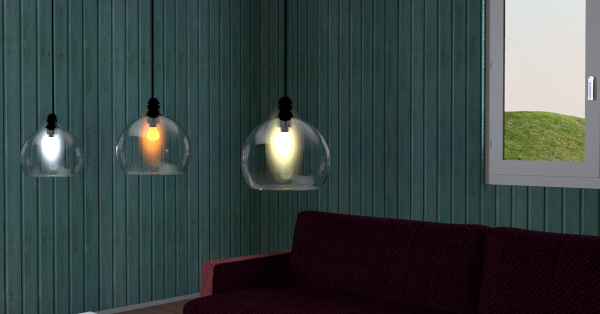
I wanted to create an open glass sphere lamp, with a bulb inside that had a glare effect.
I ended up creating this:


Apart from the glass sphere lamp, the model consist of a bulb shaped object plus two textured boxes forming a cross. And then I have placed four sphere lights like this:
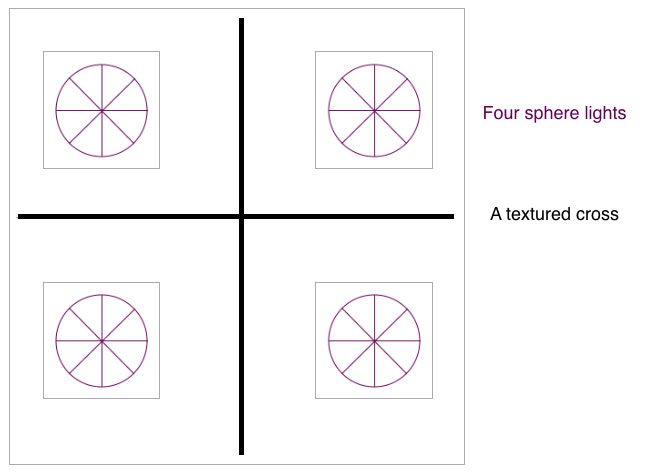


The cross is there to make sure that the glare is not lost when using other camera angles.
I ended up using a cross instead of a cylinder because the cylinder created some weird reflections on the inside of the lamp, and also made it difficult to light up both the bulb
and the glare at the same time.
Modifying the transparent .png texture used to create the glare effect, will of course make the effect stronger or weaker,
and changing the intensity and colour of the sphere lights will also make some changes:
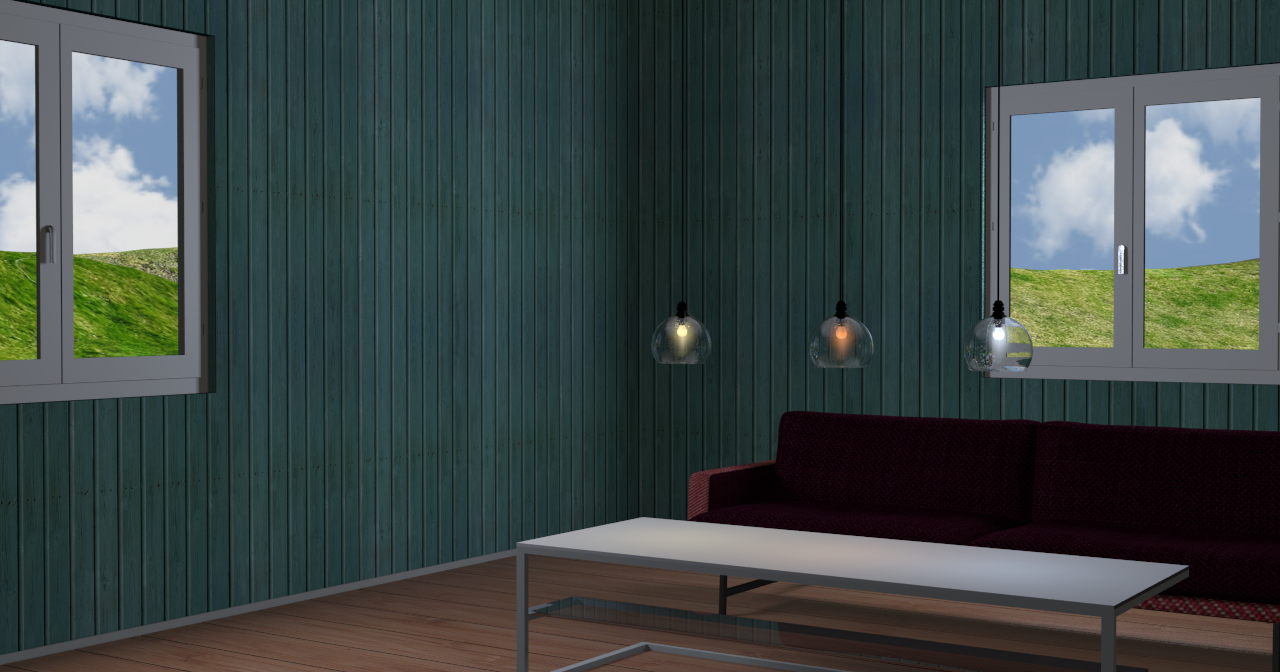
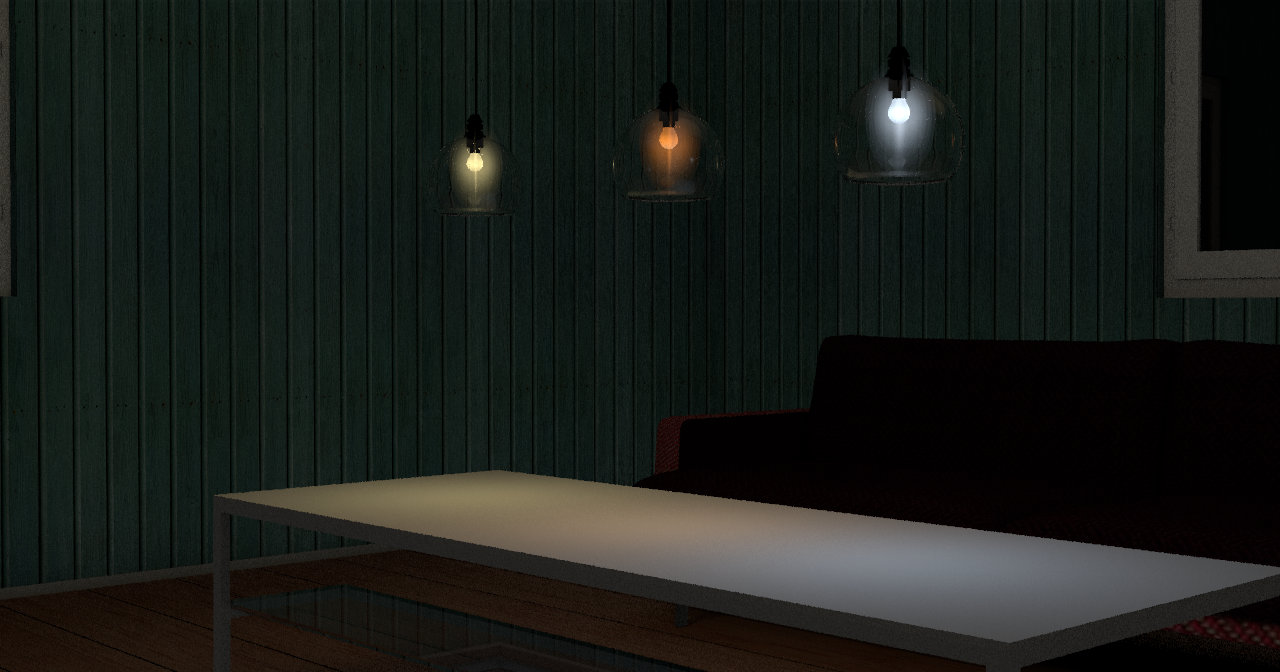


If I had taken the time ( and effort ) to teach myself how to create these light sources inside an object, I could have made this into a nice model.
But I’m too lazy ( and too busy), and besides I would never find out how to change the colour of the light sources.
Maybe someone else in here knows how to do this?

Anyway, if anyone wants to use this lamp goup ( or parts of it ), be my guest! All the elements can be made invisible, so it’s fully customisable.

The project file is here. http://ceciliabr.com/Glare/GlareProject.sh3d


Cecilia

Posted by harbinger at Jul 17, 2020, 7:38:43 AM
Re: Glare effect
Well whatever the effects of the project, these models are excellent and should be included in our standard furniture library. Did you render this with sh3d?

Posted by Ceciliabr at Jul 18, 2020, 12:08:43 AM
Re: Glare effect
Thank you!
Yes, I rendered this with SH3D using Enkonyito's beautiful plugin: PVR 1.9

Download the PVR 1.9 plugin and my project file, and you can render exactly the same image.

If you want to use the lamp model, just create a group including the lights, and copy/paste it to your project


Cecilia

Posted by enkonyito at Jul 18, 2020, 6:08:58 AM
Re: Glare effect
If I had taken the time ( and effort ) to teach myself how to create these light sources inside an object, I could have made this into a nice model.
But I’m too lazy ( and too busy), and besides I would never find out how to change the colour of the light sources.
Maybe someone else in here knows how to do this?

To do this you have to use the furniture library editor to create your library of lights.
Then edit the PluginFurnitureCatalog.properties file present in the .sh3f to add the properties of light sources to integrate as here.
As with Sweet Home 3D default light sources, you will need to create as much object as you want light color.

Enko
----------------------------------------
EnkoNyito

Posted by Xiste at Jul 18, 2020, 3:01:44 PM
Re: Glare effect
Nice!
People should really download your project file, not just for the lamp model, but to study your effective, and yet simple, lighting technique.

Posted by Mike53 at Jul 18, 2020, 3:20:53 PM
Re: Glare effect
Agree with Xiste 100%, always download what Cec kindly shares, not only to see how she achieves the quality, but because she also shares some excellent textures and objects, which i unashamedly steal wink and then say thx.

Posted by enkonyito at Jul 18, 2020, 8:43:22 PM
Re: Glare effect
Comparative rendering at night. (unviewable panel above the ground and group of fireglow light source)


----------------------------------------
EnkoNyito

Posted by Ceciliabr at Jul 22, 2020, 10:18:52 AM
Re: Glare effect
Thank you Enko!

Just a few words:

These lamps are meant as decortative elements rather than stand-alone light sources.
Since there are four light sources inside, the intensity has to be quite low for the effect to appear "natural".


5% intensity:

I think this is a bit too much, but it can work with the fireglow version.

2% intensity

This is my preferred setting.

Cecilia

Posted by VeroniQ at Jul 22, 2020, 12:03:56 PM
Re: Glare effect
Many thanks, Cecilia. I love this lights and lamps. Are they free to use?

Posted by Ceciliabr at Jul 22, 2020, 6:51:47 PM
Re: Glare effect
Are they free to use?
Absolutely free!
And not only that:
Enko has created an sh3f library containing all 3 lamps with different coloured lights ( as used in the 2 above images) and will shortly make them available for anyone to download as fully functional lamps.


Cecilia

Posts: 13   Pages: 2   [ 1 2 | Next Page ]