Print at Feb 1, 2026, 12:53:18 PM
Posted by Plutarch at Jun 21, 2020, 3:49:18 PM
Two lofts / mezzanines at different elevations
Hi

First time user. I am glad I found this software - thank you. I hope to use it for a few projects.

I am not a designer or 3D artist, so I can't seem to figure a couple of things out.

I am designing a simple rectangular building. At one end, the loft/mezzanine needs to have a ground level ceiling height of 210cm. At the other end, another loft mezzanine needs to have a ground level ceiling height of 230cm.

I am making my way through this tutorial: http://www.sweethome3d.com/blog/2015/08/29/how_to_design_a_mezzanine.html

I understand it, however, because the top level can only have one elevation, the walls are not going to match up, as they are lower on one side of the ground level than the other side (ie. 'uneven', or not the same wall height all around the ground level).

I would greatly appreciate any hacks/workarounds/suggestions as to how to achieve two lofts/mezzanines with different elevations within the same block, from any clever person who knows a way.

I am also unsure as to how to:

- Specify ceiling height
- Create a top-level ceiling that follows the A-frame roof shape (like an attic etc).

Guidance here would also be much appreciated.

Looking forward to working with SH3D - I tried a lot of other programs and I think this is the best so far.

Thanks.

Posted by Mike53 at Jun 21, 2020, 8:15:54 PM
Re: Two lofts / mezzanines at different elevations
Hi Plutarch

I think i see what you are after, i have made a file where i created this -:
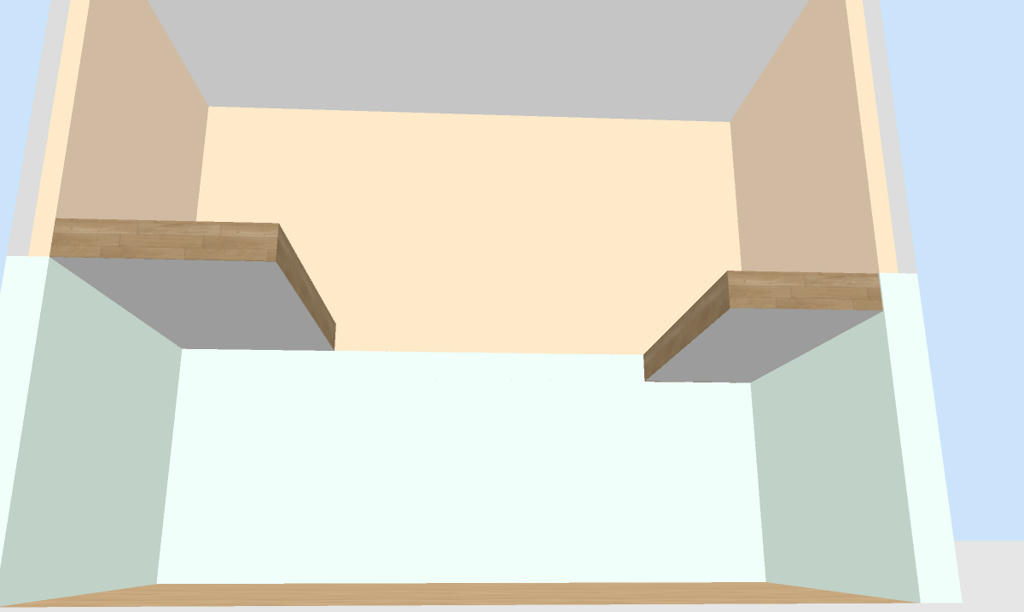


if it is something like what you need then you can download it HERE , you will need to take note of the elevations, wall heights and room modifications.
Good luck, looking forward to seeing some images in the gallery. smile

Mike

Posted by Plutarch at Jun 23, 2020, 1:58:15 AM
Re: Two lofts / mezzanines at different elevations
Thanks Mike - I very much appreciate you going to that effort for me. I will analyse the file and let you know how it goes. Sorry I didn't reply earlier, I am new to the forum and thought that I'd get email notifications if there was a reply, but I checked it manually and saw your post.

I'll post an update within a day or so. Thanks again.

Posted by Plutarch at Jun 24, 2020, 2:09:54 PM
Re: Two lofts / mezzanines at different elevations
Hey Mike - replicating the steps in your file was of huge benefit to me. Not only could I see what you did, but it made me learn a whole stack of things that I would've otherwise asked. Without your help, it would've taken me ages to figure out that levels can be used like that.

I am finding answers to questions I have in the documentation and the forum, so I'll just ask two that I'd appreciate confirmation on:

- If I need to create custom furniture/joinery etc, do I just create the structure in a new file and export as OBJ, then import into the house project? If you have a good link explaining this, that would be great.

- I have installed all the free models and textures provided on this site. That got me started nicely. If I want to spend a few bucks getting a bunch of extra textures and furniture/items, are there readily available libraries you can recommend that are perfect for SH3D (especially textures)?

Thanks again.

Posted by Plutarch at Jun 24, 2020, 3:16:25 PM
Re: Two lofts / mezzanines at different elevations
Quick edit: Furniture-wise, I have just discovered many things I need on Trimble.

My questions still remain RE textures and custom furniture process using SH3D. Thanks again.

I'm loving this software.

Posted by Plutarch at Jun 26, 2020, 12:50:41 PM
Re: Two lofts / mezzanines at different elevations
All good - I just found the Sketchup Texture Club website. That should cover most things. Cheers.