|
Sweet Home 3D Forum » List all forums » » Forum: Features use and tips » » » Thread: Roof Building for 2020 SH3D v6.3.1 |
|
| Print at Jan 31, 2026, 1:18:52 PM | |
| Posted by NotAnArchitect at Jun 18, 2020, 7:50:42 PM |
Roof Building for 2020 SH3D v6.3.1Hello, I am new to modeling and currently planning a renovation for my house. I wanted to build a cool 3d model based on my plans to share with people but feel I only got half my moneys worth. The main issue is roof building. You basically only have half a program here because in order to create a roof, based on the 3 year old forum posts, I have to use plugins that will not work with Catalina to create models, so no luck there. And, I could use Blender to create models but that would require learning an entire new app that I will more than likely never use again. I have a very complex roof so a simple wall split will not work. And, there is no tutorial for this process since 2013 which involves going into the Java plugins that again, do not run on Catalina. Because there is no set way to create roof in the app, I would think a video tutorial would be your best bet, but also that is from 2012. I found a variety of posts about this but none of them say the same thing and they bounce from idea to idea with replies covering 2012-2017, and no final result on which one worked best. Hence, the tutorial idea for the most current version, I fond a PDF tutorial from 2012. Second, the video creating is more than a slow process and the Yada plugin also, will not work with Catalina. I am running Sweet Home on a Mac Pro 2013, video card would not be a factor here. Also, being able to add architectural & decorative items like fascia boards to wall exteriors would be a great idea, as well. Trying to add items from 3d Warehouse and make them work like windows is my best bet, at this time, but not working out so well because you can only rotate items in 2d, not 3d and I would need to flip along the z axis to get some these to work. I thought about changing the wall height and adding another level for the fascia but my goodness that created huge set of new issues. And, being able to distinguish exterior walls from interior would probably be a good thing, as well. This way, designated exterior walls would be able to have design elements added to them, and rather than 'left & right', you could apply textures and colors to interior and exterior. I have a great model with no roof and no hope of being able to create one, it is terribly disappointing. Especially since I have a loft with vaulted ceiling I would like to be able to walk through. Any advice is welcome and thank you for your time. |
| Posted by Mike53 at Jun 19, 2020, 2:37:13 PM |
|
Re: Roof Building for 2020 SH3D v6.3.1 If you would like to share an image of the building we may be able to assist you further, or, share a copy of the top level, or any other level that needs a roof, i will see if i can help. If you would like to look at some of my previous posts in the gallery you will see that roofs are achievable, even complex ones. As walls, floors and shapes can be used to create roofs, and ceilings, its hard to know for certain what else to suggest. |
| Posted by NotAnArchitect at Jun 19, 2020, 10:34:21 PM |
|
Re: Roof Building for 2020 SH3D v6.3.1 Hi Mike! Thanks for getting back to me! First, I should point out that I was able to figure out the fascia/frieze board thing, I am not sure how I missed it but I did, and it was so easy! *smh* Here are dropbox links to screen shots of the front view, perspective, the 2D roof plan and the architect rendering of the front.**chances are there is a preferred method to load images into a post, but they did not show up in the post preview with the img tag, so I went with dropbox view links.** Front View Perspective View 2D Roof Plan Front Rendering Note that the front dormers with the half moon windows are split walls from the main level. Also, the front living room and back dining room will probably be open to view from the loft, whereas the rest of the rooms will have 9ft ceilings. Thank you! |
| Posted by KitchM at Jun 19, 2020, 10:59:29 PM |
|
Re: Roof Building for 2020 SH3D v6.3.1 Nice looking work! I'm impressed. Kudos to you. ![]() |
| Posted by Mike53 at Jun 19, 2020, 11:30:42 PM |
|
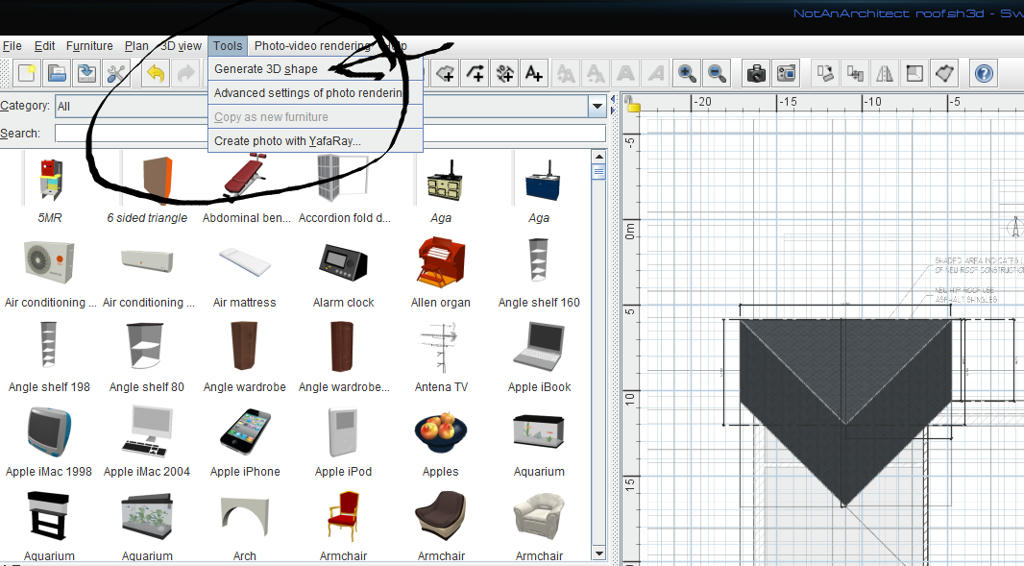
Re: Roof Building for 2020 SH3D v6.3.1 From what i can see it looks like you could do this with maybe 10 triangle "shapes", 4 rectangles and a couple of rhombus, all can be created with the shape generator tool, which can be downloaded form HERE, might take a few attempts to get used to it or you could find it simple. Once you have a section made that you are happy with i suggest you make a copy and store it in a "new" plan, you may need them to mimic the ceilings under the roof sections |
| Posted by Mike53 at Jun 19, 2020, 11:32:10 PM |
|
Re: Roof Building for 2020 SH3D v6.3.1 KitchM is right, nice job combining the imported sections with sh3d, it does look good. |
| Posted by NotAnArchitect at Jun 20, 2020, 1:04:29 AM |
|
Re: Roof Building for 2020 SH3D v6.3.1 Thank you, KM! I've already made more changes and updated the photo links. Didn't even realize I had not followed the new front design when I uploaded the photos. ![]() |
| Posted by Mike53 at Jun 20, 2020, 2:03:42 AM |
|
Re: Roof Building for 2020 SH3D v6.3.1 To give you an idea of the results you can achieve with the Shape Generator Tool. ![]() I copied one of your images onto the background in sh3d, estimated its size (width) at 35m (close???) drew some measurements onto it and used them to create the 3 shapes you can see in the image, 2 really, 1 is copied and mirrored. The file can be downloaded from HERE, i hope it helps. This method is not exactly a 1 click solution to creating a roof, but for a piece of software created about 14 years ago for positioning furniture in a room, it has in fact come a long way already. |
| Posted by NotAnArchitect at Jun 20, 2020, 3:00:12 AM |
|
Re: Roof Building for 2020 SH3D v6.3.1 Thanks, Mike! I have the shape generator and the trial and error is brutal for a poor dyslexic like me and I was terrible in still life drawing class at art school, lol! That's how I made the landscape shapes, but I only made one and re-sized it a couple of times. Is there away to edit the dimensions of what you have already created? Not in 'modify' but back in the generator. I was also thinking about trying a cross export object thing with Life Home or Sketch Up, create the roof in one and export it back to the other. What are your thoughts on that? ![]() Have a good one! |
| Posted by NotAnArchitect at Jun 20, 2020, 3:02:14 AM |
|
Re: Roof Building for 2020 SH3D v6.3.1 Oh wow, didn't 't see the last post from you! The shape generator I have takes you into a dialogue to enter specific dimensions. Do I have the wrong one? |
| Posted by Mike53 at Jun 20, 2020, 1:52:51 PM |
|
Re: Roof Building for 2020 SH3D v6.3.1 The dialogue box is correct. Here is how it works. I am sharing a large image so i will not have it appear here. LINK to view the image LINK to download the image. Resizing them is fine, 1 word of warning, length and depth are fine, but as you change the height, the object will become thinner, once you have made a couple of pieces i am sure you will opt to make individual pieces so they fit together better. I have never tried to take anything from SH3D to another software prog, so sorry cannot advise there, if you can figure that out then i would imagine the follow me tool would be very useful for the soffits and fascia, i use box's for the horizontal pieces and generate more shapes for the angled pieces. To aid your landscaping, HERE is a link to download several shapes, they may have been made by OKH, not sure, but he is kindly sharing them. |
| Posted by VeroniQ at Jun 21, 2020, 12:45:59 PM |
|
Re: Roof Building for 2020 SH3D v6.3.1 Maybe you can use only boxes ans triangles like in the example 15 of the Gallery ? |
| Posted by NotAnArchitect at Jun 21, 2020, 9:15:06 PM |
|
Re: Roof Building for 2020 SH3D v6.3.1 Thanks Mike! I grabbed the the downloads and will work more on the using the Shape tool. I am going to try the shape tool again and follow your example, I am sure that will help me greatly. I did try the export thing and here's a link to the result thus far, exterior only. The exported SH object easily imported into Live Home 3D, except for the furniture, I sized it up and made a roof. Exported the roof only as a piece of furniture and imported it back into Sweet Home. It took a couple to times to get it just so, but it is close enough. Even with their roof tools, I still had a difficult time making it work perfectly, and I don't think the main slope is correct because the interior loft overlook should have more room. I'm pretty sure it's a visual problem with me translating 2d to 3d, I can lay it out but translating into 3D seems to trip me up. Goonies never say die! Lol! Front with Roof Have a good one! ![]() |
| Posted by Mike53 at Jun 21, 2020, 9:51:10 PM |
|
Re: Roof Building for 2020 SH3D v6.3.1 That does not look too bad, would you mind sharing a sh3d file with the walls in, i am away for 5 days starting tomorrow, when i return i may take have a go at your file, looks an interesting challenge |
|
|
Current timezone is GMT Jan 31, 2026, 1:18:52 PM |