Rob:
1 - When I open your file, I see that in your room you only have two small lamps of which I'm not sure if they give any light.
2 - The only light that is active, is the ceiling light. One problem is that 1 ceiling light cannot give sufficient light for a 30 m2 room.
3 - I added five 50x50x50 cm halogen lights (elevation 200 cms, set a 50 degree angles) and I checked Turn on lamp lights in the Advance Render plug-in. The result you can see below.
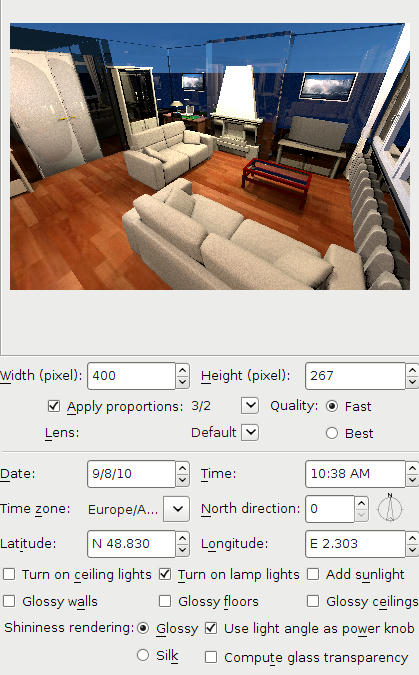
4 - The walls are all very blue. I checked the ceiling, saw that it was blue, and changed it to white. The walls still remained blue. I then deleted the floor and ceiling and saw that you used a blue sky as texture for the floor. I changed the floor texture and the sky texture, and made a new render. Still the wall remained blue. Investigating further I discovered that the chimney walls are transparent. Strange?! I deleted both walls and drew them again, giving them approx. the same colour. And? Even stranger: they're still transparent. The two colours blue that you see are the ground and sky. Somewhere in between I changed all wall heights, so that now they are 250 cm high, and after that I put new floor and ceiling.
5 - Because I don't like riddles, I decided to deleted almost everything and see what happens when I have an empty room. Here it is.
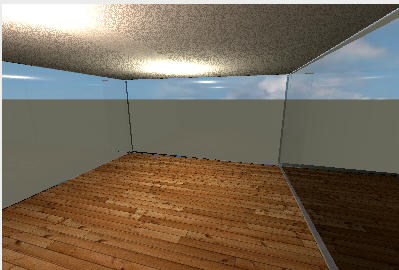
To make a long story short: it is a riddle, it remains a riddle. I can't solve the transparency of the walls. I suspect <?> that the file is somehow corrupted, but I'm not sure.
Maybe db4tech has any ideas? He programmed the advanced render plug-in.
----------------------------------------
Hans
new website - under constuction
hansdirkse.info
