Hello all :-)
Frolicking with the new Advanced Render plug-in I encounter some unexpected behaviour. This may be caused (a) by models that do not meet the specs of the new plug-in or (b) unexpected behaviour of the plug-in. (I don't think that (c) my video card is causing problems and I don't know if (d) my flavour of Java is at fault.)
So here's the blue bathroom:
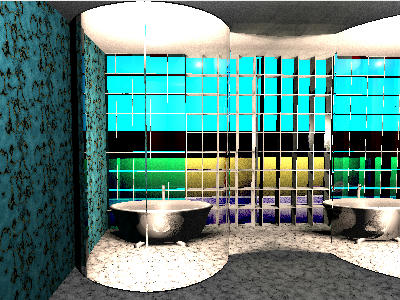
1 - The blue glass wall
The wall consists of blue glass blocks. Behind the glass wall is a low yellow wall with lights in front of it. As you can see the glass blocks on the right don't show the correct colour. They come from the SH3D model library and show the yellow wall as yellow. I'm not sure why the upper part is blue, because in other renders all blocks were completely transparent. The left part consists of glass blocks I made myself using the transparent boxes you can find in the attachments. This part shows the yellow wall as green (= blue +yellow).
2 - The bath is "hidden" behind a semi-circular glass wall that was an attachment to an earlier post here (I think from db4tech?). The lights at the center of the semi-circle don't penetrate the glass, as is shown by the darkness in front of the glass. The low light there is from the room's ceiling light.
3 - The right wall is a large mirror that perfectly reflects the bathroom.
Anyone any ideas? Bigger renders on request, and here is the original file. :-)
Hans
----------------------------------------
Hans
Ryzen 7-9700X, 32 GB RAM, 500 GB SSD, 2x 2 TB SSD, Geforce GTX 1060 3 GB
