Hi,
I just released the version 1.2 of the Advanced rendering plug-in with the following new features:
- I removed the threshold set on shininess. In the previous version, a shininess smaller than 64 was ignored. If some objects get too shiny, you can decrease their shininess by setting the "Ns" value in their MTL file (a 0 or 1 value meaning not shiny) and reimport them, or by setting their color in Sweet Home 3D with the furniture modification dialog.
- I enlarged a little lamp lights to soften shadows.
- I added "Depth of field" and "Fisheye" lens types. When "Depth of field" is chosen, focus point is computed at 2.5 m (100 inches). This distance sounded reasonable to me to get a nice effect, but we could change it as it could also be possible to change the depth of field itself.
- I added 3 check boxes to render walls, floors and/or ceilings a little shiny. They will change the shininess of all the walls, all the floors and all the ceilings. I guess it could be nice to set the shininess individually on each wall side, floor or ceiling, but I'm not sure it's so useful.
Here's a capture of the 1.2 dialog:
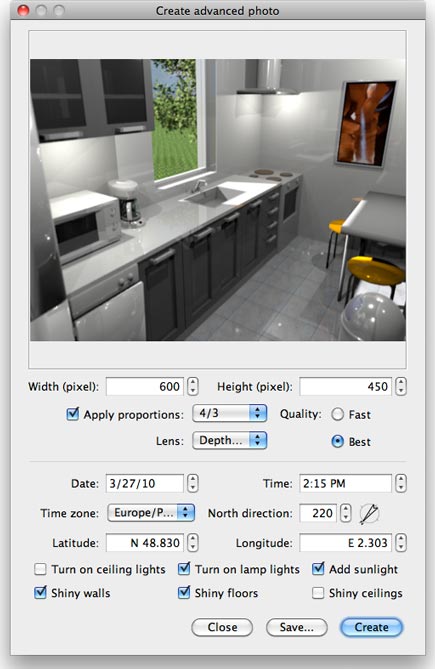
As you can see, shininess (on the walls and the floor) and focus blur (on the objects at left) remains quite subtle, and I hope you'll like it that way.

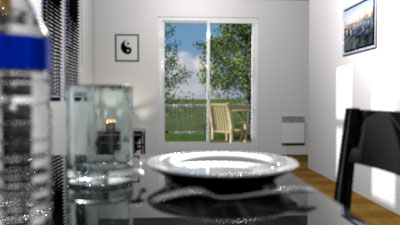
Objects very close to the camera or very far from focus point will get blurer as shown on this image:
Of course, don't expect that these additional options will speed up rendering process!

The plugin is available at http://www.sweethome3d.eu/plugins/AdvancedRendering-1.2.sh3p
As plug-ins management automatically choses the most recent version of a same plug-in available under different versions, you won't be obliged to remove previous versions after installing the new version.
----------------------------------------
Emmanuel Puybaret, Sweet Home 3D creator
