Hello :-)
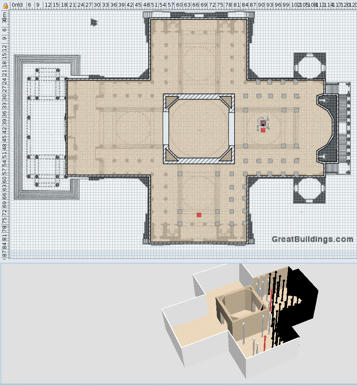
Today I started on another project, a full scale replica of the Pantheon in Paris. Here's what I learnt:
- walls cannot be higher than 2.000 cms (two thousand);
- there's a twilight zone where illumination is switched on and off.
When you drag an object into the twilight zone, it becomes black, When you drag it back it gets back its original color. In the attached file are a few columns in red. The one at X=9199 is lighted, the one at X=9201 is in the dark. Similarly there is a red column at Y=7422.5 that becomes black if you move it to Y=7423. Stranger still are the columns between the red columns: although they are at XY-values lower than the limits mentioned before, they are still in the dark. Maybe the sum of X and Y coordinate has a maximum? Putting in a floor and ceiling doesn't switch the light on either. Needless to say walls also are black in the twilight zone.
So, if you fancy a big project, you may want to consider drawing it a scale of 1:10 to be able to view it correctly.
Hans
----------------------------------------
 Pantheon_tmp.sh3d
(539171 bytes)
(Download count: 276936)
Pantheon_tmp.sh3d
(539171 bytes)
(Download count: 276936)
----------------------------------------
Hans
new website - under constuction
hansdirkse.info
