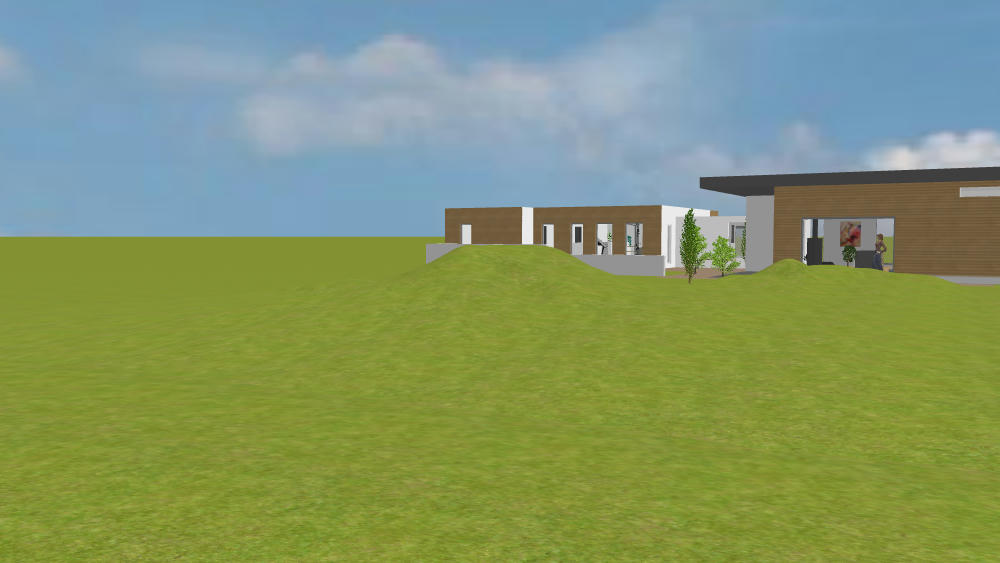
I made an item of furniture which is really a bit of landscape using Blender.
I followed directions from
https://johnflower.org/tutorial/make-mountains-blender-heightmaps
Height maps in this context are just monochrome images where (say) white stands for a high point and black stands for a low point. They can be created "by hand" in a creative way simply by adding some white spots and then grey spots to a black image and then using graphics tools to blur, smudge and generally smooth it all out.
The mountains in the tutorial were a little severe for the lawn so I used a graphics application to blur the original height map image I wanted bumps not jagged mountains.
I saved out the mesh as an OBJ file and then imported as an item of furniture.
The nice thing about the SweetHome import was that I got not only to size but also to stretch and distort by unchecking the box that keeps proportions, I stretched this one out from the size it imported as which was only a few cm to 16 metre square with a max height of 2 metre.
I would be the first to admit its a bit ugly - like there has been a punch-up between two out-sized moles but I think the potential is there.
A bit of graphics work and it could turn into a convincing landscaping or perhaps a pond ( as long as the water level is higher than ground zero otherwise ground zero will show instead ).
Maybe there is a library out there of hundreds of freebies but anyone wanting a custom terrain might find it useful?
If terrains are in demand but not available I would be happy to get involved in getting a small library together for use by others - who knows maybe its already out there - just a thought.
