Hi again,
I booted up win10 and had a play in Mitsuba using the GUI interface - it looks very workable to me.
I prepared for this by exporting my model as OBJ from SweetHome. I set all ceilings apart from a bedroom that has a mezzanine to not display.
I used the Mitsuba import OBJ plugin to import the OBJ and MTL file to Mitsuba. Around 30 warnings during import which I am sure were down to unlocated textures - ignore for now.
Here is the render produced by Mitsuba
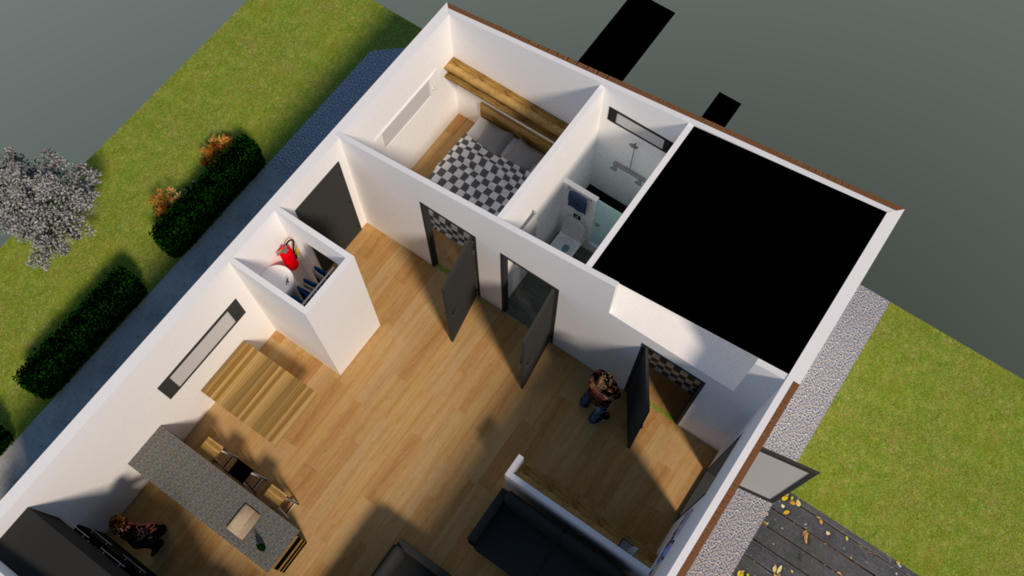
The original is sharper than this - mediafire sharing has converted from png to jpeg and compressed. Some artifacts that would need cleaning up.
The black square over one bedroom is down to my laziness in not setting no ceiling on that room -( a global option would be an enhancement inmho ) and something has been lost in translation as my windows seemed to have lost the quality of transparency in the translate - all can be solved I think - treat it as a rough first pass.
The good news is that Mitsuba converts the OBJ into an easy to read XML scene file.
Here is a random extract from mine....
<bsdf id="Samsung_QLED_55__Studio_Stand_mat2_mtl_2_material" type="diffuse">
<rgb name="reflectance" value="0.0307263 0.00151703 0.00151703"/>
</bsdf>
This correlates name-wise with the TV I placed in the scene in Sweethome so really no problem locating BSDF data for each object or rather each mesh in each object in your scene - as long as furniture has sensible names then you can navigate this file using search.
Even better if you click on an object in the preview 3D view in Mitsuba it will tell you the object ( mesh ) name so if you have one object of interest you should be able to confine your interest to one part of the file using simple text searches to find where you need to be.
The above XML BSDF tag is precisely where you would copy paste more esorteric material data straight out of the
Mitsuba PDF document if you wanted to alter the appearance of that mesh then you might go to page 62 of the Mitsuba pdf https://www.mitsuba-renderer.org/releases/current/documentation.pdf and copypaste
<bsdf type="plastic">
<srgb name="diffuseReflectance" value="#18455c"/>
<float name="intIOR" value="1.9"/>
</bsdf>
and then to remember to add the id...
<bsdf type="plastic" id="Samsung_QLED_55__Studio_Stand_mat2_mtl_2_material">
to the first line.
If Mitsuba does not object to identical ID's it might be an idea to simply add the new BSDF after the original but leave the original in place so that you can do non-destructive testing - the hope would be that Mitsuba would just assign these values to that ID twice but your new data would over-write the first, otherwise just take a note of the old BSDF values and the copypaste your new ones in taking care to preserve the ID.
I have not looked much into the issue of changing view position although changing view direction can be done simply in the Mitsuba GUI.
The above render took around 50 mins on my 8 core machine.
I am used to driving Mitsuba to render small objects I found it a different beast when dealing with a whole
room so my choice of defaults may not be great but here are the render options I chose.
Integrator: Path Tracer
Independent Sampler
1280 x 720 pixel image size
Samples per pixel 2000
Its really a lot less complicated than I thought....
Steps are
1. Get the GUI version of Mitsuba working on your machine ( should be easy for windows users ).
2. Export your model from Sweethome as OBJ setting display of ceiling to false for overhead shots otherwise you will just see black roofs.
3. Import the OBJ into Mitsuba ( its silent twin the MTL file will be automatically uploaded at the same time ).
4. Choose a view
5. Set render options ( click on COG symbol ) - suggest 20 samples per pixel and then ramp up to 2000 if your machine is fast enough.
6. Save the scene file (XML) that Mitsuba produced for you) - take a look in any text editor and play
around after first saving a copy.
Whether or not Mitsuba is a good path for folks who are not interested in frosted glass or translucence I don't know. It depends I suppose on what other renders people are using and whether they are faster or easier to use.
Personally I kind of like the Mitsuba angle - I sometimes prefer to be able to edit a script and run that, I don't get on well with Blender and of course once a script is set up it can be copied and adapted.
