Is there any handy guide to the content of the .obj file format, or can anyone point me at which chunk of the file defines the cut-out parameters?
Good you found a working solution. Just for the record in case someone else comes across this thread. The cutout is not defined in the .obj file, but in the supplementary information that can be edited with the Furniture Library Editor. Are you referring to the triple winder staircase?
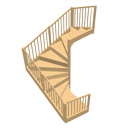
If so, the SVG cutout in the Furniture Library Editor is an L shape turned 180° - something like this: m0,0 h1 v1 h-.5 v-.5 h-.5 z - start at 0,0 where h means horizontal, v means vertical and z means return to start. This can be modified quite easily in the Furniture Library Editor to for instance: m0,0 h1 v1 h-.5 v-.5 z: meaning so the last cut will go directly (-45°) from the centre, back to the top left corner; cut exactly above where the third step begins (<200cm above in a house with a low/normal ceiling).
Which is the general point that may not apply here: Staircases can be legal pains as there can be requirements to minimum headroom (and width, railing, angle etc etc etc). There is an example - if I remember correctly - where a DIY builder had left too little headroom, had to change it after building inspection, and ended up cutting through a structural beam leaving the entire house skewed. Point is only to say that it is possible to end up with all sorts of trouble if headroom (and SVG cutout) is marginal...
ok
PS - to see the two cutouts, the enclosed code can be saved as text with an .svg extension and viewed with most browsers to see how the SVG paths work:
<svg version="1.1" width="1000" height="1000" preserveAspectRatio="none" viewBox="0 0 1 1" xmlns="http://www.w3.org/2000/svg" xmlns:xlink="http://www.w3.org/1999/xlink">

<!-- RED PATH -->
<path id="SH3D_cutout1" style="stroke:red; stroke-width:.003; fill:pink; fill-opacity:.5;"
	d="m0,0 h1 v1 h-.5 v-.5 h-.5 z" />

<!-- BLUE PATH -->
<path id="SH3D_cutout2" style="stroke:blue; stroke-width:.001; fill:lightblue; fill-opacity:.5;"
	d="m0,0 h1 v1 h-.5 v-.5 z " />

<!-- BELOW JUST COMMENTS AND ILLUSTRATIONS -->
<path stroke="silver" fill="none" stroke-width=".001" stroke-dasharray=".01,.01" d="	M.1,0v1 M.2,0v1 M.3,0v1 M.4,0v1 M.5,0v1 M.6,0v1 M.7,0v1 M.8,0v1 M.9,0v1 M0,.1h1 M0,.2h1 M0,.3h1 M0,.4h1 M0,.5h1 M0,.6h1 M0,.7h1 M0,.8h1 M0,.9h1 "/>
<circle cx="" cy="" r=".01" fill="red">
    <animateMotion id="anim" dur="5s" begin="1s;anim.end+5s">
      <mpath xlink:href="#SH3D_cutout1"/>
    </animateMotion>
  </circle>
<circle cx="" cy="" r=".01" fill="blue">
    <animateMotion id="anim" dur="5s" begin="2s;anim.end+5s">
      <mpath xlink:href="#SH3D_cutout2"/>
    </animateMotion>
  </circle>
<text x=".01" y=".95" style="font-size:.02pt;fill:gray;">SH3D cutout example:</text>
<text x=".01" y=".98" style="font-size:.011pt;fill:gray;">RED: m0,0 h1 v1 h-.5 v-.5 h-.5 z   --- BLUE: m0,0 h1 v1 h-.5 v-.5  z</text>
</svg>