This was a problem in 4.6, and it remains in the 5.0 beta. I first came across it while trying to fake a lightbulb in a hanging fixture, but it shows up in other circumstances, as well.
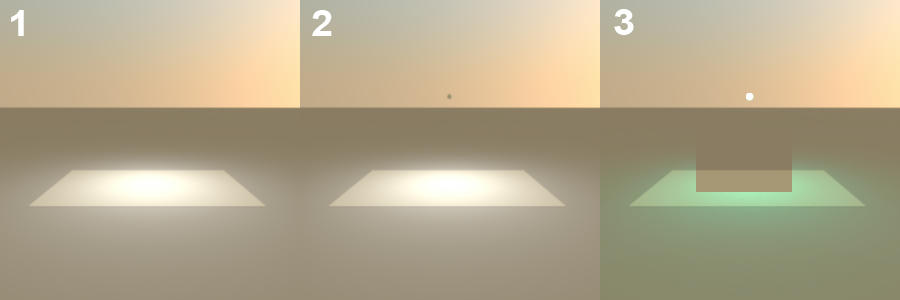
The easiest demonstration is using a light source and a sphere on which I've mapped a partially transparent PNG as a texture. This is the situation where I first came across the bug.
1. 'Baseline' render of light source alone. Light at 1-inch diameter and 3-foot elevation, with a small square floor at 0 elevation.
2. Light source and sphere concentric, both with 2-inch diameter and 3-foot elevation. Sphere is not illuminated by light source; light is not filtered by sphere texture.
3. Light source and sphere concentric. Light has 2-inch diameter and is at 3' 1/8" elevation. Sphere has 2.25-inch diameter and is at 3-foot elevation. Light source is filtered by sphere texture (IIRC, 30% transparent PNG).
Note dark rectangular artifact in center of image.
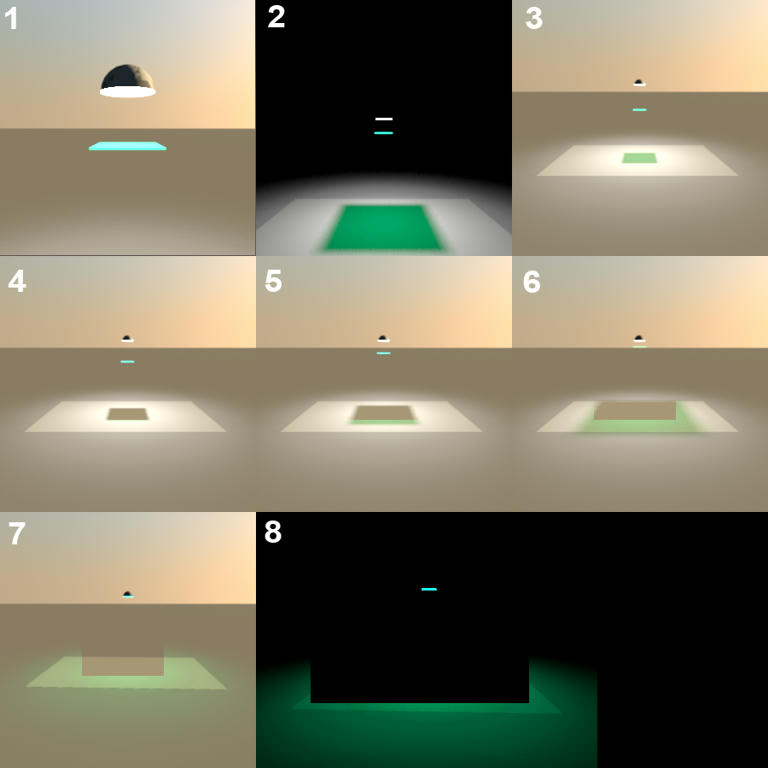
This second example demonstrates a similar issue using a flat translucent filter a various distances from a light source.
1. Basic set-up: Light 'fixture' is a half-sphere modeled in Sketchup. Fixture is 5 inches in diameter at 3-foot elevation. 'Inside' the fixture is a white light source at 1-inch diameter, aligned with the fixture on X and Y axes, with an elevation of 3' 1". Filter is also aligned on X and Y; it measures 6 inches on a side and is 1/8-inch deep. A partially transparent PNG has been mapped against the filter object as a texture. (Not visible here is a square floor at 0 elevation.)
2. 'Baseline' render, with filter at 2' 8" elevation. (Oddly, this image does not display the expected bug.)
3. Filter at 2' 0" elevation. No bug.
4. When filter is raised to 2' 2", the expected block of projected filtered light (as seen in the previous image) is somehow blocked by dark rectangular artifact.
5. At elevation of 2' 6", artifact still exists; projected block of filtered light is larger than artifact and can be seen as colored fringe outside of artifact.
6. At elevation of 2' 9", artifact remains, with filtered block increasing in size.
7. Filter elevated to 2' 11-7/8", bringing top face of filter into contact with fixture. (In other words, all light visible from light source must pass through the filter.) Note increasingly artificial appearance of artifact. (That is, in comparison with images 5 and 6, where the artifact seems more like a failed scene element than a clearly extraneous glitch.)
8. 'Nighttime' variant on render 7, clearly demonstrating artifact.
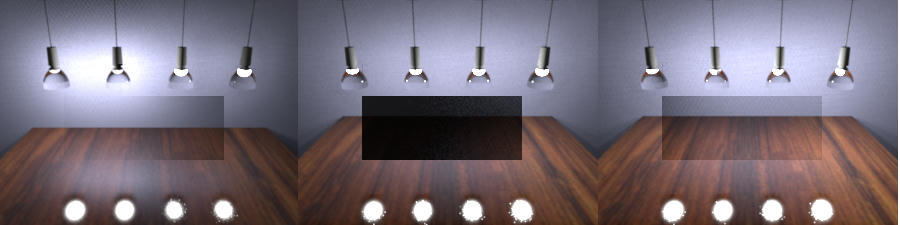
A few more examples. Without going into too much detail, these are test renders I generated a couple of months ago while experimenting with the use of translucent gradients to create directionally variable lights.
For instance, in the left-most image, all four fixtures contain concentric spheres and light sources, with the diameter of the light sources 98% that of the spheres. All spheres have translucent white textures; however, the two on the left have a uniformly 50% transparent texture, while the two on the right have a gradient ranging from 50% transparent down to 15% and back, with the gradient oriented so the area of greatest opacity is between the light source and the wall at the back of the scene. As you can see, the two lights with gradient textures do not 'burn out' as badly as the two with uniform textures while casting a comparable amount of light in other directions. (Note the reflection in the surface below the lights.)
However, what's important here is *not* my oh-so-clever use of gradient textures
 ; instead, it's our old friend the Artifact that seemingly appears whenever a light source is completely enclosed in or blocked by other objects.
The other two images show similar issues.
Thanks,
Maz
