Since version 4.2, Sweet Home 3D has supported doors and windows with a non rectangular shape. By default, their cut out shape is automatically computed, and works for many shapes, even if they are weird. The main drawback of this automatic cut out is in the case you import a frame that contains no shape at its bottom like the following one:
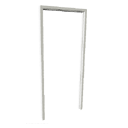
And I guess you encountered that case. To fix it, you can add to the 3D model a fully transparent shape at its bottom to "close" its shape. Or you can use the Furniture Library Editor to add the existing 3D model to a furniture library you'll import afterwards. With this editor, you can customize the cut out shape, and if it's a rectangle, you should enter the value M0,0 v1 h1 v-1 z in the Customized cut out shape field shown in the modification dialog box of an imported 3D model.
Please, read also this guide wrote by OKH for more information about this feature.
----------------------------------------
Emmanuel Puybaret, Sweet Home 3D creator
