






Import Textures
This page lists some sources of free texture images that you may import in Sweet Home 3D.
Available Sources of Textures
 Libraries of textures
Sweet Home 3D lets you import texture images one by one, or by group of textures stored in SH3T files. A SH3T file is a library of textures with their description, and can be easily installed by double-clicking on it or by choosing Furniture > Import textures library menu item in Sweet Home 3D.
The following ZIP files contain a SH3T file you can import in Sweet Home 3D.
- Textures-Contributions-1.3.1.zip (1.1 MB – 57 textures – CC-BY License)
- Textures-eTeksScopia-1.3.1.zip (18.8 MB – 340 textures – CC-BY License)
You can also download the full version with over 10,000 3D models, 400 textures already included
 Download Sweet Home 3D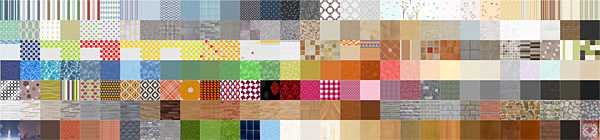
Note that a SH3T file is just some kind of ZIP file, from which you can extract individual texture images with any ZIP tool. If needed, you may also create your own SH3T files with the downloadable Textures Library Editor.
Web sites with textures
The following sites offer some free texture images supported by the texture import wizard of Sweet Home 3D:
 | ambientCG (many seamless textures published in public domain, also available as SH3T libraries here) |
| Archive textures(very large choice) |
| Sharetextures (nice seamless textures published in public domain) |
| 3D textures (another site with seamless textures published in public domain) |
| Free Web Gallery of Tile-able Website Backgrounds (customizable seamless textures available under CC-BY license) |
| Plain textures (a large choice of textures but not all of them are seamless) |
| CG Textures (a large choice of textures but not all of them are seamless) |
| Blender for Architecture (interesting for sky textures) |
| Free the models (nice textures made by Sweet Home 3D contributor) |
| Museum Textures (nice choice of textures with a few seamless ones) |
| Alterlinks (a few simple textures) |
| Hongkiat.com (wood textures, most of them aren’t seamless) |
| WDL (wall pattern textures) |
To cover a surface with a texture that repeats itself like a wall pattern, prefer choosing a seamless texture.
To avoid reducing Sweet Home 3D performances, do not import images with a large resolution (generally, 256×256 pixels images already give good results). If you have to reduce the resolution of an image, you should prefer a better JPEG quality over a larger resolution.
Please respect the license of the textures that you may download on these web sites.
Thanks to Hans Dirkse for his help
Propose other sites or report a dead link
Last update: 01/23/2023